Choosing between online learning platforms for business gets harder every year, because almost every vendor now promises AI, mobile learning and higher engagement in the same breath.
I’m David, an independent LMS consultant, and I’ve spent about ten years selecting, implementing and migrating learning systems for companies of every size. These are the online training platforms I’d actually put on a shortlist for an L&D team in 2026, with real prices and the drawbacks that sales demos tend to skip.
The stakes aren’t small. US organizations spent $102.8 billion on training in 2025, and 34% of training hours were delivered through online or computer-based technologies, according to the 2025 Training Industry Report by Training Magazine.
The pressure is about skills, too. In LinkedIn’s 2025 Workplace Learning Report, 49% of L&D professionals said their executives worry that employees lack the skills to carry out the business strategy.
The research backs the format, with a nuance worth knowing. A meta-analysis of 45 studies by Means and colleagues (2013) found that online learners performed modestly better than learners in face-to-face classes.
The clearest advantage, though, came from blended learning. The platform matters. How you use it matters more.
Online Training Platforms: My 2026 Shortlist at a Glance
The ten online learning platforms below cover three different jobs. Most are learning management systems, the learning platforms built to train your own staff. Two are content libraries packed with ready-made online courses. One is an online course platform for companies that want to sell training.
Mixing these categories up is the most common mistake I see in RFPs. A company buys a library when it needed a system, or the other way round, and discovers the gap six months into the contract.
- TalentLMS: a quick, affordable LMS for small teams that need structured courses live within days.
- iSpring LMS: a turnkey LMS with a full authoring tool included, a strong fit for companies with 100 to 500+ employees that build their own content.
- Docebo: an enterprise learning platform with AI features and support for many audiences at once.
- 360Learning: a collaborative LMS where internal experts co-create course content with the L&D team.
- Absorb LMS: an enterprise system with a strong focus on compliance and extended enterprise training.
- LearnUpon: one account for employees, customers and partners, each with a separate portal.
- Moodle Workplace: the business edition of open-source Moodle, delivered through certified partners.
- LinkedIn Learning: a large library of video lessons on business, technology and creative skills.
- Coursera for Business and Udemy Business: university level courses and practical, expert-led content, now under one parent company.
- Thinkific: an online courses platform for businesses that want to sell online courses or run a customer academy.
Depending on who writes the brochure, you’ll see these online learning platforms called virtual training platforms, distance learning platforms or electronic learning platforms. The labels change. The questions I ask during a selection don’t.
Under any name, the right online learning platform for a company delivers online courses and proves who completed them, without eating the admin hours a small L&D team doesn’t have.
At their core, online learning platforms are digital environments that deliver educational content over the internet. Learners open online courses, videos, quizzes and assignments from any device with a connection, either at their own pace or in cohorts that move through a program together.
For a business, the value lies less in the content than in the control around it. Who gets assigned what, who finished, who failed the final multiple choice test twice. That’s the layer that separates an LMS from an online class platform built for teachers or hobbyists.
The format has real limits, and I’d rather you hear them from me than from your learners. Long sessions cause screen fatigue. Remote employees can feel isolated without live contact.
Self-paced study demands discipline and time management that not every learner has, and subjects that need hands-on practice are hard to teach on a screen.
That’s why the best online learning platforms for adults at work mix formats: short modules, live sessions, on-the-job checklists and a manager who follows up. Good learning platforms also include accessibility features, from captions to screen reader support, so learning accessible to everyone isn’t an afterthought.
Cost is the other argument L&D teams bring to finance. Online courses are usually far cheaper to run than classroom programs once you remove travel, venues and trainer days.
Quality still varies a lot, though: not every catalog of online courses is kept current, so check update dates before you buy.
I deliberately left out some popular online learning platforms, such as Khan Academy, Skillshare and edX. They’re excellent online education platforms for individual learners, and I mention them in the FAQ. But none of them gives an employer the admin control, reporting and compliance tracking that a digital learning platform for business has to provide.
Online Learning Software Platforms: Detailed Reviews
I rated every tool against the same criteria, roughly in order of weight. First, how quickly a small L&D team can launch its first course. Second, how well the system tracks completions and student progress for audits.
Then come three practical questions. How much can admins automate without calling IT? Can you produce course content inside the platform, or do you need other tools? And how transparent is the pricing?
I also look at the learning experience from the employee’s side. Does the platform support several content formats, from video to simulations? Does it adapt to a learner’s role and learning style, or push the same catalog to everyone? In a dynamic world where job requirements change every year, flexible learning paths age much better than rigid ones.
Prices come from vendor pricing pages or, where vendors don’t publish them, from recent third-party listings. I checked all of them in October 2026, so confirm the current figures before you budget.
Ratings come from G2 and Capterra at the same date and are rounded, because review counts move every week.
Many lists of the best online learning platforms mix consumer marketplaces with business systems, which makes comparisons meaningless.
A marketplace offers courses to anyone, often with free courses as a hook and paid courses at frequent sales prices. A business LMS assigns online courses to specific people and proves they finished them. An online course platform like Thinkific sits in between: you own the storefront and sell your own courses.
Both have a place. But the best online learning platforms for a company are the ones that fit its processes, not the ones with the biggest catalog. That’s the lens I used for the ten online learning platforms below.
1. TalentLMS
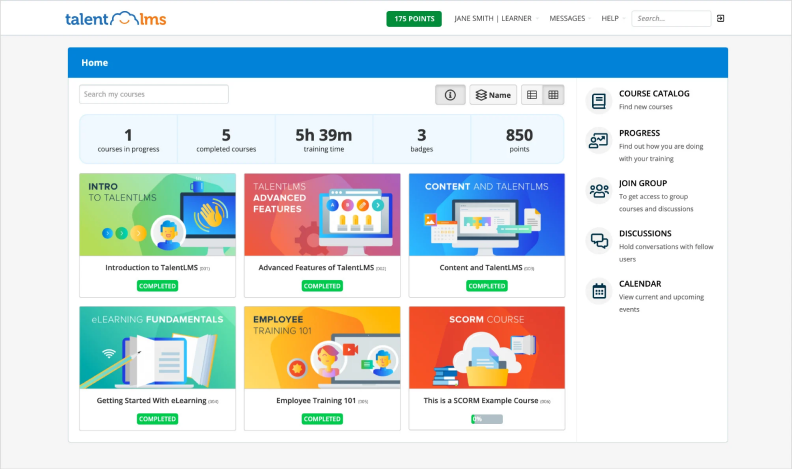
TalentLMS is the tool I recommend most often to companies buying their first LMS. Setup takes an afternoon. The interface needs almost no training, and the course builder handles video lessons, SCORM files, multiple choice tests and surveys without fuss.
Who It Suits
Small and midsize teams with one part-time admin who needs online courses running fast. Onboarding, product training and basic compliance courses are where it shines. The learning experience is clean enough that employees rarely need a tutorial.
Learners get a decent mobile app and can work through online courses at their own pace, which suits shift workers well. One of my insider tips for new admins: build your branch structure before you upload anything, because reorganizing users later is tedious.
Pricing
TalentLMS keeps a free plan for 5 users and 10 courses. Paid plans on an annual subscription currently start at $119 per month for Core (up to 40 users), then $229 for Grow (up to 70 users) and $449 for Pro (up to 100 users).
A monthly subscription costs more: $149, $299 and $579 respectively. It’s rated around 4.7/5 on Capterra.
Drawbacks
The free plan is a sandbox, not a production option. Learning paths only arrive with the Grow tier, so the cheapest paid plan can’t sequence structured courses into a real curriculum. And once you pass 100 users, per-seat add-ons pile up quickly.
2. iSpring LMS
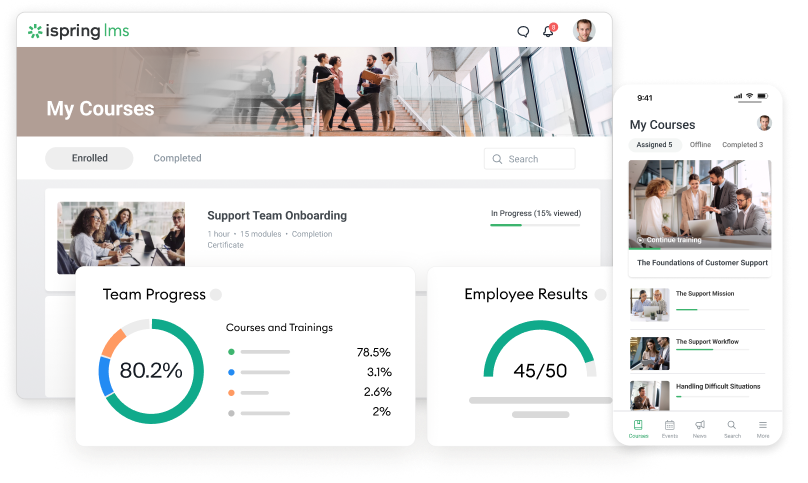
iSpring LMS is the platform I’d pick for most companies with 100 to 500 employees that create their own training. I’ve deployed it since the days it was sold as iSpring Learn; the vendor renamed it iSpring LMS on October 22, 2025, and existing accounts and links carried over unchanged.
What keeps it high on my list is time saved. Every plan includes iSpring Suite AI, the vendor’s authoring toolkit, which costs $1,290 per author per year when bought on its own.
Your subject experts can turn a PowerPoint deck into an interactive course, add quizzes and dialogue simulations, generate voice-over with text-to-speech and publish straight to the LMS. No second contract. No juggling SCORM exports between systems. Few online learning platforms bundle an authoring tool this complete.
In my pilots, the first course built this way usually goes live within a day, because the people who own the learning content can edit it themselves without waiting for an instructional designer.
Who It Suits
HR and L&D teams of two or three people who carry onboarding, compliance and sales training for hundreds of staff.
Automation does much of the heavy lifting: enrollment rules assign courses by department or role, reminders go out on their own, and scheduled reports land in managers’ inboxes.
When a regional manager asks me who still hasn’t finished the safety module, the answer takes seconds rather than a spreadsheet afternoon. That’s the kind of traceability auditors expect.
The platform offers more than content delivery. There’s 360-degree feedback, a competency profile builder and on-the-job training checklists, so a supervisor can sign off a practical skill in the same system that tracks the e-learning.
Mobile apps work offline, which matters for field and frontline employees. The corporate portal, with a newsfeed and an interactive org chart, makes the whole learning experience feel less like a compliance tool and more like a place people visit.
Results From Real Deployments
Customer results are published by the vendor, so read them as vendor figures. In iSpring’s case study, Jitasa reports that 96% of its employees regularly engage in eLearning after the company moved over from LearnDash.
Skincare group NAOS, according to the vendor, runs online training for more than 3,000 employees in 130 countries on the platform. These numbers match what I’ve seen on smaller rollouts: adoption climbs when content is quick to update.
Pricing
Pricing is per active user (anyone who logs in at least once in a month) on an annual subscription.
The official iSpring LMS pricing page lists the Business plan at $6.91 per active user per month for 100 users, $4.46 for 300 users and $3.97 for 500 users.
Enterprise is quoted and scales to 150,000 users with SSO, APIs and an optional on-premise installation. You can test it with a 30-day free trial that doesn’t ask for a credit card.
It’s rated around 4.7/5 on Capterra and about 4.5/5 from more than 130 reviews on G2. If an older roundup quotes “$2.29 per user”, that tier has been retired.
Drawbacks
iSpring LMS has no built-in checkout. You can still sell courses through its Shopify integration: when someone buys a course in your Shopify store, the LMS creates their account and enrolls them automatically. The catch is that you need a separate Shopify subscription, and the integration only works with the cloud version, not with on-premise installations. For a large paid academy, a dedicated course-selling platform is still simpler to run.
Branding options are also narrower than in the big enterprise systems. Reviewers on Software Advice mention limited control over fonts and portal design, and I hit the same wall when a client wanted a pixel-perfect match with its intranet.
Below 100 users, you’ll have to request a quote instead of reading a price off the page.
3. Docebo
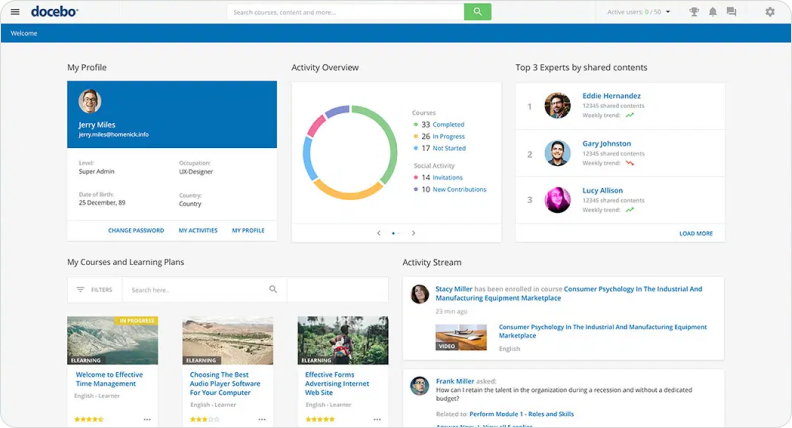
Docebo is built for large, complex organizations with several business units, partner networks and many languages.
Of the learning management systems I’ve tested, it has the most developed AI layer. Its AI features help draft courses, tag content and recommend learning by role and behavior, which earns its keep once a catalog runs into thousands of items.
Who It Suits
Enterprises with a dedicated LMS admin team and an integration budget. It handles extended enterprise scenarios well, including customer and partner training, and connects to the main HRIS and CRM systems.
If your learning strategy spans five audiences and a dozen countries, Docebo is built for that scale. Each employee gets a personalized learning journey rather than a flat catalog.
The platform offers a strong content marketplace too, so you can mix third-party online courses with your own without leaving the system.
Pricing
Docebo doesn’t publish prices. Quotes depend on active users and modules, and there’s no free plan, only a demo. It’s rated about 4.3/5 on G2 from roughly 750 reviews.
Drawbacks
Opaque pricing slows budgeting, and the configuration depth that large companies love is overkill for a team of three. In the projects I’ve run, Docebo needed several weeks of setup before the first course went live.
4. 360Learning
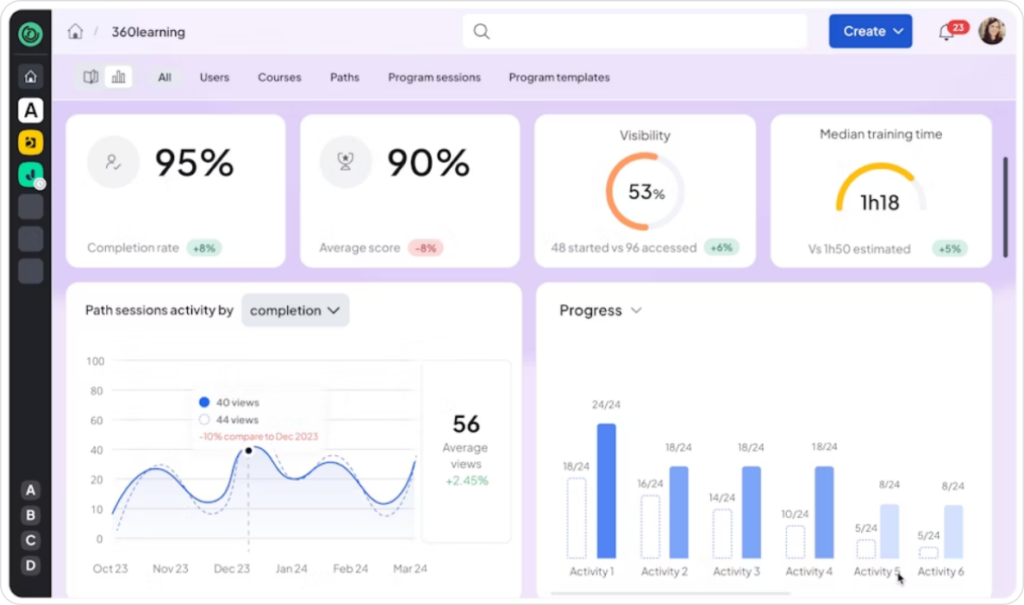
360Learning bets on collaborative learning. Subject matter experts create and update course content themselves, while L&D reviews and approves.
Learners can comment, react and ask questions inside each module, which keeps student engagement noticeably higher than in a classic LMS. It’s the closest thing to a social network among learning management systems.
Who It Suits
Companies where expertise sits with industry professionals in the field rather than with the training team: sales, customer success, technical support. Peer feedback turns courses into living documents written in the experts’ own words.
It suits teams whose learning style is conversational rather than lecture-based, where experts turn their notes into online courses in hours. It also fits a culture of ongoing learning, where valuable knowledge would otherwise stay in a few people’s heads and leave with them.
Pricing
The Team plan costs $8 per user per month for up to 100 users, with a 30-day free trial. Business and Enterprise plans are quoted. On Capterra, it holds about 4.7/5 from more than 500 reviews.
Drawbacks
Capterra’s review summary flags the price for small teams and some technical glitches that take time to resolve. Advanced features sit behind higher plans. And collaborative authoring only works if your experts actually have time to contribute.
5. Absorb LMS
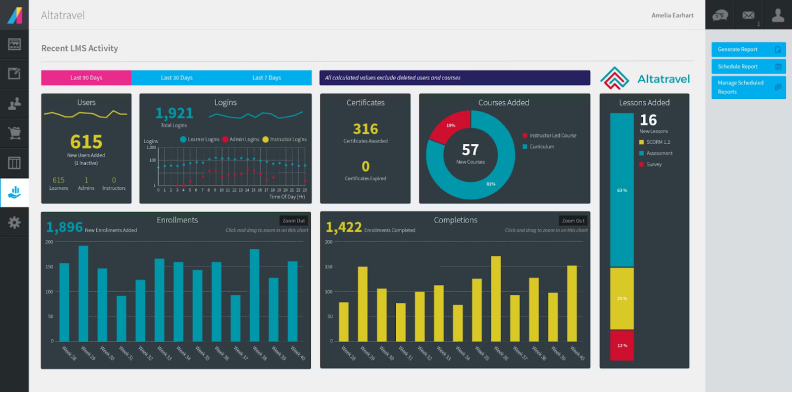
Absorb is the enterprise LMS I run into most often in regulated industries. Compliance training, certification tracking and audit-ready reporting are core features, not add-ons bolted on later.
Who It Suits
Healthcare, manufacturing, financial services and any organization that has to prove who completed which online courses, and when. Its extended enterprise setup also supports customer and dealer training. In the regulated projects where I’ve seen it, compliance managers pulled their own audit reports instead of queuing requests with an admin. That autonomy matters on the day an inspector is on site.
The admin interface is cleaner than most enterprise management systems I’ve audited, which shortens the learning curve for new administrators. Content delivery has held up well at enterprise scale in the deployments I’ve seen.
Pricing
Absorb sells on quote only, with no public trial. It’s rated around 4.6/5 on both G2 and Capterra.
Drawbacks
Without a trial, you rely on guided demos, and implementation projects are sized for mid-market and enterprise budgets. Smaller teams end up paying for compliance depth they may never use.
6. LearnUpon
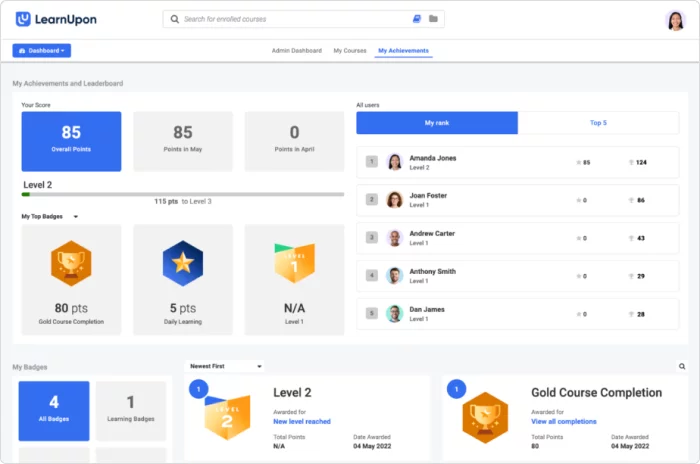
LearnUpon lets you run separate portals for employees, customers and partners from one account, each with its own branding, catalog and reports. At its price level, it’s the cleanest multi-audience setup I’ve worked with.
Who It Suits
Software and service companies that train clients and resellers alongside their own staff. External partners take the same online courses as staff, with separate reporting. Its integrations with CRM, webinar and HR tools are mature, so customer training can follow the sales pipeline.
Well-trained customers adopt more features and renew more often, so a customer academy is one of the cleanest ways to help a business grow.
The learning experience is simple and consistent across portals, which keeps support tickets down when you open training to thousands of external users.
Pricing
Pricing is on request. You may still see a “$599 basic plan” quoted in older articles; the current site doesn’t publish that figure, so treat it as outdated. LearnUpon is rated about 4.7/5 on Capterra and 4.5/5 on G2.
Drawbacks
Authoring is basic, so you’ll need separate course creation tools for interactive content. In one rollout I led, building custom reports took more effort than the client expected, and we had to simplify the dashboards they’d planned.
7. Moodle Workplace
Moodle is the most widely deployed open-source LMS in the world. Moodle’s official statistics count more than 500 million users on registered sites across over 230 countries.
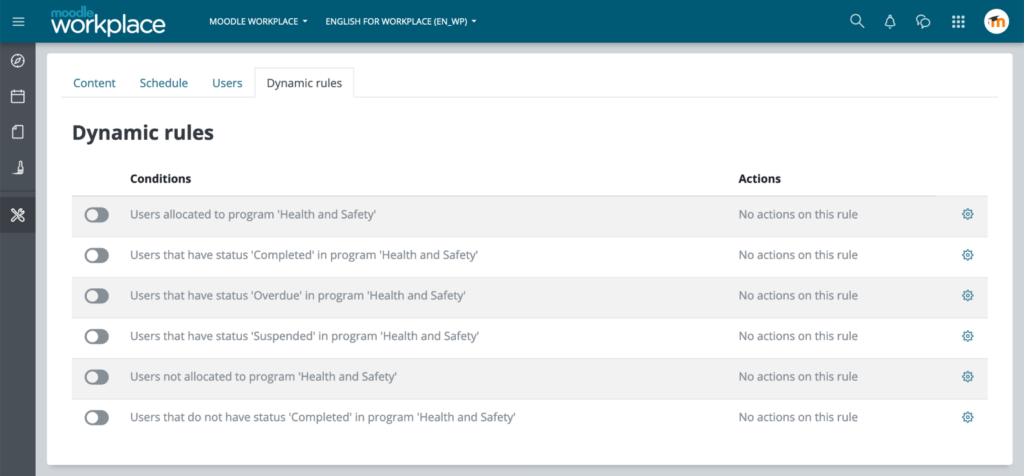
Moodle Workplace is its business edition, adding multi-tenancy, dynamic rules, certifications and organizational structures, and it’s sold through certified Moodle partners.
The platform offers almost unlimited flexibility through plugins, which is both its strength and the reason projects drift when nobody owns the roadmap.
Who It Suits
Companies with in-house IT that want full control over hosting, data and customization, or that already run Moodle elsewhere and need one consistent system.
Pricing
Moodle LMS itself is free, and many companies first host online courses on it before moving to Workplace. Workplace is licensed and hosted through partners, so pricing comes as a quote. Core Moodle holds about 4.3/5 on Capterra from more than 3,000 reviews.
Drawbacks
Out of the box, the interface looks dated next to commercial SaaS, and results depend heavily on the partner you pick. Expect more configuration work than with any other tool on this list.
8. LinkedIn Learning
LinkedIn Learning is a content library rather than an LMS. It offers courses on business, software, data science, web development and creative skills, taught by practitioners and industry leaders.
Employees learn at their own speed, which is the whole idea of flexible learning, and completed courses can appear on their LinkedIn profile. That visibility is a small but real motivator for professional growth, and for many employees the library doubles as a tool for personal growth beyond their current role.
Who It Suits
Companies that want broad professional development and job skills coverage without producing anything themselves. It pairs well with an LMS: several platforms on this list can pull LinkedIn Learning courses into their own learning paths.
Managers can also use it to build an individual growth plan, mixing soft skills, professional skills and personal development modules for each team member.
Pricing
The Teams plan runs about $379.88 per license per year and gives each license holder unlimited courses from the full library. Enterprise is quoted. On G2, it holds around 4.4/5 from more than 700 reviews.
Drawbacks
You can’t add your own training or track company-specific compliance in any depth. Catalog breadth also means quality varies: not all online courses maintain the same standard or get regular updates.
9. Coursera for Business and Udemy Business
Coursera and Udemy completed their merger on May 11, 2026, according to Coursera’s SEC filing. The combined group reported more than 300 million registered learners and over 12,000 enterprise customers in its second-quarter 2026 results.
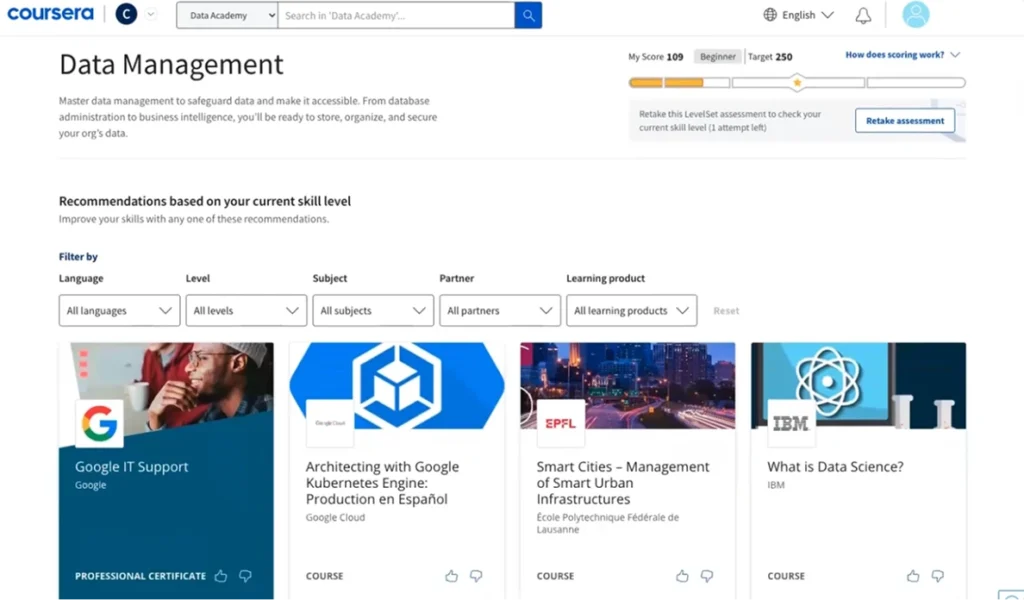
For buyers, that means two catalogs under one roof. Coursera offers courses and professional certifications from leading universities and companies, while Udemy brings a large practical catalog built by industry professionals, with coding exercises and project-based learning in many courses.
Who It Suits
Organizations that need deep upskilling in data science, AI, cloud or leadership, sometimes with credentials that carry weight. Coursera also hosts full master’s degrees awarded by its partner universities, which some companies fund as part of retention programs.
Business plans give employees unlimited access to a curated catalog, so they can explore many courses instead of waiting for approval on individual courses.
Individual learners know Udemy as a leading online marketplace where individual courses go on frequent sales. The business plans work differently: a fixed annual fee per seat covers the curated collection, which makes costs predictable for HR.
Pricing
Coursera’s Teams plan is $399 per user per year, and Udemy Business Team runs about $360 per user per year. Both hold around 4.5/5 on G2.
Drawbacks
Like LinkedIn Learning, these are libraries, not systems for your own training. After the merger, check how contract terms and catalogs will evolve before signing a multi-year deal.
10. Thinkific
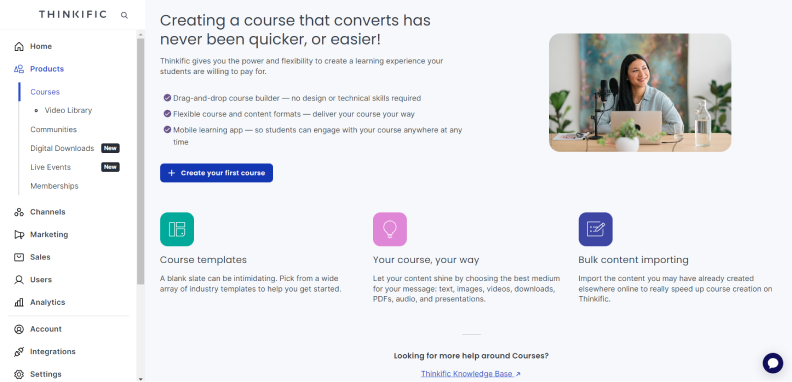
Thinkific is the odd one out, and that’s deliberate. It’s an online course platform for businesses that want to sell online courses, run paid courses for customers or build membership sites. The platform offers sales pages, checkout, coupons and robust marketing features out of the box.
Who It Suits
Training companies, consultants and software vendors that monetize customer education. Among the best online course platforms I’ve tested, it’s one of the easiest for turning internal know-how into revenue.
If you want to create online courses to sell, the path is short: outline a course that solves one problem, record the video lessons, add quizzes, then set a price or bundle paid courses into a membership. The built-in tools handle hosting and payments.
Compared with other course creation platforms, Thinkific keeps the storefront clean and lets you test pricing without a developer.
Pricing
After a price rise of roughly 10% in August 2026, Thinkific’s Basic plan costs $40 per month on an annual subscription, Start costs $82 and Grow $164, while Plus is quoted.
There’s a 30-day trial but no free plan anymore, so the Basic plan is the cheapest way to test this online course platform. It’s rated about 4.4/5 on G2 and Capterra.
Drawbacks
Thinkific is weak at internal training: no compliance tracking worth the name and limited HR integrations. As an online course platform, it was simply never designed for compliance. If your goal is staff training, choose an LMS.
Conclusion
Picking the right online learning platform comes down to the job you need it to do, not to the length of a feature list. For a first LMS and a small team, TalentLMS is the quickest start.
For companies with 100 or more employees that build their own training, iSpring LMS gives you the most for your money, because the authoring tool comes in the box.
Large, multi-audience enterprises should look at Docebo, Absorb or LearnUpon, the online learning platforms in this list built for scale.
If you need content more than a system, a library such as LinkedIn Learning or Coursera covers it, and Thinkific remains my pick among the best online course platforms when the goal is selling courses.
| Platform | Best for | Starting price (Oct 2026) | Free trial or plan |
| TalentLMS | Small teams, first LMS | $119/month (annual, up to 40 users) | Free plan (5 users) |
| iSpring LMS | Mid-size companies creating their own content | $3.97 to $6.91 per active user/month | 30-day trial |
| Docebo | Large, multi-audience enterprises | Quote | Demo only |
| 360Learning | Expert-led collaborative training | $8 per user/month (Team) | 30-day trial |
| Absorb LMS | Regulated industries, compliance | Quote | Demo only |
| LearnUpon | Employees, customers and partners | Quote | On request |
| Moodle Workplace | Full control, in-house IT | Partner quote | Moodle LMS is free |
| LinkedIn Learning | Ready-made business and tech content | About $379.88 per license/year | Varies by plan |
| Coursera / Udemy Business | Deep upskilling, credentials | $360 to $399 per user/year | Varies by plan |
| Thinkific | Selling courses, customer academies | $40/month (Basic, annual) | 30-day trial |
The table is a starting point, not a verdict. Your learners’ habits, your content and your compliance obligations will move each tool up or down the list.
Whichever you choose, run a two-week pilot with real learners and real content before you sign. It’s the fastest way to see which online training platforms fit your team, and which online learning platforms for business only look good in a demo.
FAQ
What is the best online platform for learning?
It depends on who’s learning. For individuals, Coursera is a strong choice for structured, credentialed study, and it offers financial aid on many courses.
For employers, the best online learning platforms are the ones that track progress and save admin time: iSpring LMS for teams that create their own content, TalentLMS for small teams starting out.
If accreditation is what you need, remember that online learning platforms don’t accredit anything themselves. On Coursera and edX, master’s degrees and certificates are issued by the partner universities, and that’s the institution whose accreditation counts.
What is the most used online learning platform?
By installations, Moodle: its official statistics list more than 148,000 registered sites. By learners on a single course marketplace, Coursera reported 205 million registered learners on March 31, 2026, before the Udemy merger pushed the combined figure past 300 million.
Keep in mind that “registered” doesn’t mean active. In online education overall, Moodle’s footprint across schools, universities and companies is still the largest by installations.
What are 10 examples of online platforms?
Coursera, Udemy, edX (founded by Harvard and MIT), Khan Academy, LinkedIn Learning, Skillshare, Moodle, iSpring LMS, TalentLMS and Thinkific are ten common online learning platform examples.
Skillshare focuses on creative skills through project-based learning, and Khan Academy offers free courses and educational content, mainly for school-age learners. For staff training, though, stick to online training platforms built for tracking, the core of any shortlist of online learning platforms for business.