Compliance training software helps you assign mandatory courses, automate reminders, track compliance certifications, and produce reliable compliance records for audit readiness. The right platform can also cut down on administrative work without making training harder for employees.
For this guide, I compared eight leading compliance training platforms based on their automation, reporting features, course content, ease of use, and support for different industries. After all, automation helps to prevent regulatory fines and lawsuits. My goal is to help you find a platform that fits your compliance requirements, team size, and budget.
Compliance training platforms compared
Here’s a quick look at the eight compliance platforms I selected and where each one stands out:
- TalentLMS: A practical choice for smaller organizations that want to launch recurring compliance training quickly and affordably.
- iSpring LMS: A user-friendly platform with built-in reporting and engaging content creation that helps with launching, manual tracking, and analyzing the learning process.
- Absorb LMS: A scalable option for managing compliance across employees, customers, partners, and other learner groups.
- Cornerstone Learning: A powerful platform built for global enterprise organizations with complex, role-specific, and location-based training requirements.
- Litmos: A flexible LMS with a large course catalog for companies that want ready-made compliance content alongside custom training.
- SC Training: A mobile-first platform well suited to frontline and distributed compliance teams that complete mandatory training away from a desk.
- NAVEX One: A specialized solution for ethics, workplace conduct, policy management, and broader risk and compliance programs.
- Relias: An industry-focused platform designed around healthcare training, certification management, regulatory requirements, and compliance requirements.
These platforms approach compliance from different angles. Next, I’ll take a closer look at their features, limitations, pricing, and ideal use cases.
Best LMS for compliance training
Compliance gaps can be closed with automated tracking systems, so investing in relevant training programs that boost compliance rates is the cost-effective choice. The best learning management system for mandatory compliance training should automate workflows, maintain dependable records of compliance status and training status, and make mandatory pre built compliance courses straightforward for employees to take in regulated industries.
The following are some of the best LMS for compliance training I’ve come across:
1. TalentLMS
G2: 4.6
Capterra: 4.7
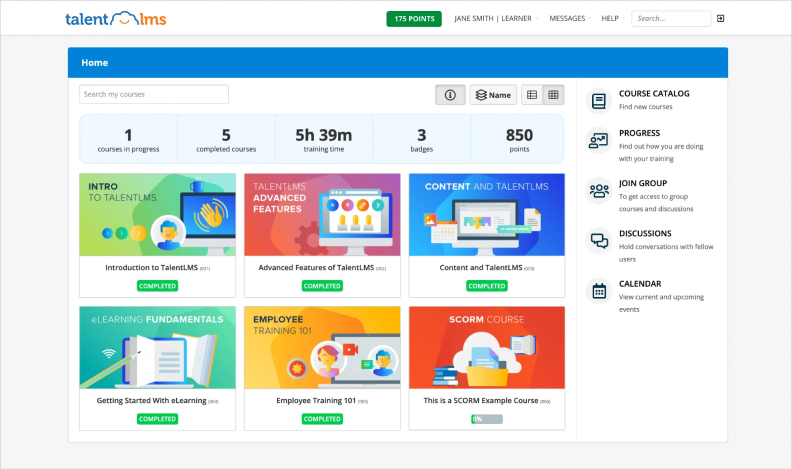
TalentLMS is approachable and engaging compliance training management software for smaller and growing organizations. It lets you build courses, purchase ready-made content through TalentLibrary, and automate recurring training without a lengthy implementation.
Pricing
TalentLMS offers a limited free plan. Paid annual plans start at $119 per month for up to 40 users. TalentLibrary costs extra.
What users think about TalentLMS
Pros
Users frequently praise its quick setup, intuitive course builder, straightforward administration, and helpful support. It’s accessible even if you don’t have much LMS experience.
Cons
Some reviewers find its compliance reporting and automation too limited for complex programs. Larger organizations may also outgrow its administrative controls.
Is a free trial available?
TalentLMS offers a free plan for up to five users, which you can use to test the platform.
What are the best features?
- Automatic assignments based on role, location, or hire date
- Recurring training, reminders, and renewable certificates
- Custom reports covering completion rates, scores, and overdue courses
- Tests, surveys, learning paths, and course creation
- Separate branches for departments or locations
- Mobile learning, SSO, integrations, and API access
- Optional ready-made compliance courses through TalentLibrary
Who is this compliance LMS best for?
I’d consider TalentLMS for a smaller company that values quick setup, predictable pricing, and uncomplicated recurring compliance training.
2. iSpring LMS
G2: 4.6
Capterra: 4.7
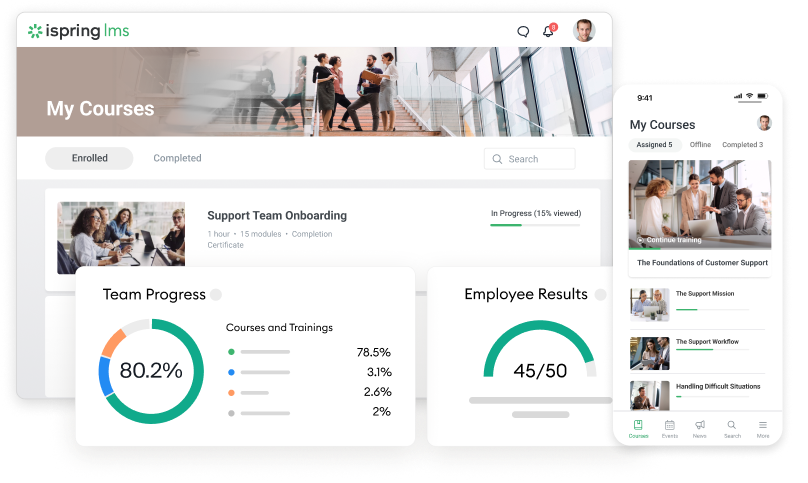
iSpring LMS supports compliance, onboarding, employee training, OJT, and performance evaluation. Its intuitive interface and extensive automation make it particularly practical for HR and L&D teams of one to three people managing several responsibilities.
Pricing
iSpring uses active-user pricing. Annual plans cost $8,286 for 100 active users, $16,050 for 300, and $23,790 for 500. Enterprise pricing is customized.
What users think about iSpring LMS
Pros
Users regularly praise its easy setup, intuitive administration, straightforward course creation, and responsive 24/7 support. Its automation also reduces repetitive work for small training teams.
Cons
Some reviewers want broader native integration capabilities and greater control over branding. Highly specialized reports or system connections may require API work.
Is a free trial available?
Yes. iSpring offers a 30-day free trial.
What are the best features?
- Automated enrollment, certificates, reminders, and scheduled reports
- Detailed analytics and reusable report templates
- Course creation, quizzes, and an employee training knowledge base
- Group-specific content, users, and statistics
- OJT assessments, competency profiles, and 360-degree feedback
- Blended learning programs with different training delivery methods and and virtual meeting integrations
- Multilingual, customizable portals with catalogs, chats, and comments
- Browser, mobile, and offline access
- SSO, role-based permissions, secure hosting, and API access
- 24/7 technical support
Who is this compliance LMS best for?
In my opinion, iSpring is a strong choice for a lean HR or L&D team that needs dependable compliance automation, training content creation, and compliance reporting without a steep learning curve.
3. Absorb LMS
G2: 4.6
Capterra: 4.5
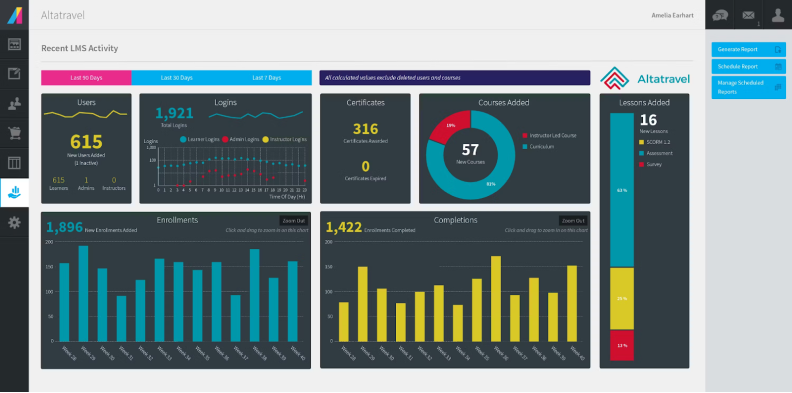
Absorb LMS is corporate compliance training software for mid-sized and large organizations. It can manage training for employees, customers, partners, and other audiences through separate learning experiences.
Pricing
Absorb provides pricing by quote, with costs based on learner numbers and selected features. There’s no permanent free plan.
What users think about Absorb LMS
Pros
Users appreciate its polished learner experience, scalability, customer support, and relatively smooth implementation. Its automation also works well for complex training programs.
Cons
Reporting receives mixed feedback. Some users find it difficult to configure, and deeper analytics require an additional module. Reviews also mention occasional delays when syncing data with third-party systems.
Is a free trial available?
Yes, although Absorb doesn’t specify the trial length publicly.
What are the best features?
- Automated enrollments, notifications, certificates, and renewals
- Real-time compliance dashboards and configurable reports
- Separate branded portals for different learner groups
- Absorb Amplify compliance course library
- AI-assisted administration and course creation
- eCommerce and embedded learning through Absorb Infuse
- SOC 2 Type 2, GDPR, WCAG 2.1, and 21 CFR Part 11 support
Who is this compliance LMS best for?
I’d shortlist Absorb when you need to manage compliance programs across several audiences and want more scalability than a lightweight LMS can provide.
4. Cornerstone Learning
G2: 4.1
Capterra: 4.3
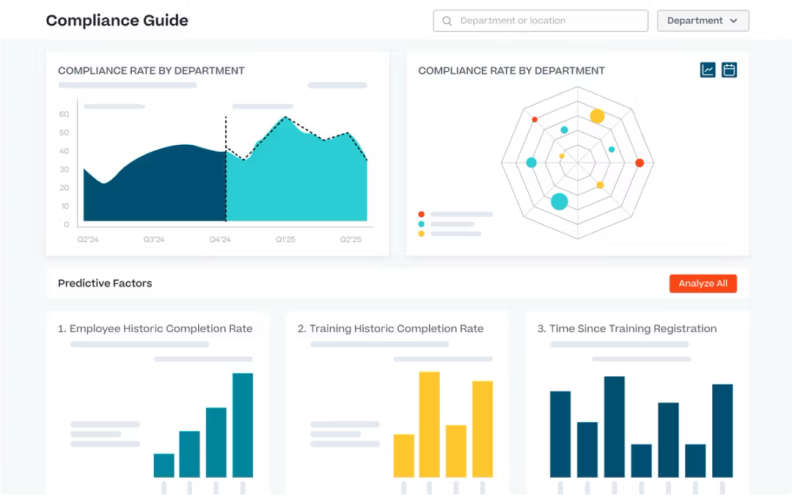
Cornerstone Learning is compliance LMS software for large organizations with different compliance requirements across roles, locations, business units, and countries. Its Training Models connect required learning to job data, helping companies with certification management at scale.
Pricing
Cornerstone doesn’t publish standard prices. Costs depend on workforce size, selected products, content subscriptions, and implementation requirements.
What users think about Cornerstone Learning
Pros
Users value its scalability, reporting, customization, and ability to keep required learning in one system. Its rules and integrations suit complicated organizational structures.
Cons
Reviewers frequently mention a steep administrative learning curve. Some workflows require many steps, and parts of the interface can feel dated or difficult to navigate.
Is a free trial available?
Cornerstone doesn’t advertise a free trial, but you can request a personalized demo.
What are the best features?
- Role-, task-, department-, and location-based assignments
- Automated reminders, certification tracking, and recertification
- Real-time compliance dashboards for employee training and audit ready reporting
- Observation checklists for verifying workplace skills
- Extensive HR integrations and global content subscriptions
- Mobile training for employees, contractors, and partners
Who is this compliance LMS best for?
I’d consider Cornerstone for a global or heavily regulated organization that needs sophisticated assignment rules and has the resources to manage a more complex platform.
5. Litmos
G2: 4.3
Capterra: 4.2
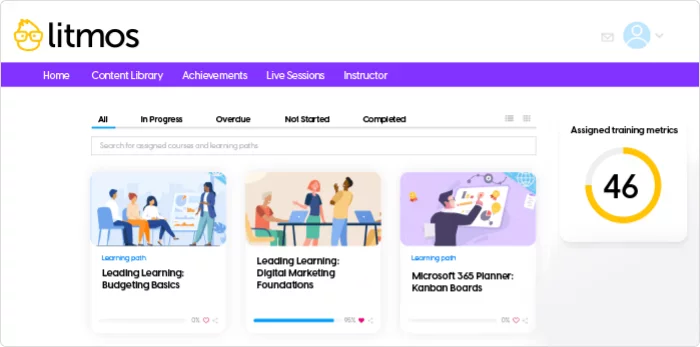
Litmos combines an LMS with a large library of prebuilt courses covering compliance topics like workplace safety, ethics, cybersecurity, workplace harassment prevention, and help with keeping up with industry specific regulations (and when regulations change). You can also create custom lessons or import existing SCORM content.
Pricing
Litmos offers several quote-based plans, including options with its training libraries. It doesn’t publish starting prices or offer a permanent free plan.
What users think about Litmos
Pros
Users frequently praise its ease of use, straightforward course creation, and broad content library selection. Combining the platform and courses can help you launch and manage compliance training faster.
Cons
Reporting is a recurring concern in G2 reviews. Some users find reports difficult to configure and mention cumbersome administrative workflows and escalation rules.
Is a free trial available?
Yes. Litmos offers a 14-day free trial.
What are the best features?
- Automated assignments, reminders, renewals, and certificates
- Audit-ready reporting trails and real-time completion monitoring
- Role-based compliance learning paths
- Regularly updated, ready-made courses
- Built-in course creation and AI tools
- Gamification and mobile learning
- Training for employees, customers, and partners
Who is this compliance LMS best for?
In my opinion, Litmos is one of the best compliance training software options when ready-made course coverage and fast deployment matter more than highly specialized reporting.
6. SC Training
G2: 4.7
Capterra: 4.7
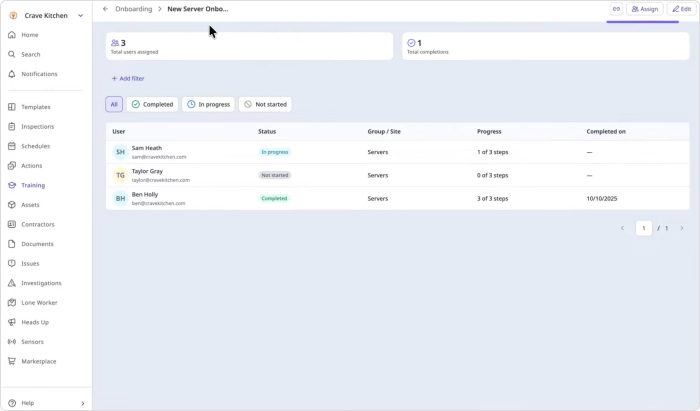
Formerly EdApp, SC Training delivers short, mobile-first lessons to employees who rarely work at a desk. Its editable course library and AI-assisted builder can turn policies and safety procedures into quick, practical modules for improved course completion.
Pricing
The free plan supports up to 10 learners. Premium costs $5 per learner per month when billed annually, plus at least one administrator at $24 per month. Enterprise pricing is customized.
What users think about SC Training
Pros
Users praise its mobile experience, easy course creation, engaging lesson formats, and responsive support. The free plan also makes the platform easy to test.
Cons
Some reviewers find course management and formatting restrictive. Its reporting and administrative controls may feel limited for complex enterprise programs. The Capterra score is also based on a small review sample.
Is a free trial available?
Yes. SC Training offers a 30-day Premium trial as well as its permanent free plan.
What are the best features?
- Mobile-first microlearning and push notifications
- AI course creation and editable course templates
- Quizzes, certificates, gamification, and spaced repetition
- Group training and practical workplace assessments
- Completion tracking and compliance analytics
- Offline learning, SSO, learner groups, and AI translation
Who is this compliance LMS best for?
I’d choose SC Training over traditional compliance training tools when mobile access, short lessons, and frontline skill checks are the priorities.
7. NAVEX One
G2: 3.7
Capterra: 3.4
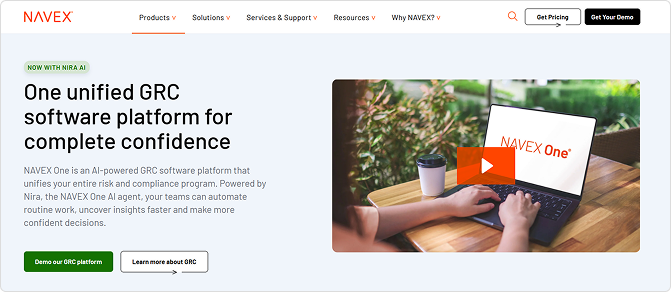
NAVEX One connects employee training with policy management, incident reporting, disclosures, and other governance and risk processes. Its course library focuses on ethics, workplace conduct, data privacy, and regulatory changes and compliance.
Pricing
NAVEX One uses custom pricing based on company size, operating regions, selected interactive modules, and program complexity. It doesn’t offer a permanent free plan.
What users think about NAVEX One
Pros
Users appreciate having several compliance activities in one system and generally find the core features easy to use. Its specialized content and policy connections provide more context than a typical LMS course library.
Cons
Advanced features can take time to learn, and reviewers raise concerns about administration, support, and value for money. Both ratings come from relatively small review samples, so I’d interpret them cautiously.
Is a free trial available?
NAVEX One doesn’t advertise a free trial, but you can request a personalized demo.
What are the best features?
- More than 130 customizable ethics and compliance courses
- Adaptive learning based on employee knowledge
- Automated user management, assignments, and reporting
- Auditable completion records and employee attestations
- HR system synchronization and SSO
- Connected policy, whistleblowing, disclosure, and risk tools
- Multilingual content reviewed by legal specialists
Who is this compliance LMS best for?
I’d choose NAVEX One when training is part of a wider ethics and risk program. It may offer more than you need if your only goal is to assign courses and track compliance training completion rates.
8. Relias
G2: 4.0
Capterra: 3.8
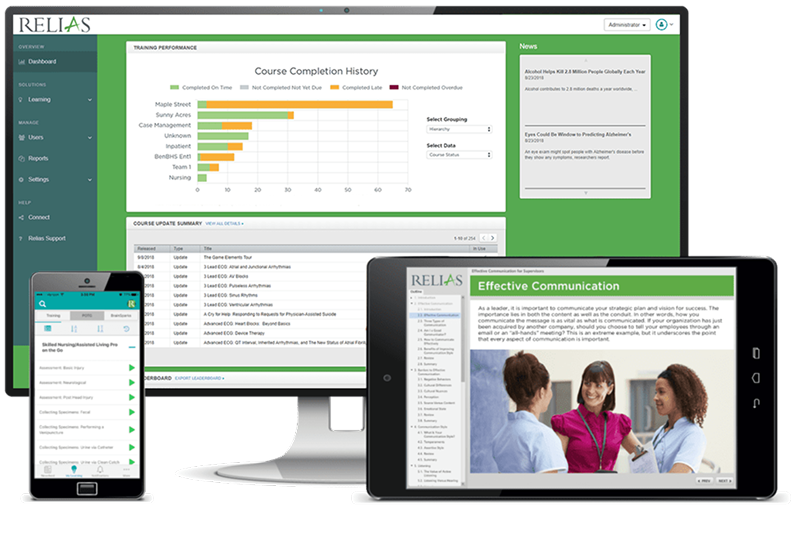
Relias is designed for healthcare and human services organizations. It combines compliance management with clinical education, continuing education, competency evaluation, and credential tracking.
Pricing
Relias doesn’t publish standard prices but requires significant budget. Plans are customized according to organization size, selected course libraries, and platform requirements.
What users think about Relias
Pros
Users value its extensive healthcare course library, easy learner experience, automated reminders, and compliance tracking. Reviewers also appreciate having clinical education and required training in one place.
Cons
Some users find the administrator interface difficult to navigate and reporting unnecessarily complicated. Reviews also describe certain courses as lengthy, repetitive, or dated.
Is a free trial available?
Relias doesn’t advertise a free trial, but you can request a personalized demonstration.
What are the best features?
- More than 5,000 accredited and expert-developed courses
- License, credential, certification, and requirement tracking
- Automated assignments, reminders, and real-time reporting
- Clinical competency evaluations and workplace skill checklists
- Policy and procedure management
- Continuing education and certification management and preparation
- Mobile, blended, microlearning, and scenario-based training
- Custom courses and personalized learning paths
Who is this compliance LMS best for?
In my opinion, Relias is best suited to healthcare, behavioral health, senior care, and human services organizations that need specialized clinical content alongside regulatory training.
Selecting the right compliance training platform
The right compliance training LMS platforms depend on your industry, workforce, and administrative resources. TalentLMS suits smaller programs, Cornerstone Learning can handle complex global compliance requirements, and Relias provides specialized healthcare content. Litmos is also worth considering if you’d rather purchase ready-made courses than develop everything internally. iSpring LMS suits lean HR and L&D teams that need compliance training software with automation, content creation, detailed reporting, and straightforward administration. It can be a practical option for keeping training current while reducing routine admin work.