Your LMS should make it easier to deliver useful training programs or employee training and see where people need help. Finding that fit takes some digging. Platforms that look similar in a demo can differ considerably once you start assigning online courses, managing departments, or pulling reports.
In this guide, I compare 10 options for online learning management software, including their pricing, essential features, and recurring themes in user feedback. I also explain the main types of LMS so you can narrow your search for the best learning management software before booking demos. My focus is practical. What will help your team create, deliver, and manage training tools without unnecessary administrative work?
Types of LMS and how they differ
LMS categories describe different things. Some tell you who manages the best learning management system software while others describe licensing or the audience it serves. A platform can belong to several categories at once. For example, a cloud subscription can support both employee onboarding and customer education.
I find it useful to separate those decisions before comparing individual LMS providers.
Cloud-based LMS
A cloud-based LMS runs on infrastructure managed by the vendor or hosting provider. Your administrators and learners usually access it through a browser, and the provider handles software updates and the underlying hosting environment.
This is often the most manageable starting point when your training team has limited IT support. You still own the work of organizing training content, setting permissions, and maintaining accurate learner records. Before subscribing, check how the vendor counts users, what happens during busy training periods, and how you can export your online courses and results.
Self-hosted LMS
With self-hosted LMS platforms, your organization or chosen service provider manages the installation. That can give you more control over infrastructure, seamless integrations, and deployment schedules. It also means someone must take responsibility for updates, backups, monitoring, and recovery.
I would consider this approach when you have specific infrastructure requirements and the technical capacity to support them. Include ongoing administration in the budget. An inexpensive software license can become a costly project if maintaining the system falls to people who already have full workloads.
Open-source LMS
Open-source software gives you access to the source code under its license terms. Moodle LMS is a familiar example. You can adapt the platform and extend it with compatible plugins, either through your own developers or a service partner.
Open source describes licensing, so it doesn’t necessarily mean self-hosted: managed hosting is also available. It can suit a custom learning platform, but customization needs a clear purpose. Each additional plugin or code change adds something your team must evaluate when the platform updates. Decide which requirements justify that work before commissioning development.
Corporate LMS
Corporate LMS training systems often automate compliance training as part of employee onboarding, recurring training, professional development, and records for managers. Common priorities include automated enrollment, certificates, organizational hierarchies, HR integrations, and reports that show who still needs to complete training, including where individual skill gaps affect compliance training.
The need extends beyond initial onboarding. Effective onboarding can increase employee retention and employees would often stay longer if offered professional development. That visibility into growth also supports employee engagement and helps people feel more confident in their roles. I would therefore look for a system your team can maintain as roles and skills change, including a straightforward process for revising online training courses that people have already completed so updated requirements also reinforce confidence in day-to-day work.
Academic LMS
Academic LMS platforms organize teaching around online training courses, classes, course assignments, discussions, and grades, and they need to support students and other stakeholders through accessible course and communication workflows. They often suit programs with instructors, scheduled terms, and detailed assessment workflows.
Those capabilities can also serve professional education. However, an academic LMS platform may need additional configuration to reflect your departments, manager responsibilities, or recurring certification schedules. They should also meet WCAG accessibility standards and comply with privacy regulations to protect student data. If you’re considering one for employee training, ask the vendor to demonstrate those business workflows, while noting that academic systems may also include comprehensive dashboards and early warning analytics to monitor learner progress and flag at-risk learners. A strong gradebook doesn’t automatically tell a department manager which employees need to renew a qualification next month.
Extended enterprise LMS
An extended enterprise training supports learners outside your workforce, including customers, partners, dealers, franchisees, members, or contractors. Depending on the product, you can create separate branded portals, delegate administration, sell courses, or provide different catalogs to different groups.
An enterprise learning platform can improve product adoption and knowledge retention while helping teams avoid repetitive tutorials.
The important question is how those audiences stay separate. A customer’s administrator may need to see their own team’s progress without seeing anyone else’s records. Check how accounts, permissions, custom branding, and reports work together. Better customer training can also lower support volume, with some teams reporting a 96% reduction in support tickets. Also ask whether additional portals require a higher plan or a separate charge.
These categories give you a way to describe your requirements. The next step is to see how different blended learning management systems put those capabilities together.
Learning management system software comparison
The best learning management system software depends on your audience, internal resources, and employee training priorities, and the right fit can differ for small and medium businesses as well as larger teams. Here’s the shortlist I’ll explore below:
- TalentLMS: A cloud LMS platform for teams that want approachable and interactive course creation and administration, with a free plan for a small pilot.
- iSpring LMS: An all-in-one corporate training option that combines collaborative learning management, reporting, employee development tools, and included access to iSpring Suite AI.
- 360Learning: A platform built around collaborative course creation, helping internal experts share knowledge and respond to learner feedback.
- Docebo: A configurable enterprise platform for managing training programs across employees, customers, partners, and other audiences.
- LearnUpon: An LMS platform with separate social learning portals, automated journeys, and tools for employee, customer, and member education.
- Absorb LMS: A platform for established training operations, with audience management, reporting, mobile learning, and ecommerce capabilities.
- Moodle LMS: An open-source option for teams that want control over course design, hosting, and extensions and can support the configuration involved.
- Litmos: A corporate LMS with authoring tools and content-library options for delivering workplace training across distributed teams.
- ProProfs Training Maker: A course-building and training-management platform with quizzes, templates, and a free plan for up to 10 learners.
- SkyPrep: A business LMS with course management, collaborative learning paths, and reporting, suited to teams that value accessible day-to-day administration.
A shortlist gives you a starting point, but it can’t show how much work each platform will require from your team. Moving training to online platforms can also reduce delivery costs, which matters when you’re comparing systems. In the reviews below, I look at course delivery, administration, pricing, and what users say works well or needs improvement.
Top LMS software solutions
I’ve compared published product information, pricing pages, and user reviews, focusing on business training needs. The order isn’t a universal ranking. A platform suited to a small onboarding program may be a poor fit for a large customer academy.
Prices and review scores reflect the sources checked in October 2026 and can change. Dollar prices are in U.S. dollars unless stated otherwise. Feature availability can also vary by plan, so compare the package you would actually buy.
I use ratings as context, then look at the underlying feedback. A learner who opens one course a month has a different view from an administrator managing thousands of records. When evaluating the best LMS platforms for your team, pay particular attention to reviews from people doing similar work.
1. TalentLMS
G2: 4.65
Capterra: 4.7
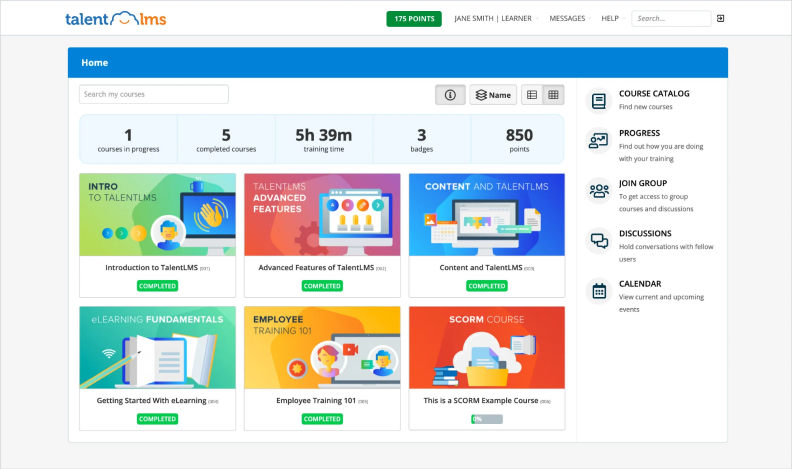
TalentLMS combines course building, assessments, learner management, and reporting in a cloud platform. You can turn existing documents, files, and media into online training courses and knowledge checks, import supported collaborative learning packages, or use its TalentCraft authoring tools, where authors can add interactions such as quizzes. Branches provide separate training environments for different groups.
I see its appeal when you need to get a structured program running without assigning a full-time administrator immediately, especially since the interface is relatively easy to navigate for new administrators. Think onboarding for a growing team or product training across several locations. You can start with a manageable catalog and expand from there, although the plan’s limits become more relevant as your audiences and automation needs grow.
Pricing
TalentLMS pricing starts at $119 per month for Core with up to 40 users when billed annually. Grow starts at $229 for 70 users, and Pro starts at $449 for 100 users. Enterprise pricing is custom. Compare branch allowances, a custom learning process, automation, and support before choosing a tier.
What users think about TalentLMS
Pros
Reviewers regularly describe course setup and everyday administration as approachable. Positive feedback also mentions customer support and the ability to organize different content formats. Those are useful strengths when subject-matter experts contribute training alongside their regular responsibilities.
Cons
Users also report limitations around customization, reporting, and exporting content created within the platform. I would check the exact reports you need and ask how you can move your materials elsewhere if your requirements change.
Is a free trial available?
TalentLMS offers a free plan for up to five users and 10 courses. That gives you time to evaluate a small training program, although paid-plan LMS features need their own review.
What are the best features?
- Course creation and AI-assisted authoring
- Tests, surveys, and blended learning paths for personalized learning
- Branches for separate training audiences
- Enrollment automation and custom reports on eligible plans
- Mobile learning, SSO, and business integrations
The free plan provides a useful starting point for seeing how those everyday tasks feel.
Who is this LMS best for?
TalentLMS suits small, midsized, and growing teams moving beyond shared folders and manual reminders. I would give it particular attention when ease of administration matters more than extensive platform customization. Have a future administrator build a course and assign it to a group before deciding. That experience is more useful than watching someone else demonstrate the process.
2. iSpring LMS
G2: 4.6
Capterra: 4.7
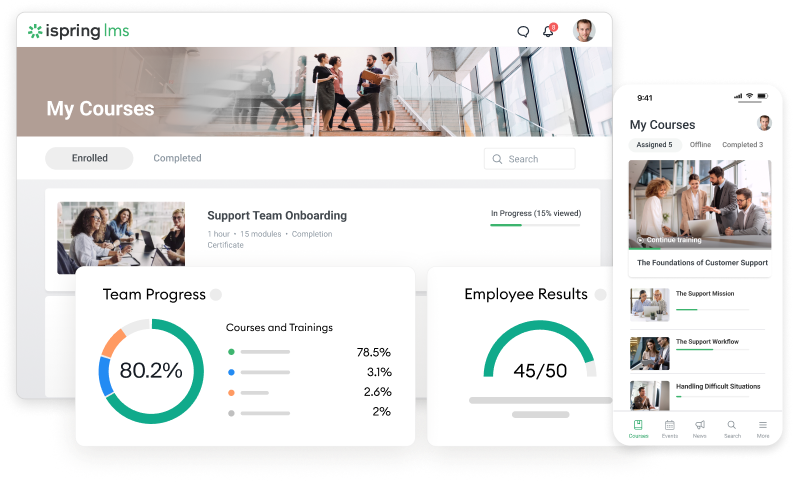
iSpring LMS supports the full corporate training workflow, from creating courses and enrolling employees to seeing results with progress tracking and planning further development. Its social learning tracks organize materials into a program, while automated assignments and reminders help administrators manage recurring work.
The all-in-one approach is a particular strength. An iSpring LMS subscription includes access to iSpring Suite AI, so course authoring and learning management sit within the same product ecosystem. You can create interactive training from existing slides or build new materials, then publish directly to the LMS. The platform also includes browser-based course creation.
I like the connection between formal courses and practical development. A new hire’s program might include online training, a supervisor’s checklist, and activities supported by a mentor in one place. That gives managers more to work with than a completed-course list alone, and it can leave new employees feeling more empowered as they take on responsibilities.
Pricing
Published annual prices are $8,286 for 100 users, $16,050 for 300 users, and $23,790 for 500 users. Enterprise pricing is custom. Billing uses active users, defined as people who log in at least once during the month. Ask for a quote if your audience falls outside the listed tiers. Large organizations with broader rollouts should request custom pricing and implementation details beyond the published tiers.
What users think about iSpring LMS
Pros
Users frequently praise its accessible interface, responsive support, and straightforward course administration. Reviews also describe its usefulness for delivering training across locations, including teams without a dedicated training department.
Cons
Some reviewers want more flexibility in reporting and customization. If you have a specific management dashboard or organizational workflow in mind, make that part of the demonstration rather than relying on a general reporting overview.
Is a free trial available?
Yes. iSpring LMS offers a 30-day free trial. I would use it to build a short program, enroll a pilot group, and review the results from a manager’s perspective.
What are the best features?
- Included access to iSpring Suite AI
- Built-in course creation and structured learning tracks
- Automated enrollment, reminders, and training reports
- Development plans, on-the-job checklists, and 360-degree feedback
- Knowledge base and mobile apps with offline learning
These capabilities make it possible to keep training creation, delivery, and follow-up within one ecosystem.
Who is this LMS best for?
iSpring LMS suits teams that want a coordinated approach to onboarding, recurring employee training, and skills development. It’s especially relevant when your authors already work in PowerPoint and your managers need clear visibility into progress. I would shortlist it when you want substantial course-building capability included with your LMS subscription.
3. 360Learning
G2: 4.6
Capterra: 4.7
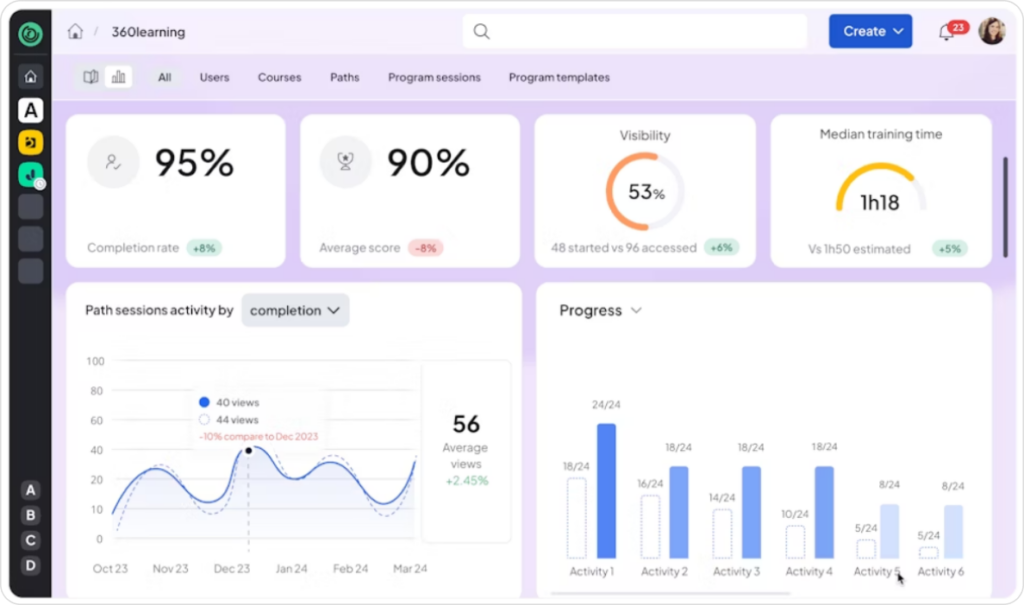
360Learning centers its approach on collaborative learning. Internal experts can contribute courses, co-author materials, and respond to questions or feedback, which can increase learner engagement and make people more likely to participate. The platform also handles social learning paths, assignments, and reporting, so collaboration takes place within a managed training program.
This is useful when your most valuable training knowledge lives with people across the company. I would evaluate it around that contribution process: how easily can someone share useful knowledge, in a way that helps learners participate rather than passively consume updates, have it reviewed, and keep it current?
Pricing
The Team plan costs $8 per user per month for up to 100 users. Business and Enterprise plans use custom pricing, with licensing options for internal and external audiences. Confirm the integrations, customization, and support included in the proposed package, particularly when several departments will manage training.
What users think about 360Learning
Pros
Reviewers appreciate the ease of course creation, clean learner experience, and support. Feedback also highlights the convenience of keeping social learning materials together. The collaborative approach gives course authors a way to hear where employees need clarification.
Cons
Reporting, customization, and some administrative settings receive more mixed feedback. Users describe extra configuration or a learning curve for advanced tasks. Ask your reporting owner to work through the dashboards rather than judging them only from the learner view.
Is a free trial available?
Yes. 360Learning offers a 30-day trial of its Team plan. Invite a subject-matter expert as well as an administrator so you can evaluate the contribution process.
What are the best features?
- Collaborative authoring and co-authoring
- Course feedback and learner discussions
- AI-powered course creation
- Learning paths and blended learning
- Mobile learning and reporting
Those features are most valuable when experts have time to contribute and someone owns the review process. They matter most when they support more responsive and seamless learning experiences, not just faster publishing.
Who is this LMS best for?
360Learning suits teams that need to capture internal expertise and update training frequently. I would consider it for product education, onboarding, and knowledge sharing across distributed departments. Before rolling it out, decide who can publish, who checks accuracy, and who revisits older lessons. The software supports collaboration tools, but your team still needs an editorial routine.
4. Docebo
G2: 4.3
Capterra: 4.4
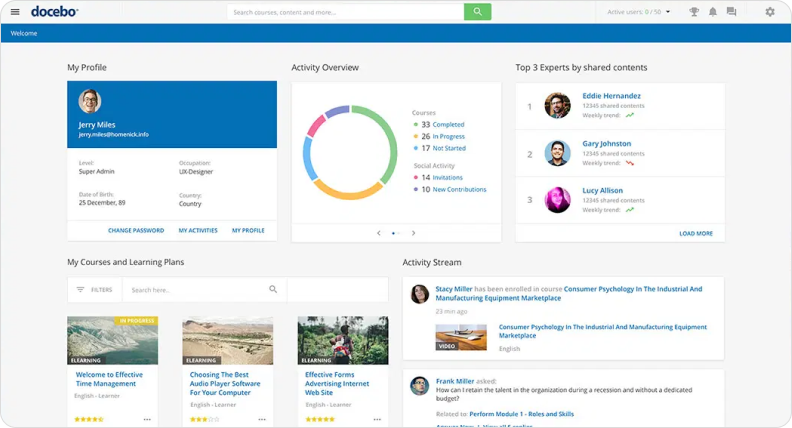
Docebo supports employee development, customer education, partner training, and other programs within a configurable enterprise platform. Its capabilities cover content delivery, certification management, automation, mobile learning, and connections to business systems.
The attraction is the breadth of programs you can manage. You may need separate experiences for new employees, established customers, and channel partners, and administrators may also need reporting and advanced analytics across those audiences. Different access rules and reporting expectations often extend to learner-level insights for individuals as well as group reporting. Docebo belongs in that conversation. I would approach the evaluation with a clear map of those audiences, because a broad feature set can make an unfocused demonstration look convincing without resolving your actual requirements.
Pricing
Docebo’s Elevate and Enterprise plans require a quote. Enterprise includes additional capabilities, while some products and services remain add-ons. Request an itemized proposal covering integrations, extended-enterprise features, content, AI usage, implementation, and support. That makes comparisons with other LMS vendors much more meaningful than a single annual total.
What users think about Docebo
Pros
Users value its flexibility, learner interface, and ability to manage different training audiences. Reviews also highlight automation, community resources, and the range of available features. These strengths matter when several teams need to coordinate their programs.
Cons
Some reviewers describe a learning curve for configuration, certifications, and reporting. Advanced requirements can take additional effort to implement. I would ask who on your team will own platform administration and how much training that person receives during rollout.
Is a free trial available?
Docebo promotes a personalized demo and product tour. Ask the sales team about evaluation or sandbox access for your project; don’t assume a public, self-service trial is included.
What are the best features?
- Multiple audience experiences and branding
- Automated learning administration
- Certification and compliance tracking
- Mobile, social learning, and instructor-led learning
- Reporting, integrations, APIs, and optional AI capabilities
The value of that breadth depends on how much of it your programs will actually use.
Who is this LMS best for?
Docebo suits enterprise organizations managing complex internal and external training. Among the top learning management systems, it’s worth considering when configuration and integrations are central to your requirements. Give administrators time to evaluate it properly, including the less visible work of correcting learner records, changing assignments, and maintaining reports.
5. LearnUpon
G2: 4.5
Capterra: 4.7
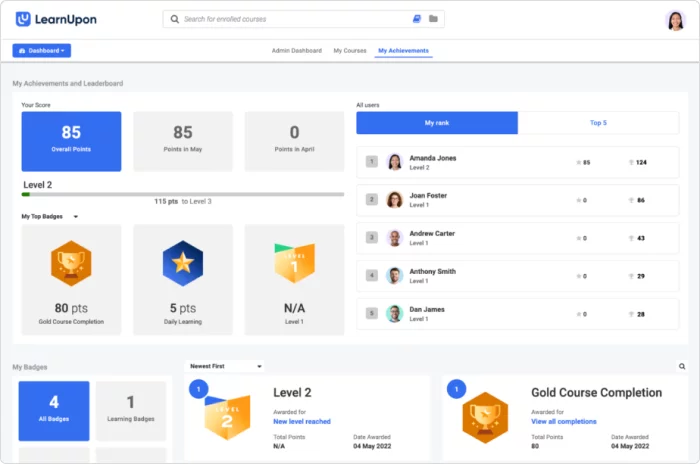
LearnUpon supports employee, customer, and association learning through separate portals, course management, and automated learning journeys. Its platform also includes AI-assisted authoring through Create+ and reporting tools.
The portal model interests me when your audiences need distinct experiences. Keeping those programs organized under a common platform can make administration more manageable, provided permissions and reporting boundaries match your structure.
LearnUpon is also expanding its AI capabilities. When evaluating them, ask which features are available in your package and which are still in beta or planned. Build your purchasing decision around what your team can use at launch.
Pricing
LearnUpon provides custom pricing for its employee, customer-education, and association offerings. Its plans include implementation assistance, customer success, and technical support. Your proposal should specify audience size, portal requirements, integrations, and the content-creation capabilities included. Extra help during implementation has value, but you need to know exactly what that help covers.
What users think about LearnUpon
Pros
Reviewers often praise the support team and accessible interfaces for both learners and administrators. Users also describe straightforward course setup and predictable content updates. That is encouraging for teams that regularly revise training materials.
Cons
Feedback includes requests for more flexible reporting, user grouping, and learning journeys. Some users find settings spread across different areas. Have an administrator demonstrate a complete workflow, including editing it later, rather than stopping once the initial assignment works.
Is a free trial available?
LearnUpon’s main platform pages direct buyers to a demo. Discuss trial access with sales. If you see a Create+ trial, check its scope, since an authoring trial doesn’t necessarily provide access to the full LMS.
What are the best features?
- Separate learning portals for different audiences
- Automated learning journeys to track learning outcomes
- Create+ course authoring for self-paced content and live sessions in portal-based customer education
- SCORM and xAPI support
- Reporting, integrations, customer-education tools, and external learning activities
The portal structure is the feature I would explore first when audience separation drives the purchase.
Who is this LMS best for?
LearnUpon suits teams managing employee training alongside customer or member education. It’s a strong candidate when you want dedicated implementation support and clear audience organization. During a pilot, involve the people who will manage each portal so you can confirm what they can control independently.
6. Absorb LMS
G2: 4.6
Capterra: 4.6
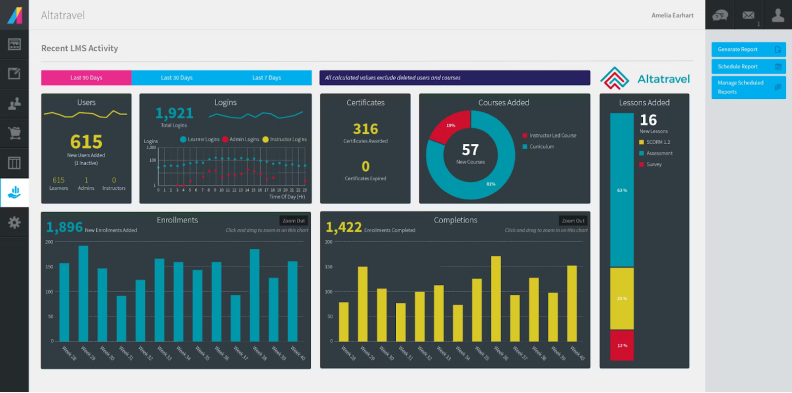
Absorb LMS combines course and user management with certifications, reporting, mobile learning, and support for external audiences. Ecommerce and separate learning environments make it relevant when your training operation extends beyond employee development.
I would look at it when a growing catalog needs more consistent administration. For example, a manufacturer may need employees to complete internal training while dealers or other external learners access product courses and certifications, and those groups may number in the hundreds as the catalog grows. The practical question is whether the administrators can manage those programs without repeatedly rebuilding the same content or manually combining reports.
Absorb also markets AI capabilities through Aura. Ask for a demonstration of the specific functions included in your proposal and how administrators review their output.
Pricing
Absorb pricing is available by quote and depends on your requirements. Request separate details for the LMS, authoring capabilities, additional products, implementation, and support. For external training, discuss how occasional learners affect the bill. A customer academy may have a very different usage pattern from a workforce completing monthly assignments.
What users think about Absorb LMS
Pros
Users praise the learner experience, support, and reporting options. Some particularly like the spreadsheet-style reporting interface and export flexibility. Those capabilities can help training administrators share results with managers who don’t work inside the LMS.
Cons
Other reviewers find report consolidation time-consuming or certain administrative steps less intuitive than expected. Migration and terminology changes can also require attention. Use your existing reports and a sample of learner records to make the evaluation concrete.
Is a free trial available?
Yes. Absorb offers a free-trial request. Confirm the duration, included capabilities, and setup assistance before organizing your pilot. The request form doesn’t establish one universal trial period.
What are the best features?
- Course administration and automated user management
- Certifications and training records
- Customizable reports and dashboards
- Multiple audience environments
- Mobile learning, ecommerce, and business integrations
Together, these give you room to manage several training programs, with the final scope determined by your package.
Who is this LMS best for?
Absorb suits established teams coordinating employee and external training, particularly when reporting and audience management deserve close attention. I would include the people responsible for data migration early. A polished learner experience matters, but so does preserving the historical records your managers rely on.
7. Moodle LMS
G2: 4.1
Capterra: 4.3
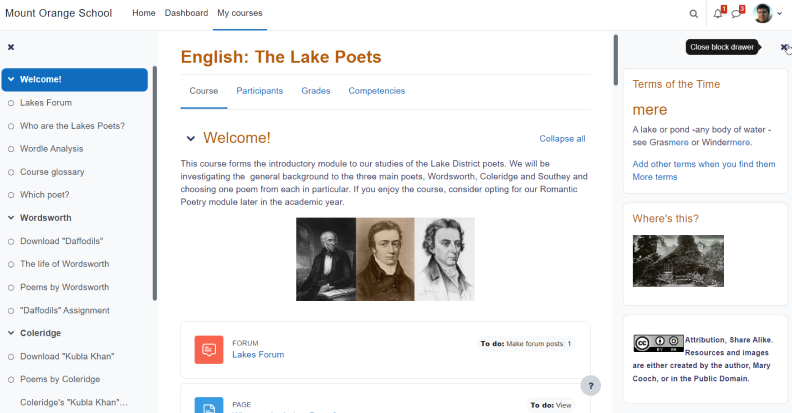
Moodle LMS is an open-source platform with extensive tools for courses, quizzes, assignments, discussions, and assessment. You can host it yourself, work with a service provider, or choose a managed service like MoodleCloud, and learners can access courses and activities from a browser or mobile device depending on deployment.
Its flexibility is the main reason I would consider it for business training. You have considerable control over how courses work and which extensions support them. That can be useful for instructor-led professional education or programs with detailed assessment requirements.
However, Moodle LMS and Moodle Workplace aren’t interchangeable names. Workplace is a separate business-focused offering with additional organizational capabilities and partner-based delivery. This review and the ratings above refer to Moodle LMS.
Pricing
The open-source software has no license fee, but hosting, implementation, maintenance, and support still need funding. MoodleCloud lists a Starter plan for 50 users at approximately $170 annually. Plans are billed in Australian dollars, so conversion and taxes can affect the amount you pay. Managed plans also have storage and customization limits.
What users think about Moodle LMS
Pros
Reviewers appreciate its flexibility, assessment tools, and ability to organize structured learning. The open-source model and extension options appeal to users who want more control over their environment.
Cons
Navigation and configuration attract mixed feedback. Some users describe a steep learning curve or an interface that takes getting used to. Experiences vary considerably because different organizations configure Moodle differently. Look at a setup comparable to the one you intend to run.
Is a free trial available?
You can download and test Moodle LMS without a license charge. MoodleCloud also offers a 28-day trial. Its managed environment is useful for exploring the platform, but it won’t represent every custom deployment.
What are the best features?
- Quizzes, assignments, gradebooks, and discussion forums
- Flexible course structures and activity completion
- Roles, permissions, and competency tools
- Plugins and integration options
- Mobile access and control over deployment
The range of options gives you flexibility, while making configuration decisions part of the project.
Who is this LMS best for?
Moodle suits teams with technical support and specific learning-design requirements. Among popular LMS systems, it deserves attention when control matters enough to justify ongoing maintenance. I wouldn’t choose it solely to avoid a subscription. Compare the complete cost of operating the environment you need.
8. Litmos
G2: 4.3
Capterra: 4.2
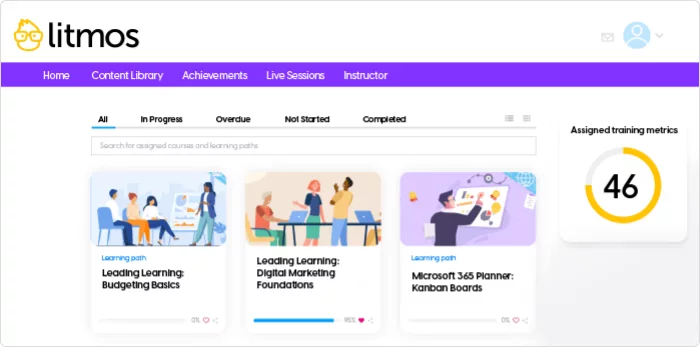
Litmos brings together course delivery, assessments, learning paths, and administration for workplace training. It also offers authoring capabilities and content libraries, which can help teams cover common training topics while developing their own materials.
I would consider it when you have several recurring training needs and limited time to produce everything internally. Ready-made content can reduce the amount you need to build, but in addition to the time saved, it still needs review. Your policies, terminology, and procedures may differ from those in a generic lesson. Ask how easily you can supplement the material with company-specific instructions and track the resulting program.
Pricing
Litmos publishes starting annual prices of $8,000 for Foundation and $15,000 for Platinum. Platinum AI requires a sales quote. These are starting figures, so confirm user capacity, content-library access, authoring features, and any additional environments in your proposal. Don’t assume every item shown in a demo belongs to the entry plan.
What users think about Litmos
Pros
Users often praise the approachable interface, course creation, and support. Reviews also describe the convenience of managing company-specific training and learning paths within the platform.
Cons
Reporting and customization are recurring concerns in user feedback. Some administrators find it difficult to retrieve information in the format they need. For recurring training, ask to see how the system displays previous completions and current renewal requirements together.
Is a free trial available?
Yes. Litmos offers a 14-day free trial. Plan a small evaluation in advance so you can cover course setup, learner access, and reporting during that period.
What are the best features?
- Course management, assessments, and learning paths
- Authoring and collaboration tools and optional training libraries
- Automated assignments and certification workflows
- Mobile and instructor-led learning
- Branding, integrations, and multi-audience options
The combination is worth exploring when ready-made training could fill immediate gaps in your catalog.
Who is this LMS best for?
Litmos suits distributed teams delivering recurring workplace training, including programs that benefit from a content library. I would bring a sample training requirement and the associated reporting request to the demo. That lets you assess the entire process, from selecting a lesson to showing a manager who still needs to complete it.
9. ProProfs Training Maker
G2: 4.6
Capterra: 4.8
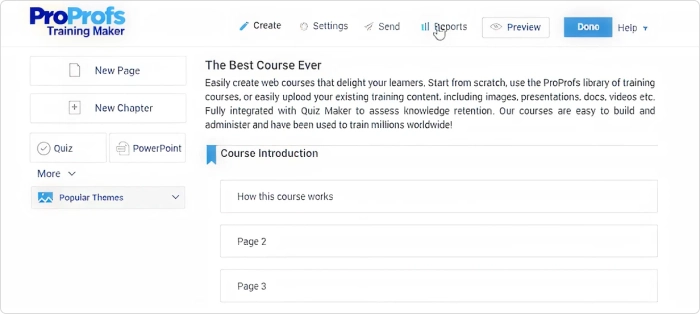
ProProfs Training Maker combines elearning course creation and tracking with quizzes, assignments, and certificates. You can create materials from scratch, adapt templates and existing content, or use AI-assisted authoring. Its ready-made course library offers another starting point.
The appeal is getting a defined training task organized quickly. If your current process involves emailing a document and asking people to confirm they’ve read it, a course with questions and recorded results gives you a more useful way to follow up. I would still keep the first program focused, so you can evaluate the learner experience without building an entire catalog.
Pricing
The free plan supports up to 10 learners. Essentials starts at $1.99 per active learner per month with annual billing and a maximum of 100 active learners. Higher plans expand the available scope. Check which integrations, reporting options, and library content your chosen plan includes, along with how active learners are counted.
What users think about ProProfs Training Maker
Pros
Reviewers highlight accessible course creation, customization, quizzes, and assignment management. Positive comments often focus on being able to organize training without extensive technical knowledge.
Cons
Some users want more design templates and greater flexibility for complex course structures. Others mention an initial learning curve. Its Training Maker review samples are also smaller than those of several platforms here, so I would read individual accounts closely rather than give the headline score too much weight.
Is a free trial available?
You can start with the permanent free plan, and ProProfs also advertises trials for paid plans. Check the signup details for the trial’s duration and included features before inviting your test group.
What are the best features?
- Browser-based course creation and templates
- AI-assisted content and quiz development
- Assessments, certificates, and learner reports
- Training assignments and reminders
- Customizable ready-made courses
Those features provide a practical starting point for turning informal materials into a trackable program.
Who is this LMS best for?
ProProfs suits smaller teams and departments with straightforward training needs. I would evaluate it for onboarding, policy education, or short product courses. If your program requires detailed branching, complex organizational permissions, or unusual reporting, include those requirements in the trial before committing to a larger rollout.
10. SkyPrep
G2: 4.6
Capterra: 4.8
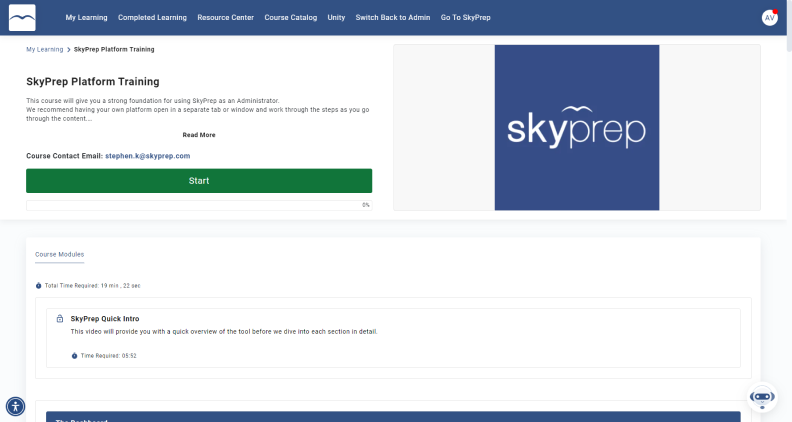
SkyPrep is a corporate LMS for creating and assigning courses, organizing learning paths, and monitoring progress, including tracking training performance across teams. It supports uploaded materials, assessments, certificates, instructor-led training, and automation, with more advanced administration available on higher plans.
I see it as a candidate for teams that want routine training work to stay manageable. You may have a small learning department supporting many locations, with managers responsible for checking their own teams. In that situation, clear permissions and useful reports matter as much as course design. The evaluation should include the managers who will actually use those views each week.
Pricing
SkyPrep provides custom quotes for Lite, Premium, and Enterprise Learning Suite. Lite and Premium are listed for 100 or more active users. Premium adds capabilities including advanced reporting, workflow automation, API access, and SSO. Confirm the package required for multiple platforms, mobile offline use, and your preferred support arrangements.
What users think about SkyPrep
Pros
Users frequently praise its ease of use, support, and straightforward course administration. Some reviewers particularly value scheduled reports and manager permissions for teams spread across locations.
Cons
Other feedback asks for clearer report layouts or additional flexibility. Since reporting experiences vary, give the vendor a sample of the output you need. Ask whether an administrator can reproduce it directly and save it for later use.
Is a free trial available?
SkyPrep advertises a 14-day trial. Confirm access and the available plan with the vendor, then use the evaluation to complete a full training cycle rather than only explore the learner dashboard.
What are the best features?
- Courses, assessments, and learning paths
- Certificates and renewal workflows
- Scheduled reporting and manager access
- Workflow automation on eligible plans
- Mobile learning, integrations, and separate-platform options
The combination is useful when your priority is keeping course delivery and follow-up consistent across teams.
Who is this LMS best for?
SkyPrep suits organizations that want approachable administration and support as their training program grows. I would compare it with other leading learning management systems using everyday tasks: enrolling new starters, updating a course, checking overdue training, and giving a local manager the right view of their team’s progress.
Choose an LMS your team can work with
I want to finish this comparison with a clear reason to choose a platform. Perhaps managers spend too much time chasing overdue training. Perhaps useful knowledge stays with experienced employees because nobody has an easy way to turn it into a course. Or perhaps your current system has become difficult to manage as more departments use it.
Whatever brought you here, keep that problem at the center of the decision. The best LMS software solutions should offer a convincing way to address it. A long feature list can distract you from a basic requirement that still takes six manual steps.
That’s also how I’d approach the budget conversation. When comparing these top LMS systems, look beyond the subscription price to the work your team will take on. Who will update courses? What can department managers handle themselves? Will you need outside help whenever an integration changes? Those answers help you understand what you’re committing to after the initial setup is over.
For teams that need to develop training as well as manage it, iSpring LMS deserves a closer look. Its subscription includes access to iSpring Suite AI, bringing course creation and learning management into the same ecosystem. That all-in-one approach is particularly relevant if producing useful training content is currently holding your program back.
I’d also consider TalentLMS if your priority is making everyday training administration easier, or 360Learning if you want internal experts to take a more active role in developing and updating courses.
You don’t need to solve every future training challenge with this purchase. You do need a clear account of what will improve first, who will make it happen, and how the platform will support the work that follows.
FAQ
What is the most commonly used LMS?
There isn’t one defensible answer across every industry and region. Moodle is among the most widely deployed platforms: its registration statistics show sites across more than 200 countries. Those figures describe registered installations, however, rather than a universal market-share ranking.
Corporate and academic audiences also use different products. I would use adoption figures to understand the size of a product’s community, then compare the LMS products that fit your training requirements. Popularity can help you find resources and implementation partners, but it doesn’t establish suitability, and claims about which platform is “most popular” should be validated against current market research rather than third-party summaries such as Forbes Advisor roundups.
What is the easiest LMS to use?
TalentLMS, iSpring LMS, and SkyPrep are reasonable starting points because user feedback frequently highlights their accessibility. The easiest option for your team depends on who will use it and what they’ll do.
During a trial, ask someone to create a course, enroll a group, complete a lesson, and find an overdue-training report. Pay attention to where they need help. An LMS can feel straightforward to learners while requiring much more effort from administrators, so evaluate both experiences before deciding.
What is a learning management software?
Learning management software, usually called a learning management system or LMS, helps you organize, deliver, and track learner progress. You can use it to assign courses, manage learners, assess knowledge, and record results. Many online LMS systems also include course creation, automated reminders, certificates, integrations with HR or business software, and in some cases tools such as video conferencing.
For example, an onboarding program might automatically assign lessons to a new employee, record their assessment results, and show their manager what’s still outstanding. The exact capabilities vary between custom learning management system companies and subscription plans.
What is an example of an LMS?
iSpring LMS is one example. It supports course creation, training assignments, learning tracks, reporting, and employee development, with access to iSpring Suite AI included in the subscription, and a sales-enablement training LMS can also support product education when training aligns sales strategies with value propositions. TalentLMS is another example, offering course building, learner management, assessments, and reporting.
For an open-source example, Moodle LMS provides configurable course and assessment tools. All three online learning management software help organize learning, but their deployment options, administration, and customization differ. A best learning management system comparison should account for those practical differences, user experience, and the feature list.