I’ve watched a company wiki turn into a graveyard nobody trusts. I’ve watched managers scramble because they can’t prove a single hour of required training ever happened. Knowledge base vs wiki vs LMS comes down to one question: what does each tool actually prove? This guide breaks down all three and helps you figure out which one, or which mix, your team really needs.
In short: a knowledge base is a curated library of reference articles, built so people can find answers without asking a person. A wiki is an open, editable space where a team writes and updates shared documentation together, with no formal review step. An LMS, short for learning management system, delivers structured courses, tracks who finished them, and issues certificates that hold up during an audit.
The simplest way to separate the three: a knowledge base curates, a wiki invites contribution, and an LMS assigns and tracks. A knowledge base stores an answer. A wiki records work in progress.
An LMS proves that training actually happened. Most growing teams end up using some mix of all three, not just one.
| Knowledge Base | Wiki | LMS | |
| Purpose | Answer questions, reduce repeat lookups | Collaborate on shared documentation | Deliver and prove training |
| Editing model | Curated, usually one owner per article | Open editing, anyone on the team | Built by admins, assigned to learners |
| What it can prove | That an answer exists and was published | That a page was edited, and by whom | That someone completed, scored, and was certified |
What Is a Knowledge Base?
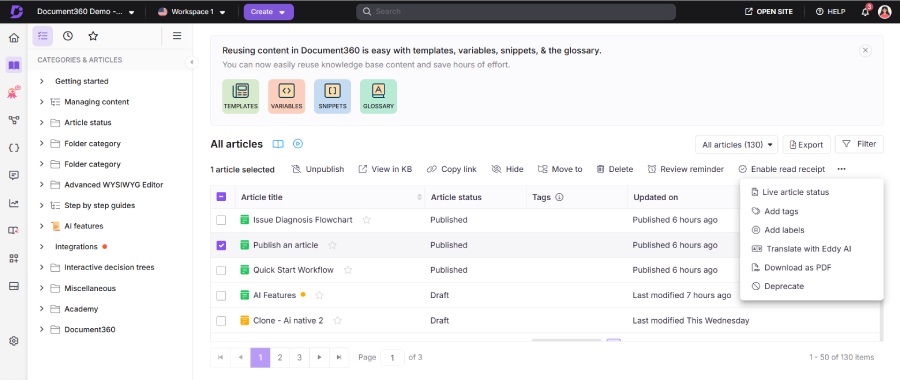
A knowledge base (KB) is a structured library of articles built to answer specific, recurring questions. Support teams use an external knowledge base, often a self-service portal, so customers can solve problems without opening a ticket. Internal teams use an internal knowledge base to store policies, SOPs, and how-to guides for employees.
The defining trait of a knowledge base is curation. Someone, often a subject matter expert (SME), owns each article, reviews it on a schedule, and keeps version control so outdated instructions don’t quietly linger. That ownership is what keeps a knowledge base from turning into a documentation graveyard nobody trusts.
A good knowledge base also depends on content taxonomy and tagging. Articles get organized by category, product, or department, so search returns the right answer instead of ten loosely related pages.
The internal versus external distinction matters when you’re picking a tool. An external, customer-facing knowledge base needs a clean public design and a self-service portal. An internal one can be plainer, since the priority is fast search for employees, not brand polish.
Popular knowledge base tools include Zendesk, Help Scout, Document360, Bloomfire, and Guru. Each is built around the same core job: structured articles, strong search, and clear ownership.
What Is a Wiki?
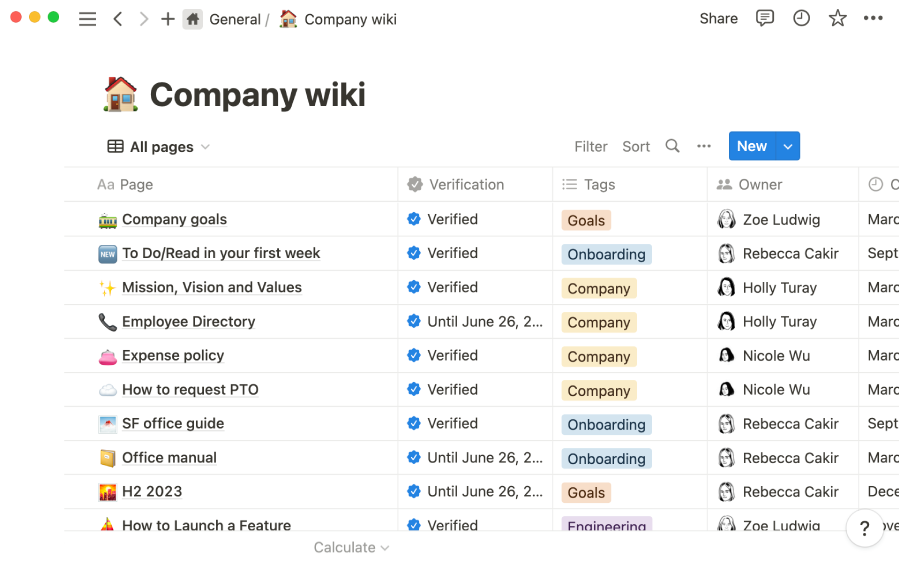
A wiki is a shared space where anyone on the team can create or edit a page, usually without a formal approval step. Whoever knows something writes it down, and the next person can update it. That open-editing model is a wiki’s biggest strength and its biggest weakness.
It shines for fast-moving collaboration: meeting notes, project specs, and documentation that changes weekly. It’s also a natural fit for remote and distributed teams. They need an async single source of truth, a place to write things down once instead of repeating them across chat threads.
It breaks down when nobody is accountable for accuracy. Without contributor accountability, pages go stale, conflicting versions pile up, and content drift sets in until nobody quite trusts what they’re reading.
Modern wikis include Atlassian Confluence, Notion, and Slite. Confluence tends to win with teams already using other Atlassian tools, while Notion is popular for combining docs, tasks, and notes in one place. Teams weighing knowledge base software open source vs wiki options often land on MediaWiki or DokuWiki instead. Some IT and engineering groups keep documentation inside a broader system like SharePoint, which blurs the line between a wiki and a document library.
What Is an LMS?
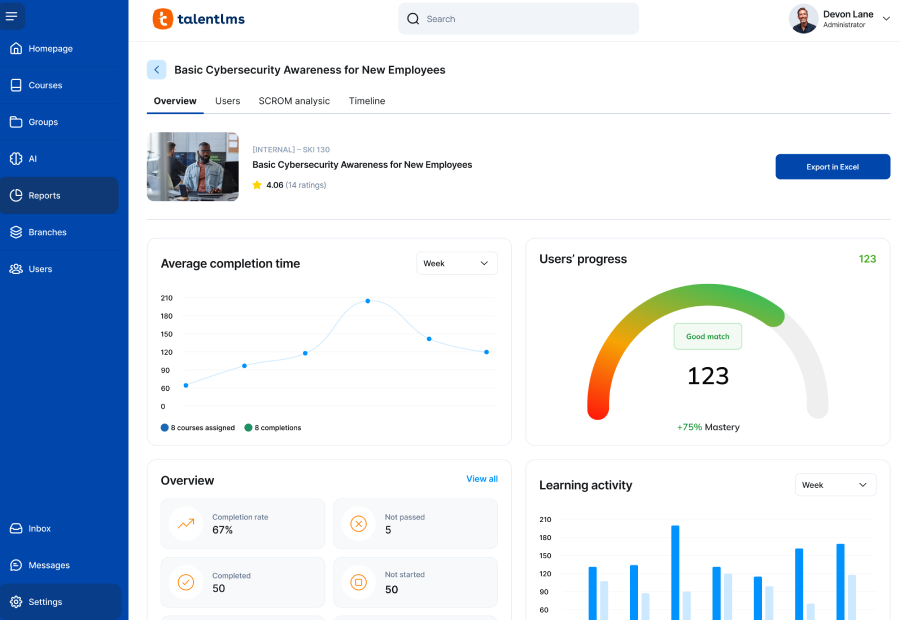
A learning management system (LMS) is software built to deliver, track, and prove training. Instead of a page someone might read on their own time, an LMS assigns a course a learner has to complete, often on a deadline.
That difference matters. An LMS organizes content into structured courses and learning paths rather than standalone pages. It includes assessments to check understanding, not just exposure to information. It tracks completion for every learner and issues certificates that hold up during a compliance audit.
Most LMS platforms also support the SCORM standard, so existing courses can move between systems without being rebuilt from scratch. Reporting and analytics dashboards show leadership exactly who finished what, and who didn’t.
A knowledge base or a wiki can store a safety policy document. Only an LMS can tell you, with a report, exactly who passed the safety course, who still needs to, and when their certification expires.
Knowledge Base vs Wiki vs LMS: The Key Differences
Put side by side, the differences come down to who owns the content, how it’s structured, and what it can prove. The table below lays out the practical differences.
| Factor | Knowledge Base | Wiki | LMS |
| Purpose | Answer questions, reduce lookups | Collaborate on shared documentation | Deliver and prove training |
| Who edits | Owner or small content team | Anyone on the team | Admins build, learners consume |
| Structure | Categorized articles, taxonomy and tags | Loosely linked pages | Courses, modules, learning paths |
| Accuracy | Reviewed on a schedule | Only as current as the last edit | Version controlled by the admin |
| Tracking and reporting | Article views, search terms | Edit history, page views | Completion, scores, time spent |
| Certification | Not built in | Not built in | Certificates, expiration, renewal |
| Compliance evidence | Limited | Limited | Audit ready reports |
| Best for | Self-service, support deflection | Fast-moving internal notes | Onboarding, certification, compliance |
Notice that certification and compliance evidence only show up in one column. That gap is what eventually pushes most compliance-driven teams toward an LMS, no matter how good their knowledge base or wiki already is.
When to Use a Knowledge Base
Reach for a knowledge base when the goal is ticket deflection. If customers or employees keep asking the same questions, a well-tagged article library lets them find answers without waiting on a person to respond.
A knowledge base also works well as a single source of truth for policies, SOPs, and product documentation. It captures tribal knowledge, the details a longtime employee knows but never wrote down, and turns it into institutional knowledge that survives after that employee leaves.
Zendesk, Salesforce, and Help Scout are common choices for support-facing knowledge bases. Document360, Bloomfire, and Guru are popular for internal reference libraries and cross-team documentation.
The tradeoff is that a knowledge base only proves an answer exists and was published. It doesn’t prove that anyone actually read it, understood it, or applied it correctly.
When to Use a Wiki
Reach for a wiki when information changes often and speed matters more than polish. Engineering teams use wikis for architecture decisions and technical specs that shift from sprint to sprint. Operations teams use them for meeting notes, runbooks, and project logs that get updated constantly.
A wiki is also a strong fit for documentation that several people need to co-author, rather than one owner publishing to everyone else. That’s the core difference in a corporate wiki vs knowledge base comparison. A wiki assumes shared authorship. A knowledge base assumes one point of ownership per article.
Small teams sometimes lean on a wiki for early onboarding too, before they’ve grown enough to justify a dedicated training system. That works, until someone needs proof the onboarding actually happened.
The tradeoff is contributor accountability. Without a clear owner for each page, information gets out of date, and nobody notices until someone acts on something that’s no longer true.
When to Use an LMS
Reach for an LMS when you need to prove that training happened, not just that it was available somewhere. Onboarding at scale is the clearest case: new hires move through a structured learning path instead of hunting through scattered documents on their own.
Role-based training is another strong fit. Sales reps, support agents, and warehouse staff can each follow a different course track built around their job. The same platform tracks who finished what and feeds it into reporting leadership can actually use, instead of a spreadsheet someone updates by hand.
Compliance is where an LMS earns its place in the stack. Mandatory training needs a paper trail: who took it, when, what score they got, and when the certification expires. Neither a knowledge base nor a wiki can produce that kind of report.
LMS options range from open source platforms like Moodle to commercial systems such as Docebo, TalentLMS, Absorb, 360Learning, and iSpring LMS. Some LMS platforms, including iSpring LMS, bundle a basic knowledge base directly into the system. That can simplify the toolset for smaller teams that would rather not manage three separate products.
Can You Use Them Together?
Most companies past a certain size end up using more than one of these tools, and that’s normal, not a sign anything went wrong. A common stack looks like this: a wiki for internal collaboration, a knowledge base for polished reference material, and an LMS for anything that needs to be tracked or certified. Each tool does the job it’s actually good at, instead of being stretched to cover all three.
The lines blur in practice more than the category names suggest. Some wikis add access controls and start acting like a knowledge base. Some knowledge base tools add quizzes and start acting like a lightweight LMS. iSpring LMS and a handful of other platforms fold a knowledge base directly into the LMS, so the boundary isn’t always a hard line.
Whichever mix you choose, someone needs to own governance: who approves knowledge base articles, who moderates the wiki, and who assigns and reviews LMS courses. Without that ownership, even a well-chosen stack drifts back into the same problems, a graveyard nobody trusts and training nobody can verify.
How to Choose
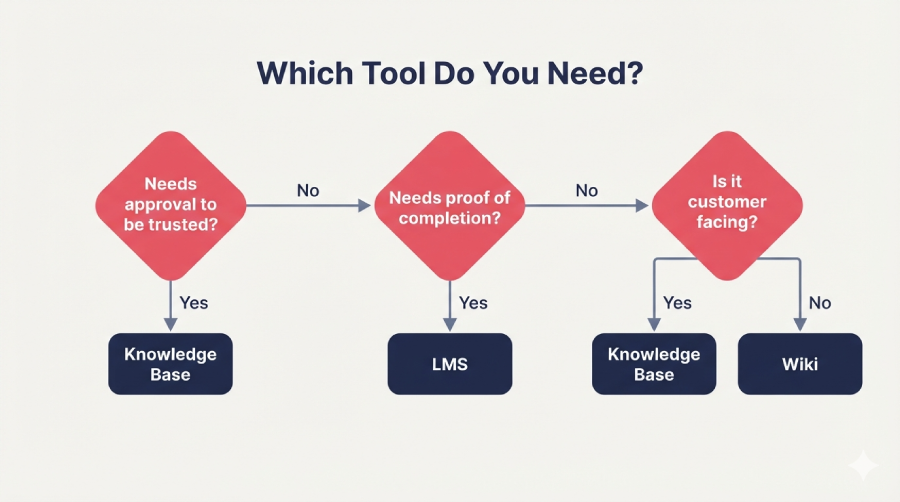
If you’re still not sure which one you need, three questions usually settle it.
Does the content need approval before people can trust it? If yes, lean toward a knowledge base. If anyone can write it and errors get caught quickly through peer review, a wiki works fine.
Does someone need to prove they completed or understood the material? If yes, you need an LMS. Neither a knowledge base nor a wiki can generate that kind of evidence on its own.
Is the content customer facing? If yes, a knowledge base is usually the right home, since it’s built for self-service and search. Internal wikis and LMS content typically stay behind a login.
Most teams don’t pick one tool and stop there. They answer these three questions section by section, sometimes landing on a different tool for onboarding than they use for product documentation.
Here’s what that looks like in practice. A support team might keep customer FAQs in a knowledge base, let engineers swap notes in a wiki, and run new-hire certification through an LMS, all inside the same company, none of it in conflict.
Examples and Tools by Category
A support team drowning in repeat tickets builds a knowledge base in Help Scout or Document360. It tags every article by topic and watches ticket volume drop within a few months.
An engineering team documents a system that changes every sprint using Confluence or Notion. They accept that some pages will go stale and get cleaned up later, rather than trying to make everything permanent from day one.
A manufacturing company has to certify every new hire on safety procedures before they touch the floor. It runs that training through an LMS such as Docebo or iSpring LMS. A supervisor pulls a completion report before each shift starts, so nobody unqualified ends up on the line.
A forty-person startup runs all three at once: Slite for team notes, Guru for customer-facing answers, and TalentLMS for structured onboarding. No single tool covered every need once headcount grew past a couple dozen people.
Whether you’re weighing knowledge base vs wiki vs LMS for the first time or rethinking a stack that’s grown messy, the right answer usually comes down to what you need to prove, not just what you need to store. If you want a closer look at how a knowledge base works day to day, our companion guide on what a knowledge base actually is covers ownership models and structure in more detail.
FAQ
What is the difference between a knowledge base, a wiki, and an LMS?
A knowledge base stores curated answers with one clear owner per article. A wiki is an open, collaborative space anyone on the team can edit. An LMS delivers structured courses and proves who completed them, with scores and certificates attached.
Do I need an LMS, or is a knowledge base enough?
A knowledge base is enough if you only need people to find information on their own. You need an LMS the moment you have to prove they learned it, not just that it was available.
Can an LMS replace a knowledge base or a wiki?
Not entirely. Some LMS platforms include a basic built-in knowledge base, but they still aren’t built for the fast, open collaboration a wiki handles well.
Does an LMS have a built-in knowledge base?
Some do. iSpring LMS is one example that bundles a knowledge base into the platform, though the depth of that feature varies by vendor.
Which tool is best for onboarding new employees?
An LMS, because onboarding benefits from a structured learning path, tracked progress, and a clear way to confirm new hires actually finished each step.
Which one do I use for compliance or mandatory training?
An LMS. It’s the only one of the three built to produce audit-ready completion records and certificates with expiration dates.
When should a team use a wiki instead of a knowledge base?
Use a wiki when information changes often and speed matters more than polish, like evolving project notes, meeting logs, or architecture decisions still in flux.
How do I track whether people actually read or completed the documentation?
A knowledge base can show article views and search terms, but only an LMS can confirm someone read the material, passed an assessment, and earned a certificate for it.