Docebo is an enterprise learning management system designed for employee, customer, partner, and extended-enterprise training.
I first tested Docebo hands-on in 2020. Since then, the platform has changed considerably, particularly around AI, content creation, reporting, integrations, and administration.
In this updated Docebo LMS review, I’ll look at its current features, pricing, pros and cons, while keeping my original hands-on observations where they’re still useful.
Docebo LMS: Quick Verdict
Best for: Mid-size and enterprise organisations with complex employee, customer, partner, or multi-audience training needs.
Key strengths: Customisation, automation, multi-audience learning, integrations, reporting, and AI functionality.
Main drawback: Docebo is a powerful platform, but that also means more complexity for administrators than you’ll find in many simpler LMSs. Current user reviews remain mixed on this point: some administrators find it intuitive, while others report a learning curve for advanced configuration.
Pricing: Custom quote. Docebo currently offers Elevate and Enterprise plans and says it is typically best suited to organisations training at least 250 learners.
Docebo LMS Features

Docebo has grown substantially since I first reviewed it. Today, its LMS features cover traditional learning management as well as AI-assisted content creation, social learning, automation, mobile learning, skills management, and multi-audience training.
If you’re comparing platforms more broadly, I cover the capabilities that matter across vendors in my guide to key LMS features. Here, I’ll concentrate specifically on what Docebo offers.
| Category | Key features | Things to consider |
| Administration | Custom and scheduled reports; dashboards; automation rules; ILT management; onboarding services; user and enrolment automation | Advanced setups can take time to learn |
| Content | AI-assisted course creation; SCORM, xAPI, AICC, LTI, video, files and HTML; tests and surveys; learning plans; Content Marketplace | Some content and advanced products are add-ons |
| User management | CSV user import; branches and groups; automatic grouping; Users, Power Users and Superadmins; configurable permissions | More complex organisational structures require careful setup |
| User experience & social learning | Mobile learning; gamification; social and informal learning; channels; Q&A; experts; multilingual learning | Some social-learning functionality depends on plan and configuration |
| Customisation & integrations | White-labelling; branded portals; branded mobile app; APIs; webhooks; SSO; 400+ integration options | Some integrations and advanced capabilities depend on the selected plan or add-ons |
Docebo’s current offering includes AI-powered content creation, customisation, reporting, mobile learning, social learning, gamification and skills management.
The platform also supports the main e-learning content standards you’d expect, including SCORM, xAPI, AICC and LTI. If SCORM compatibility is particularly important to your project, I cover that requirement separately in my guide to SCORM-compliant LMSs.
If you’re mainly researching products that compete directly with Docebo rather than reviewing Docebo itself, see my separate guide to Docebo alternatives.
Docebo LMS Detailed Overview
Let’s look more closely at what using Docebo is like and how the platform has changed since my original review.
Learning the Ropes and Ease of Use
When I originally tested Docebo in 2020, my first impression wasn’t particularly good.
I expected the platform to guide me through its functionality, but instead I found myself dealing with a fairly complicated interface without much help. I also struggled to work out how to switch to the learner experience and found some important admin functions in places I wouldn’t naturally have looked.
At the time, this made getting started with Docebo more tedious than it needed to be.
The current interface is noticeably different from the version I tested in 2020.
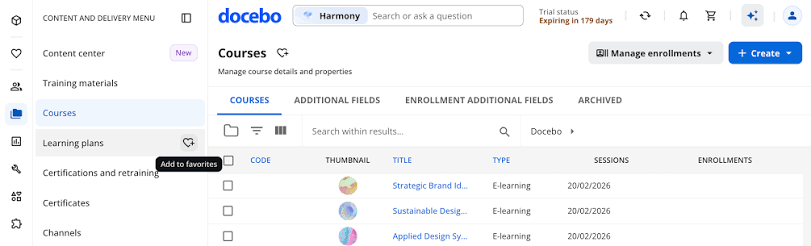
Docebo introduced a redesigned navigation interface in 2026. The administrator menu is now reorganised into areas such as People, Content and Delivery, Data and Analytics, Configuration, and Customisation. Administrators can also save frequently used pages as favourites, while search can be used to reach menu items directly.
Docebo also now offers formal onboarding services, including configuration, content migration, administrator training and integration setup. In other words, my original criticism that there was “zero onboarding” no longer applies.
That doesn’t necessarily make Docebo a simple LMS.
Current reviews paint a fairly balanced picture. Many users describe the learner experience as easy to navigate, but administrators still sometimes mention complexity when configuring advanced workflows, permissions or customisation.
For a system this configurable, setup matters almost as much as the software itself. My LMS implementation guide covers the wider planning involved in configuring users, content, integrations, roles, reporting and launch.
Managing Users and User Roles
Adding users in Docebo can be done individually through the interface or in bulk using a CSV file.
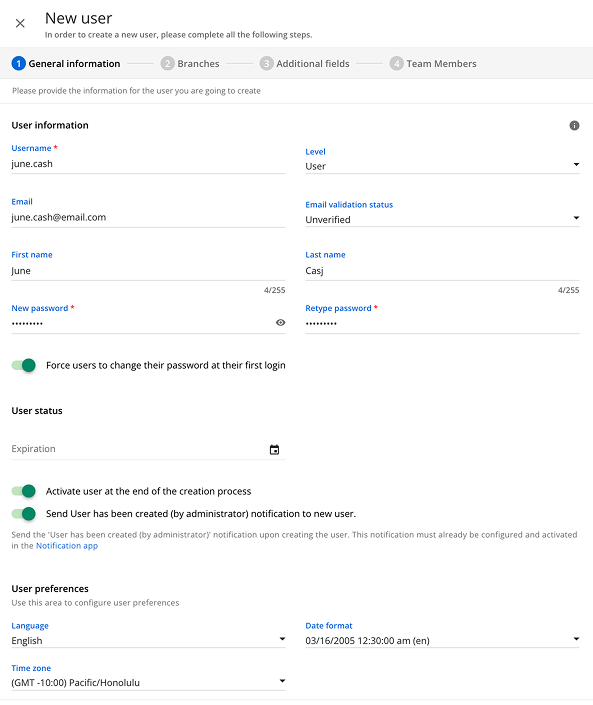
Docebo uses Branches and Groups to build organisational structures and manage different learner populations.
Docebo uses three main user levels:
- User
- Power User
- Superadmin
A regular User has basic learner permissions. Superadmins can manage the entire platform, while Power Users can be given selected administrative permissions for particular users, groups, courses or areas of the LMS.
Docebo distinguishes these account levels from roles. Depending on the context, users can act as learners, tutors, instructors, managers or experts.
This is more flexible than the terminology I struggled with during my 2020 test, although organisations with complicated permission structures will still need to spend time planning how they want Users, Power Users, Groups and Branches to work together.
Adding and Managing Content
In Docebo, content management starts with creating a course and adding training materials to it.
I found the process functional but sometimes unnecessarily complicated in 2020.
Docebo’s current content capabilities are significantly broader.
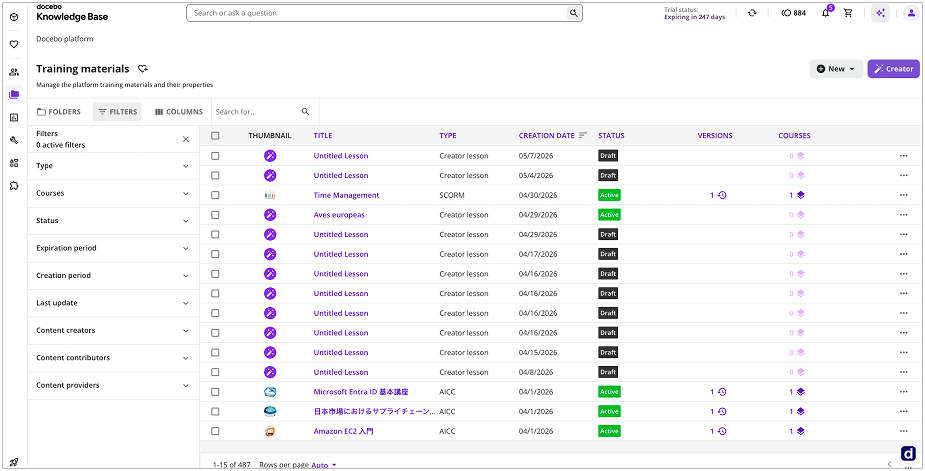
The platform supports common e-learning standards and formats including SCORM, xAPI, AICC and LTI, alongside video, files, HTML pages, tests, surveys, assignments and other training materials.
Courses can also be organised into learning plans, allowing administrators to build structured training programmes rather than assigning courses individually.
Another major change is authoring.
When I originally reviewed Docebo, one of my criticisms was the lack of built-in course authoring. That is no longer accurate.
Docebo Creator
Docebo now includes Creator, an AI-assisted authoring tool built into the platform.
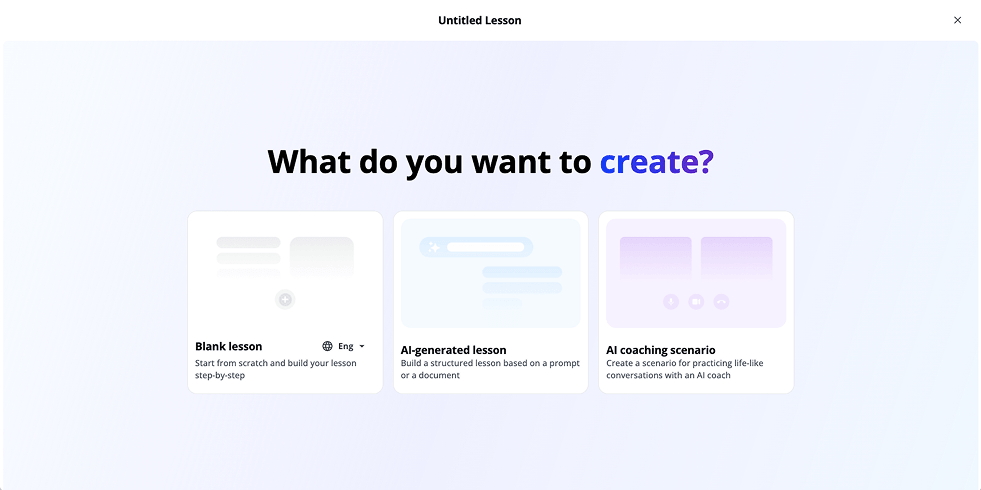
You can start from a prompt or document and use Creator to generate a structured lesson. The editor supports elements such as text, images, video, voiceover, knowledge checks, assessments, hotspots and interactive content.
Courses can also be translated and either published directly to Docebo or exported as SCORM packages.
This substantially changes Docebo’s content-creation proposition compared with the product I tested in 2020. You no longer necessarily need a separate authoring tool for every piece of relatively simple online training.
For organisations creating sophisticated interactive courses, though, a dedicated authoring platform may still make sense.
Content Marketplace
Docebo also has a Content Marketplace where administrators can access off-the-shelf training content.
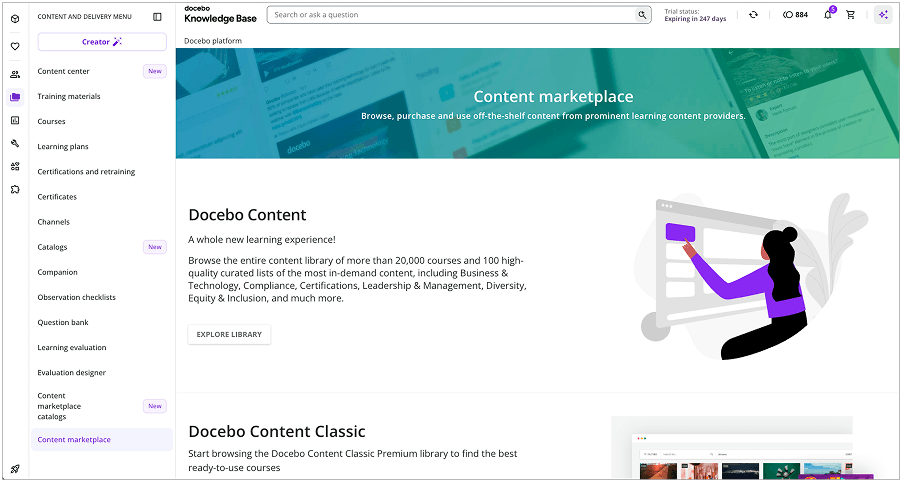
It includes Docebo Content and third-party content libraries that administrators can connect to the LMS and use as training material inside courses.
One distinction is important here: the Content Marketplace isn’t simply a storefront where your learners buy third-party courses.
Docebo’s separate e-commerce functionality is designed for organisations that want to sell their own courses and learning plans. Content sourced from marketplace providers cannot simply be resold through Docebo e-commerce.
Docebo AI Features
AI is probably the area where Docebo has changed most dramatically since my original review.
Back in 2020, I wasn’t convinced that the AI functionality I tested justified how heavily the vendor marketed it. I wouldn’t make that criticism of the current platform.
Docebo now has several distinct AI capabilities.
Harmony
Harmony is Docebo’s conversational AI experience.
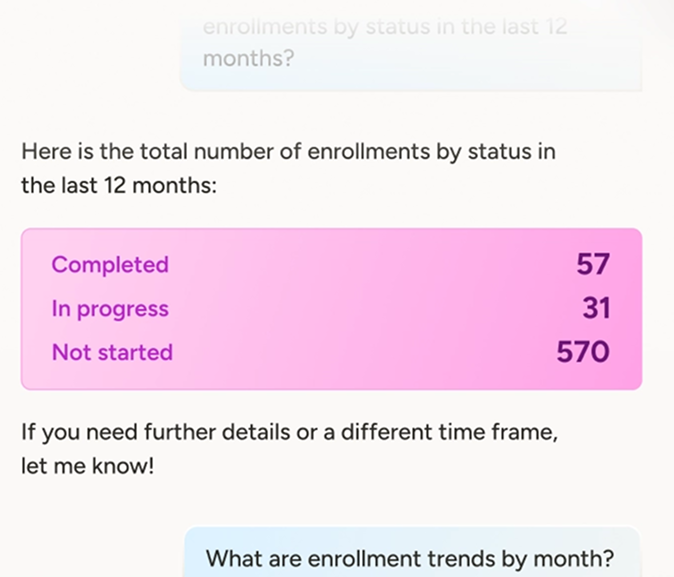
Harmony Search lets users ask questions, search for learning content and discover information through a unified interface.
Harmony Copilot is aimed more at administrators and Power Users, providing contextual guidance and step-by-step help with using the platform.
AI Content Creation
As mentioned above, Creator uses AI to generate and develop lessons from documents or prompts.
Docebo’s current Elevate and Enterprise plans both include AI-powered content creation and AI assistance, although usage-based AI credits apply to certain functionality.
Skills Intelligence
Docebo also moved further into skills intelligence in 2026 by acquiring 365Talents.
365Talents focuses on areas such as skills inference, workforce analytics, career paths, internal mobility and matching employees with projects or opportunities. Docebo plans to progressively integrate the two platforms.
This makes the current AI proposition much broader than the basic tagging and recommendation features I encountered when I originally reviewed Docebo.
Reporting
Reporting was already one of the more capable areas when I first tested Docebo.
Today, Docebo includes standard and customisable reporting, pre-built dashboards and custom dashboards.
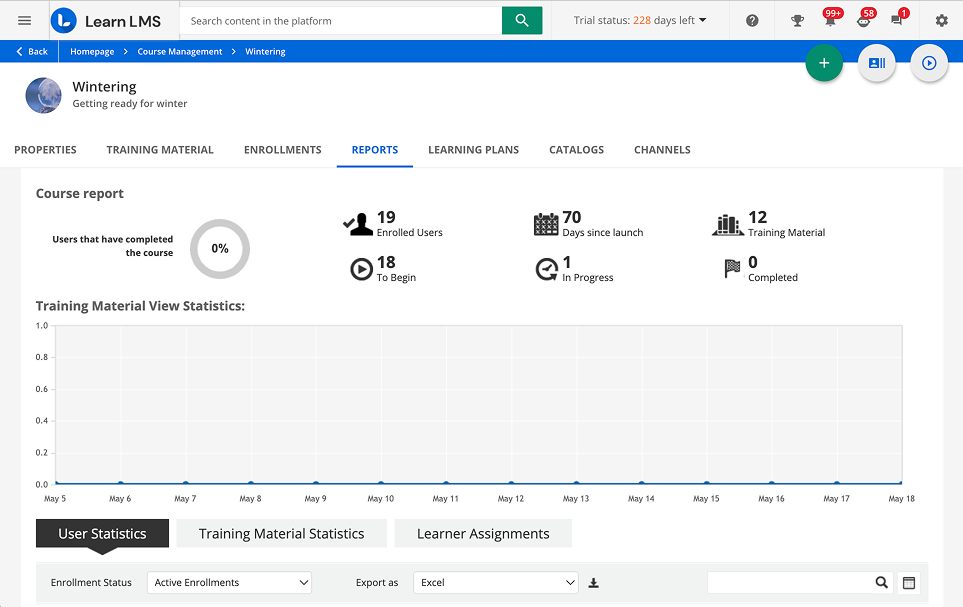
Administrators can create custom reports around users, courses, training materials and other platform data. Reports can also be scheduled for automatic delivery by email.
For a large organisation running different training programmes across employees, customers or partners, this is a useful part of the platform. There are also more advanced analytics options for organisations that need to connect learning data with wider business metrics.
Branding, Integrations, and Security
Customisation was one of Docebo’s strongest areas when I originally reviewed it, and that remains true.
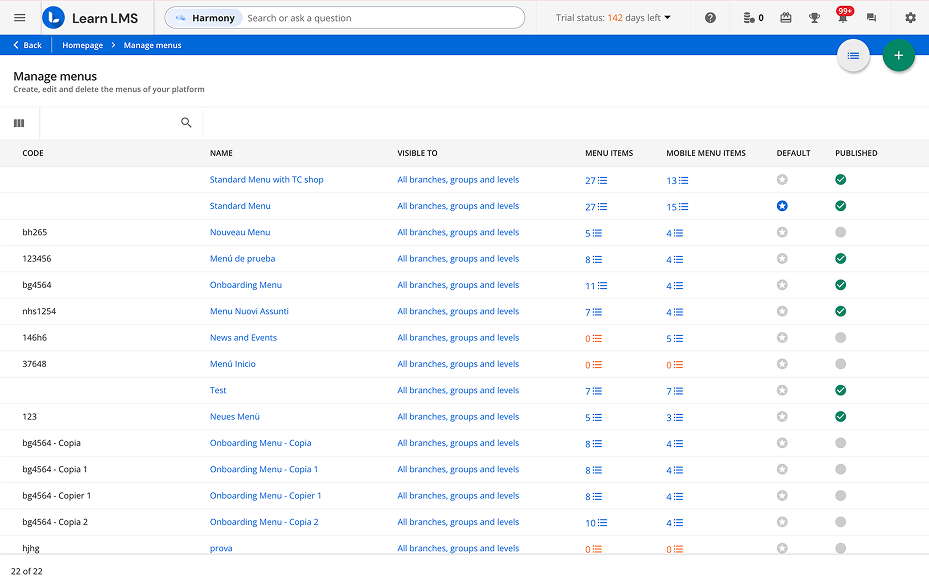
You can customize the learner experience, menus, pages, branding and white-labelled interface. The current admin interface has a dedicated Customisation area covering branding and design, pages, menus, public pages, localisation, white labelling and branded mobile apps.
For companies training several different audiences, Docebo also offers Extended Enterprise capabilities. The Enterprise plan currently includes Extended Enterprise for up to 10 domains.
Integrations have expanded substantially since my original review.
Rather than listing individual webinar tools that may disappear or change, it’s more useful to look at the broader ecosystem. Docebo says it supports more than 400 integrations across categories such as:
- HRIS
- CRM
- Single sign-on
- Enterprise messaging
- Content authoring
- E-commerce
- Data and analytics
- Video conferencing
- Learning content providers
The platform also supports APIs, webhooks and workflow automation for more customized integrations.
But the number of logos in an integration marketplace doesn’t tell you whether a connection will handle your particular workflow. If integrations are a major buying requirement, my LMS integration guide explains what to check around data, direction, frequency, APIs and ownership.
Elevate currently includes up to four integrations, while Enterprise includes up to six. Other integrations or more complex setups may affect the overall cost.
From a security perspective, Docebo highlights features such as access controls, encryption and compliance with standards including GDPR and SOC 2. Organisations with particularly strict requirements should still validate the exact certifications, hosting arrangement and security features required for their own industry during procurement.
Learning Experience and Mobile Device Support
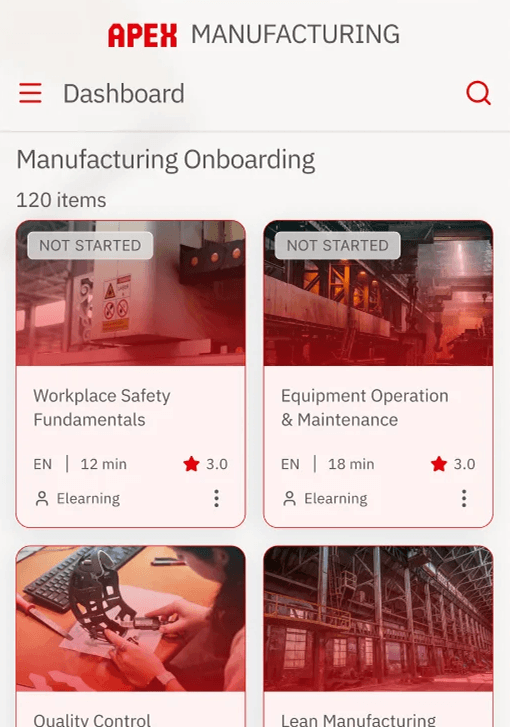
Docebo now offers the Go.Learn mobile app for iOS and Android, alongside a branded mobile app option for organisations that want their own app name, icon and experience.
Mobile learning includes offline capabilities, allowing users to download supported content and access it without a connection.
The branded mobile app is currently included with the Enterprise plan and available as an add-on with Elevate.
If mobile and offline learning are central requirements rather than secondary features, I’ve compared Docebo with other options in my guide to the best mobile LMS platforms.
Social and Informal Learning
Docebo also continues to support social and informal learning through Discover, Coach & Share.
Learners can share assets through channels, ask questions and interact with subject-matter experts. Depending on configuration and plan, experts can review shared content, answer questions and help curate knowledge inside the platform.
This makes Docebo particularly relevant to organisations that want learning to extend beyond assigned courses and formal training.
Docebo can also manage instructor-led sessions alongside online content. If that is a major part of your programme, see my separate explanation of instructor-led training and how it fits into an LMS.
Docebo LMS Pros and Cons
Based on Docebo’s current feature set and my experience with the platform, these are the pros and cons I think matter most.
Pros
- Broad set of Docebo LMS features. It can support employee, customer, partner and other external training from one platform.
- Strong customisation. Branding, pages, menus, white labelling and Extended Enterprise give larger organisations considerable control over the learner experience.
- Good automation options. User management, enrolments, integrations and workflows can reduce repetitive administration.
- Strong reporting capabilities. Custom and scheduled reports, dashboards and analytics cover more than basic completion tracking.
- Large integration ecosystem. Docebo advertises 400+ integration options alongside APIs and webhooks.
- Built-in AI functionality. Harmony, Creator and Docebo’s broader AI functionality now go considerably beyond the features I tested in 2020.
- Built-in course creation. Creator means basic and intermediate learning content can now be produced without always relying on a separate authoring tool.
- Good multi-audience capabilities. Docebo is designed to handle internal and external learners within the same broader learning ecosystem.
Cons
- Administration can become complex. Docebo has a lot of functionality, and some current reviewers still report a learning curve when working with advanced configuration.
- No public list pricing. You need to contact Docebo for a quote.
- It isn’t aimed at very small training programmes. Docebo says it is typically best suited to organisations training at least 250 learners.
- Some capabilities increase the total cost. Advanced products, integrations and add-ons can make the final setup more expensive than the core LMS alone.
- Built-in authoring is still relatively lightweight. Creator is useful for quickly producing AI-assisted lessons, but teams building complex interactive courses, simulations, branching scenarios or detailed software training may still need a dedicated authoring tool.
- It can be more platform than some teams need. If your priority is simply to create courses, assign them to employees and track results, a simpler LMS can be faster to implement and easier to manage.
Docebo LMS Use Cases
Docebo can cover a broad range of training scenarios, but I don’t think every organisation needs this much LMS.
Best Suited For
Employee Training
Docebo is a strong fit for organisations running continuous employee training across multiple teams, departments or locations.
Learning plans, automation, reporting, mobile learning and integrations give administrators enough flexibility to manage large programmes without assigning everything manually.
Employee Onboarding
Groups, branches, learning plans, certificates and automated enrolment workflows make Docebo well suited to structured onboarding.
For larger organisations, it can also connect learning with the rest of the HR and technology stack rather than operating as an isolated training portal.
If onboarding is your main use case, I compare the requirements and suitable platforms in my guide to LMSs for employee onboarding.
Customer Education
Docebo is designed for external as well as internal learning.
That makes it suitable for software companies and other organisations that need to onboard customers, provide product education, or run customer academies alongside internal employee training.
Partner and Extended-Enterprise Training
This is one of the clearer reasons to consider Docebo over a simpler LMS.
Companies can use the platform for distributors, franchisees, resellers and other external audiences, with different branded experiences where required.
Docebo’s Enterprise tier currently includes Extended Enterprise for up to 10 domains.
Less Suitable For
Small or Short-Term Training Projects
I still wouldn’t put Docebo near the top of my list for a small company that needs little more than uploading a few courses and tracking completions.
Docebo is positioned primarily toward medium and large organisations with more complicated learning requirements, and the vendor says the platform is generally best suited to organisations training 250+ learners.
The additional functionality can be valuable when you need it. If you don’t, it creates more platform to configure, learn and pay for.
Docebo LMS Pricing
Docebo doesn’t publish fixed prices on its website.
Instead, pricing is customised according to the selected product tier and user model.
There are currently two core Docebo LMS pricing tiers:
Elevate
Elevate includes the core learning-management platform, including capabilities such as:
- Personalisation and multi-audience support
- White-labelled design
- Certification and compliance tracking
- AI-powered content creation
- Multilingual learning and translation
- Automation
- AI assistance
- Reporting
- Mobile learning
- Social learning
- Up to four included integrations
Enterprise
Enterprise includes the Elevate functionality plus additional capabilities such as:
- More advanced analytics and insights
- Up to six included integrations
- Extended Enterprise for up to 10 domains
- Two sandbox environments
- Branded mobile app
- Higher API limits
- Dedicated database
- Higher-level support
Docebo also sells a number of add-ons and additional products, including Advanced Analytics, Extended Enterprise for Elevate, additional content, Communities, e-commerce, immersive learning and other specialist capabilities.
Pricing also depends on how users are counted.
Docebo currently supports:
- MAU — Monthly Active Users
- YAU — Yearly Active Users
- RAU — Registered Active Users
Docebo’s model is therefore based not only on the selected tier but also on the agreed user model.
The vendor doesn’t provide a public price per learner, so you’ll need to request a custom quote.
It’s also worth asking specifically about onboarding, integrations, add-ons and expected user growth rather than comparing only the headline platform price. The implementation and integration work required can materially affect the total cost.
Before choosing any LMS on pricing alone, I recommend documenting your requirements first. My LMS selection guide covers the questions I would take into vendor demos and pricing discussions.
Docebo LMS Review: Final Thoughts
Docebo is a considerably different LMS from the product I first tested in 2020. Its current strengths are flexibility, multi-audience training, integrations, reporting, automation and a much more developed AI offering.
That breadth also makes the platform more complex to set up and manage. Docebo makes the most sense for organisations that actually need enterprise-level configuration, external training capabilities and a wide range of integrations. Smaller teams, or those mainly focused on creating training content quickly and managing straightforward employee learning, may find a simpler platform easier to implement and use.
Overall, Docebo is a strong enterprise LMS, especially for organisations that need a flexible platform for several training audiences and more complex learning programmes.