Most corporate training software solutions look alike in a sales demo. The differences surface three months later, when an auditor asks for completion records, a new region needs its own portal, or your two-person L&D team is still assigning courses by hand on a Friday afternoon.
I’m David, an independent LMS consultant. I help companies choose, migrate and untangle corporate LMS systems, and no vendor in this review pays me or LMS Chef for a mention.
The money at stake is large. U.S. organizations spent $102.8 billion on training, according to Training Magazine’s 2025 Training Industry Report, and the platform that delivers it decides how much of that budget turns into skills rather than admin work.
What Is Corporate LMS Software?
A corporate LMS is software a company uses to create, deliver, assign and track training for its workforce and, more and more often, for customers and partners. G2’s category definition describes these tools as helping companies “organize, track, and manage efforts to train and upskill their workforce,” from onboarding to compliance.
In practice, a corporate learning management system is where your training programs live. Courses, quizzes, certificates, due dates and the reports that prove who completed what all sit in one place. I describe it to clients as the system of record for learning, the same way a CRM is the system of record for sales.
Under the hood, most platforms combine the same building blocks. Course management handles enrollments, deadlines and versions. A content management system stores your training materials, from SCORM packages to PDFs and videos. Learning paths chain courses into a sequence, and reporting and analytics show learner progress by team, site or role. The better tools add automation on top, so the right online courses reach the right people without anyone opening a spreadsheet.
Corporate learning management system software also has a job that people underestimate: it keeps company training consistent. Once content is published, every new hire in every office gets the same version, which is hard to guarantee with slide decks sent by email.
For small L&D teams, the time savings matter as much as the consistency. Automatic enrollment, reminders and certificates take hours of chasing off their plate every week, and that time goes back into designing better training programs.
How a corporate LMS differs from an academic one
Academic platforms such as Canvas, or Moodle in a university setting, are built around semesters, grades and instructors. Corporate learning management software is built around roles, deadlines and business outcomes. It connects to HR data, assigns courses when someone changes jobs, and reports on what a manager actually asks about: overdue compliance training, onboarding progress by site, certification expiry dates.
It also has to handle external training. Many companies now train partners, resellers and customers on the same learning management system they use for staff, each audience in its own portal with its own reports. University tools rarely plan for that.
Compliance training is the other big difference. Regulated companies need proof of who completed which version of a course and when, stored for years and retrievable in minutes. A corporate platform treats that audit trail as a core feature; an academic one treats it as a report someone builds by hand.
I’ve watched companies try to run employee training on a university-style LMS. The admin team ended up exporting spreadsheets every week to answer basic questions. That’s the gap an LMS for corporate training is designed to close.
LMS vs LXP: do you need both?
A learning experience platform (LXP) is learner-driven. It recommends content, surfaces social learning and lets people explore learning resources on their own. A classic LMS is admin-driven: it pushes structured, often mandatory content and tracks completion.
Most corporate learning platforms now blend the two, adding AI-powered recommendations and personalized learning paths on top of the tracking core. For mid-sized businesses I usually advise one solid LMS platform with some LXP features rather than two systems. A separate LXP starts to pay off once you have a big content library and people who go looking for it.
Don’t dismiss the learning experience as a nice-to-have, though. When the interface feels like a chore, employee learning drops to the mandatory minimum. When it feels closer to a good consumer app, people come back on their own, and that’s the only reliable route to continuous learning.
In my audits, the platforms with the best learning experience are rarely the ones with the most features. They’re the ones where a learner can find the next module in two clicks and see their own progress without asking HR.
Examples of corporate training programs that run on an LMS
Almost every client I work with runs some version of these employee training programs:
- Onboarding paths that walk new hires through policies, tools and first-week tasks.
- Compliance training on data privacy, harassment prevention or health and safety, with automatic recertification.
- Product and sales enablement modules released before a launch.
- On-the-job training checklists that a supervisor signs off on the shop floor.
- Leadership programs for first-time managers, built on skills development and coaching.
- Customer education and partner academies, often delivered through a separate branded portal.
What these programs share is structure. Each one has an audience, a deadline and a way to prove completion, which is exactly what an LMS is good at. That’s also why a well-run platform supports workforce development beyond HR’s checklist: once the basics are automated, L&D teams finally have time for the programs that build careers.
Customer education is the fastest-growing item on that list. It used to be an afterthought; now many companies budget for it because trained customers open fewer support tickets and renew more often.
Why the category keeps growing
Analysts disagree on the exact size of the market, but not on the direction. Grand View Research values the corporate LMS market at $9.6 billion in 2024 and projects $27.4 billion by 2030, while Precedence Research estimates $14.49 billion for 2025. Different scopes explain most of the gap, so I treat any single number with caution.
Adoption is already close to universal. The same Training Magazine report found that 89% of organizations use a learning management system, and that the share using AI in training jumped from 25% to 37% in a year.
The pressure on training and development teams is real, too. ATD’s 2025 State of the Industry report found that employees used 13.7 formal learning hours in 2024, down from 17.4 in 2023, while the cost per learning hour used rose 34% to $165. Less time, higher cost: the platform has to remove friction, not add it.
Retention is the other argument. In LinkedIn’s 2018 Workplace Learning Report, 94% of employees said they would stay at a company longer if it invested in their learning and development. The figure is old, but I still hear the same thing in exit interviews today, and it’s one reason digital training has moved from a cost line to a retention tool.
What the research says about online training
The strongest evidence I know comes from a meta-analysis by Sitzmann, Kraiger, Stewart and Wisher (2006) in Personnel Psychology, which pooled studies of workplace and adult learners. Web-based instruction was 6% more effective than classroom instruction for declarative knowledge and equally effective for procedural knowledge. When both formats used the same instructional methods, the differences largely disappeared.
A later U.S. Department of Education review by Means and colleagues, published in Teachers College Record in 2013, reached a similar conclusion and found blended learning did best of all.
My takeaway for anyone choosing a corporate e-learning platform: the software doesn’t make online training effective on its own. Instructional design does. What a good platform does is make well-designed training cheaper to deliver and much easier to measure.
That has a practical consequence for buyers. Spend as much time checking how the platform supports practice, feedback and spaced reminders as you spend on its dashboards. Online training that asks people to apply what they learned beats a long video every time, whatever the delivery tool.
What’s the Best Platform for Corporate Training?
It depends on the job you need it to do, and I mean that literally. For a global enterprise training employees, partners and customers, I usually start with Docebo. For a lean team that must build its own content fast, iSpring LMS tends to win. For a small business counting every dollar, TalentLMS is hard to beat.
Those three answers cover most of the requests I get. The rest come from companies with a specific constraint, such as heavy regulation, an existing Adobe stack or a very large HR suite, and the other platforms in my ranking exist for them.
Before any demo, I ask clients to write down three things: the skill gaps they need to close this year, who needs training (internal staff only, or external audiences as well), and which compliance obligations must be provable on demand. That short list rules out half the market before a single sales call. It also stops the classic mistake of buying the platform with the longest feature list and using a fifth of it.
Choosing a corporate learning management system is closer to hiring a long-term colleague than buying a tool. You’ll live with its strengths and quirks for years, so test the daily admin work, not the showcase features.
The criteria I use to compare platforms
Every platform in this review went through the same questions:
- How fast can a small team go live, and how steep is the learning curve for admins?
- How easy is course creation for people who aren’t instructional designers?
- Can it automate assignments from HR events, such as a new hire or a role change?
- Does reporting and analytics produce audit-ready records without manual exports?
- How good is mobile learning, including offline access for frontline and distributed teams?
- Can it deliver training to partners and customers without a second system?
- Does it integrate with existing systems like the HRIS, SSO, Salesforce or your chat tools?
- Will pricing stay predictable as headcount grows?
The mobile question weighs heavily when a client asks me for the best LMS for remote teams. If people can’t finish a module on a phone during a commute, completion rates suffer no matter how good the desktop version is. For distributed teams across time zones, offline mobile access and automatic reminders matter more than any dashboard.
I also read corporate LMS software reviews on G2, Capterra and Gartner Peer Insights. I look for patterns in complaints rather than star ratings, because ratings drift every month and recurring complaints don’t. Prices were checked on each corporate LMS vendor’s site in September 2026.
One more test I run on every shortlist: I build the same three learning paths in each trial, one for onboarding, one for annual compliance training and one for a skill gap flagged by managers. How long that takes, and how clearly each LMS platform reports on the result, tells me more than any demo script.
Corporate LMS Systems: A Quick Review of My Shortlist
If you’re comparing learning management systems for corporate training and only have two minutes, this is my shortlist of the best learning management systems for most corporate buyers in 2026.
- Docebo. An AI-powered enterprise platform with strong extended-enterprise and customer education features, for large and global programs with a budget to match.
- iSpring LMS. A corporate training LMS with a built-in authoring tool, so a small L&D team can create courses and track them in one place, at transparent per-user pricing.
- Absorb LMS. A mature mid-market and enterprise platform, strong on automation, compliance and e-commerce.
- TalentLMS. Simple, affordable and available with a free plan. My default pick for small companies.
- 360Learning. A collaborative learning platform where subject-matter experts build courses together.
- Adobe Learning Manager. An enterprise LMS with personalized learning journeys and close ties to Adobe’s content tools.
- LearnUpon. A multi-portal LMS for training employees, partners and customers from one account.
- Cornerstone. A talent suite for very large organizations that want learning tied to skills and performance data.
When someone asks me for the top 5 LMS systems for corporate use this year, I give them the first five on this list.
Corporate Learning Platforms: The Most Recommended in 2026
I ranked these platforms by how often each one turns out to be the right answer for the companies I advise, not by feature count. Review scores come from public sites in September 2026. Treat them as a snapshot.
1. Docebo
Best for and pricing
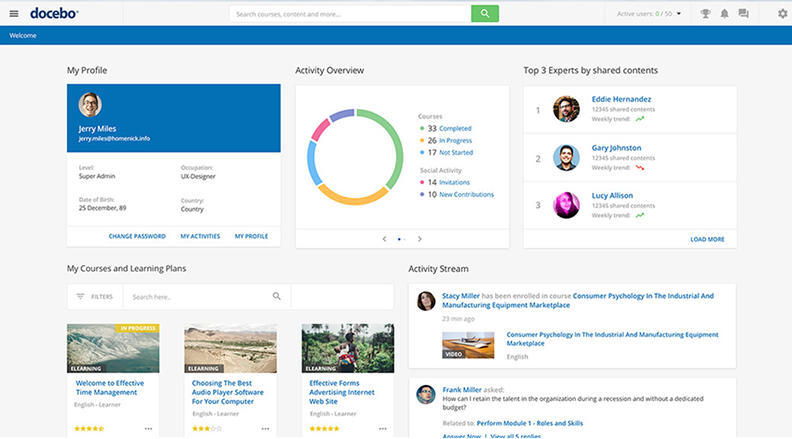
Docebo is the LMS platform I recommend most often to large organizations that run employee, partner and customer training from a single system. AI is woven through it: automatic content tagging, recommendations, skills mapping and an AI coach. It’s regularly cited among the most recommended corporate LMS software by analysts and reviewers. Pricing is quote-only and based on active users, so expect an enterprise-level conversation. It’s also one of the stronger options for external training, with a separate branded portal for each audience.
What I like
Scale is where Docebo shines. By the vendor’s own case studies, Zoom’s learning center passed 600,000 registered users within a year, Booking.com reports saving more than 800 hours of learning admin time a year, and Flix credits its LMS team with saving €135,000 a year in onboarding costs.
These are vendor-published numbers, but they match what I’ve seen on projects. Once enrollment rules and learning paths are set, Docebo runs very large learning programs with a small team. Its social learning features and AI-driven recommendations also help keep employees engaged between mandatory courses.
The mobile learning app is solid, with offline access and push notifications, and the platform’s extended-enterprise setup lets one team run separate learning programs for staff, resellers and customers with shared content but separate reporting and analytics.
Where it falls short
Docebo’s weak points are cost and complexity. It’s overkill for a 200-person company, the price stays opaque until you’re deep in the sales process, and the configuration depth that impresses enterprise buyers can slow down a lean team. Budget for implementation time, not only licenses, and plan for a dedicated admin once you pass a few thousand users.
2. iSpring LMS
Best for and pricing
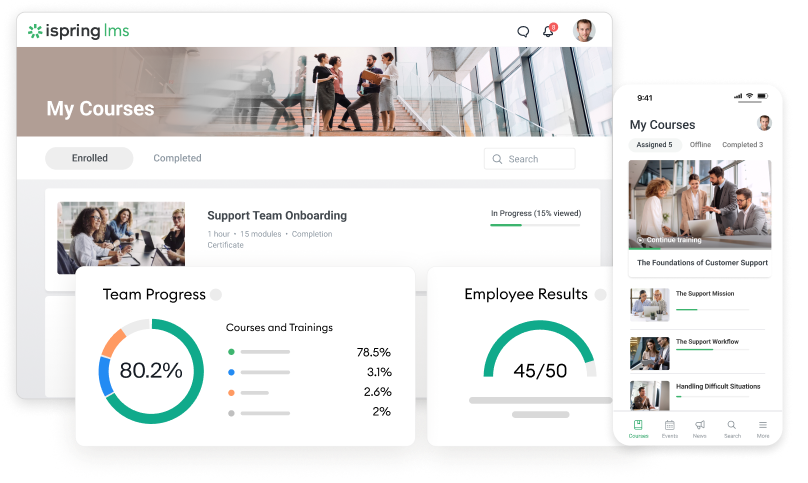
iSpring LMS is a cloud corporate training platform for teams that need to create content and deliver training without a dedicated eLearning developer. It was called iSpring Learn until the vendor renamed it in October 2025. Every plan includes iSpring Suite, the PowerPoint-based authoring tool from iSpring Solutions, and that bundle is the main reason it lands on so many shortlists.
Pricing is public, which I appreciate. On the Business plan, billed annually, it’s $6.91 per active user per month for 100 users, $4.46 for 300 and $3.97 for 500, per iSpring’s pricing page in September 2026. You only pay for people who log in during the month, and there’s a 30-day free trial with no credit card.
What I like
The admin learning curve is the shortest on this list. On trial setups I’ve run with clients, an HR generalist with no eLearning background had a branded portal, a first course and automatic assignments working in an afternoon.
The authoring side is where it pulls ahead. You build quizzes, role-plays and video lessons in PowerPoint, publish them to the LMS and track learner progress, with no SCORM files passed between tools. Course creation stops being a bottleneck, because the subject-matter expert who already owns the slides can turn them into training content.
Mobile apps work offline, and on-the-job training checklists, 360-degree feedback and recurring compliance training assignments are all included. For a small team, having these in one corporate learning management system instead of three tools saves more time than any single feature.
Jitasa, an accounting firm of 400+ employees serving nonprofits, shows the fit well. According to iSpring’s published case study, the company built more than 50 courses in nine months and cut onboarding by one to two months, using checklists combined with assignments to certify accountants’ skills. It’s a vendor story, so read it as a best case, but it matches the pattern I see with content-heavy employee onboarding.
Where it falls short
Reporting and customization are the weak spots. Reviewers on G2 regularly say branding options are tighter than on enterprise platforms and that reports are hard to combine or filter the way an analytics-minded L&D lead would want. The main authoring tool is Windows and PowerPoint-based, so Mac-only teams need a different route: iSpring Cloud AI, the vendor’s online course builder, runs in any browser on Mac, Windows or a tablet and exports to SCORM and xAPI.
Even so, iSpring LMS holds around 4.6 out of 5 on G2 and 4.7 on Capterra, each from well over a hundred reviews (September 2026).
3. Absorb LMS
Best for and pricing
Absorb LMS suits mid-sized businesses and enterprises that want strong admin automation, dependable compliance tracking and the option to sell online courses. Pricing is quote-only, usually per active user on an annual contract.
What I like
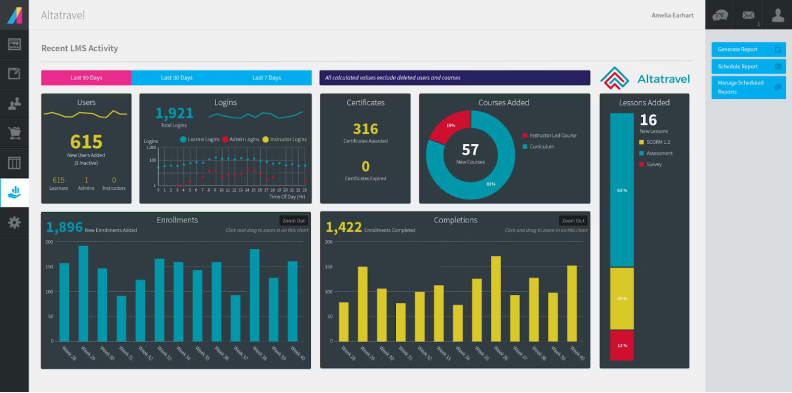
Absorb LMS handles rule-based enrollment very well. Courses follow department, location or job title automatically, which is exactly what compliance teams need when people move around. Built-in AI tools help with content creation, and the learner interface is clean enough that support tickets stay low.
A Forrester Total Economic Impact study commissioned by Absorb (March 2024) modeled a 490% three-year ROI for a composite 10,000-employee company, including 40% faster employee onboarding. A commissioned study with a composite company is a framework, not a promise, but it’s more rigorous than most vendor claims. On Capterra, Absorb LMS sits around 4.5 out of 5 across several hundred reviews.
For compliance training specifically, Absorb LMS does the unglamorous work well: recurring certifications, automatic reminders before expiry, and reports an auditor can read without a walkthrough. It’s the LMS platform I suggest most often to healthcare, manufacturing and financial services clients who have outgrown a basic tool.
Where it falls short
Reporting is powerful but not always intuitive, and reviewers mention that bulk edits take more clicks than they should. Absorb LMS is also priced for organizations with a few hundred users or more, so a 30-person team would pay for capacity it won’t use. The course authoring side is fine for simple modules, but teams with ambitious content usually keep a separate tool. I’d also ask for a sandbox during evaluation, because the admin interface is dense and it’s worth seeing how your own team copes with it before signing.
4. TalentLMS
Best for and pricing
TalentLMS, built by Epignosis, is the platform I suggest most often to small companies. The free plan covers 5 users and 10 courses. Paid plans start at $119 a month for Core, then $229 for Grow and $449 for Pro when billed monthly, with about 20% off on annual billing (September 2026).
What I like
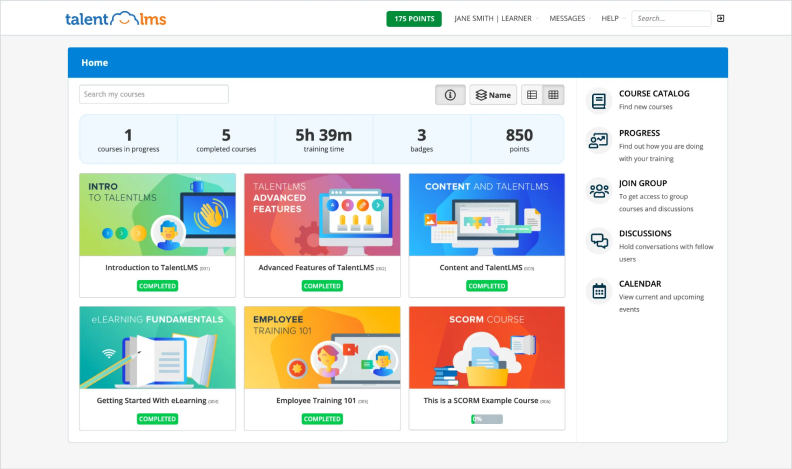
Setup takes hours, not weeks. The interface is plain in a good way, gamification is built in, and the mobile app makes self-paced learning easy for people who rarely sit at a desk. The AI course builder turns an outline into a draft course quickly, which helps teams with no instructional designer. The mobile learning app mirrors the web version closely, so there’s nothing extra to configure for field staff.
For a first corporate LMS software purchase, it’s a low-risk choice. You can start free, prove adoption, and upgrade once you know what you need. Learner engagement tends to be good from day one because there’s so little to learn. On Gartner Peer Insights it holds around 4.4 out of 5.
Most of my small clients use it for a handful of employee training programs: onboarding, a few compliance modules and some product training. For that scope, TalentLMS covers course management, simple learning paths and certificates without anyone needing a manual.
Where it falls short
Reporting is basic compared with Absorb LMS or Docebo, and branches and advanced features depend on the tier. Once you pass a few hundred users or need complex multi-audience setups, you start to feel its limits, and migrating later is more work than choosing a bigger LMS platform from the start.
5. 360Learning
Best for and pricing
360Learning is built around collaborative learning: subject-matter experts create and update courses, colleagues comment and ask questions, and L&D teams curate rather than produce everything. The Team plan costs $8 per user per month for up to 100 users with a free trial; Business and Enterprise plans are priced on request.
What I like
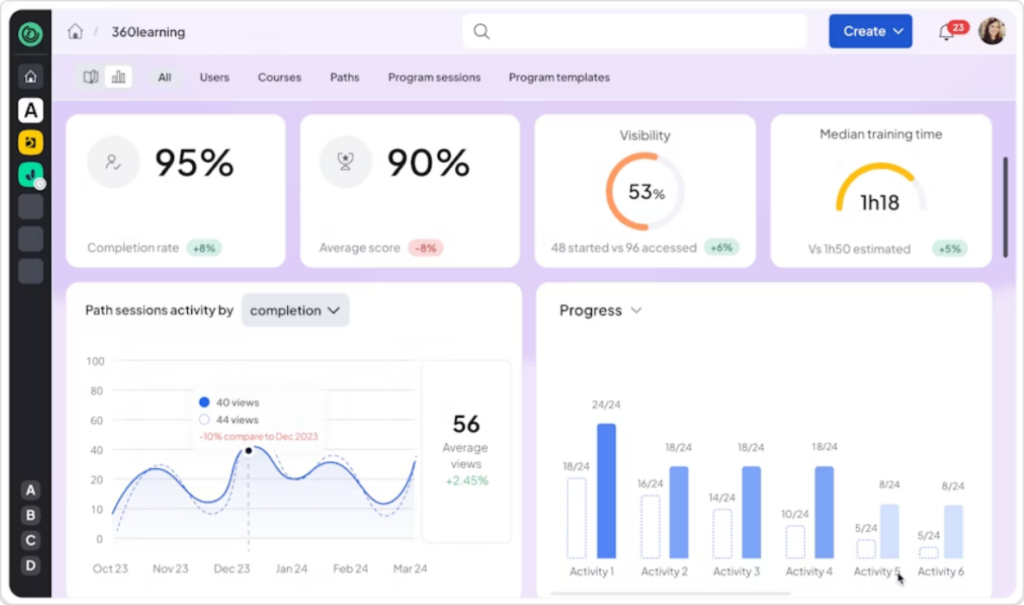
It turns knowledge sharing into a habit. Learners can request courses, experts answer in threads, and AI helps turn existing documents into training modules, which makes content creation much faster than a traditional authoring cycle. I’ve seen it work very well in fast-moving tech and sales teams where technical knowledge changes every quarter.
Collaborative learning also spreads the workload. Instead of one instructional designer writing everything, the people closest to the work keep material current, which is the most sustainable model I know for workplace training at scale. It’s also one of the few platforms where knowledge sharing between teams shows up in the data, because you can see who contributes and who learns from whom.
The social learning layer also lifts employee engagement in a way I rarely see elsewhere. People comment, react and vote on courses, and that feedback shows L&D teams which content is working long before completion data does. The learning experience feels closer to a social network than a course catalog.
Where it falls short
It’s less natural for strict, top-down compliance programs where every word must be approved. Advanced reporting needs some configuration, and the Team plan’s 100-user cap means growing companies move to custom pricing fairly quickly. Course creation by experts also needs editorial guardrails; without a review step, quality varies from one author to the next.
6. Adobe Learning Manager
Best for and pricing
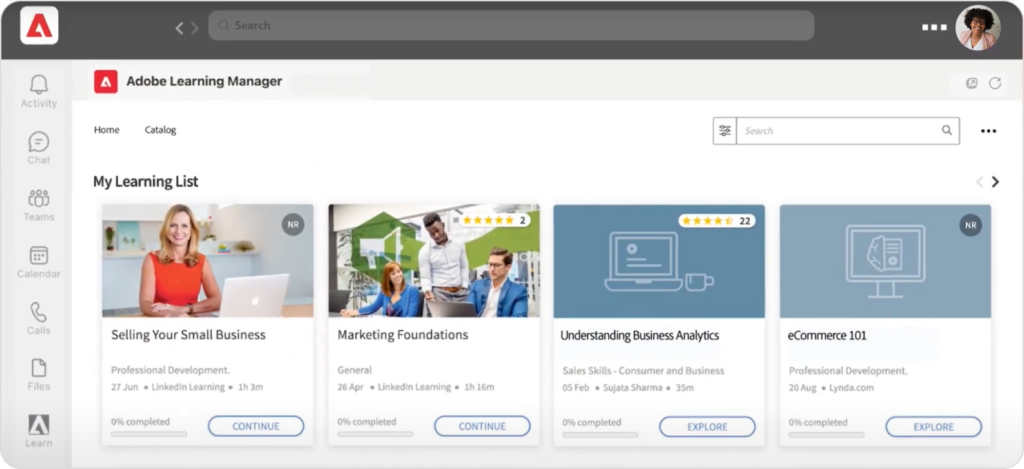
Adobe Learning Manager, formerly Adobe Captivate Prime, fits enterprises already invested in Adobe’s content tools and companies running customer training at scale. Pricing is quote-only across two packages, Prime and Ultimate, with extended-enterprise features and advanced analytics in Ultimate. Large enterprises use it for both employee programs and customer academies from one catalog. If your designers already build content in Adobe Captivate, publishing to the platform is close to seamless.
What I like
Reviewers praise how easy it is for employees to use, with automatic reminders, gamification and customizable learning paths. Integration with Microsoft Teams and LinkedIn Learning lets people train where they already work. For branded partner and customer academies, Adobe Learning Manager is one of the more polished options.
It also supports scalable learning programs across regions, with multilingual catalogs and granular roles, which matters when one platform serves dozens of business units with different rules.
Admins can also build personalized learning paths from skill profiles, so someone with identified skill gaps in product knowledge gets a different sequence than a veteran. As a learning management system for mixed internal and external audiences, it’s one of the more flexible options I’ve tested.
Where it falls short
Reporting is the most common complaint in G2 reviews, where Adobe Learning Manager averages around 4 out of 5. Admins describe some tools as overengineered, the mobile app has had rough edges, and several reviewers call the price the first line cut in budget talks. Admin onboarding takes real time, so train your own team before rollout and check which features sit in Prime versus Ultimate before you compare quotes.
7. LearnUpon
Best for and pricing
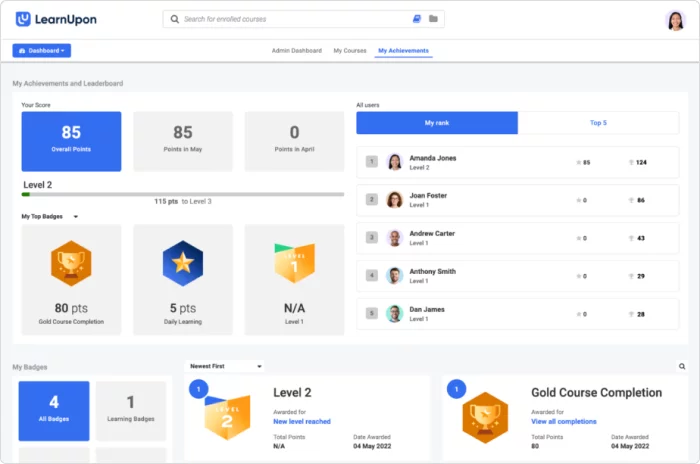
LearnUpon, based in Dublin, is built for companies that train several audiences at once. One account can run separate portals for employees, partners and customers, each with its own branding and training courses. Pricing is quote-only. It’s a common pick for software companies, franchise networks and associations that treat external training programs as part of the product.
What I like
Portal management is the reason to choose it. Customer education and internal employee training stay in one system without mixing audiences or reports, which makes external training much easier to run. Its support team comes up again and again in reviews as responsive and helpful, and it scores strongly on Gartner Peer Insights, though from a smaller pool of reviews than the big names.
Each portal can carry its own learning paths, enrollment rules and certificates, so partner onboarding and customer education run on their own schedule. For a software company that sells through resellers, this LMS platform removes a lot of duct tape. Integrations with Salesforce and common HR systems keep enrollments in sync with the CRM, which helps partner programs. Setting up a new portal takes minutes once the first one is configured, which matters when sales signs a new reseller and wants training live the same week.
Where it falls short
Reporting is course-centric, so skills-level analysis needs exports. Built-in authoring is basic, which means most teams pair it with a separate tool for course development, and some reviewers mention friction with mobile sign-in. If you only train employees, you’re paying for flexibility you won’t need, and a simpler LMS platform may serve you better.
8. Cornerstone
Best for and pricing
Cornerstone is an LMS for large companies that want learning tied to performance, skills and talent development. It has grown through acquisitions, including SumTotal in 2022, and is owned by private equity firm Clearlake Capital. Pricing is quote-only and aimed at large contracts. It usually shows up on shortlists of companies with 10,000 employees or more, often as part of a broader HR technology decision.
What I like
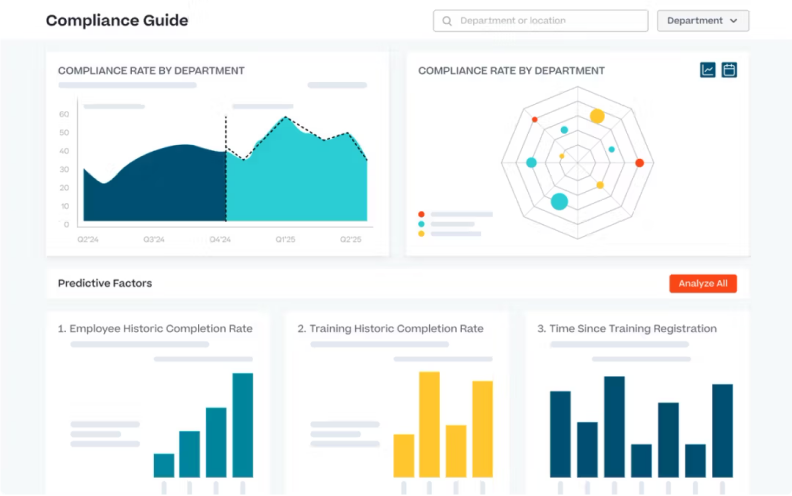
Cornerstone’s strength is depth. Compliance, certifications, content marketplaces, skills data and career paths live in one suite, with real-time reporting built for HR leaders. On Gartner Peer Insights it averages around 4.4 out of 5 across hundreds of reviews, a large base for enterprise software. For a global company that wants one talent record per employee, few alternatives go as far. Course management at this scale, with thousands of courses across languages and legal entities, is where Cornerstone earns its price.
Cornerstone also connects learning programs to performance reviews and succession plans, so training programs become part of how people move up rather than a separate checkbox. Large HR teams value that link more than any single learning feature.
Where it falls short
The learner experience feels dated next to newer platforms, administration is complex, and implementations take months. Unless you have thousands of employees and a dedicated LMS admin team, you’ll pay for power you won’t use. Its content marketplace and skills tools also carry separate costs in many contracts, so ask for a full price breakdown before comparing it with lighter tools. In my experience, Cornerstone projects succeed when there’s an executive sponsor and a named platform owner from day one; without them, they tend to stall after launch.
Conclusion
No single platform wins every scenario, and anyone who tells you otherwise is selling one. Docebo is my pick for global, AI-driven programs with a budget to match. iSpring LMS is the one I suggest to lean teams that need to create courses and launch training quickly, with pricing they can read without a sales call. TalentLMS remains the easiest entry point for small businesses.
Whichever LMS platform you pick, the software is only half the project. The other half is the training programs you put inside it and the people who keep them current. Budget for training and development staff time, not just licenses, and revisit your learning management system every few years, because this market moves fast.
Before you sign with any corporate LMS provider, run a two-week pilot with real content and a real group of learners. Check how long the first course takes to publish, whether reports answer your auditor’s questions, and how learners feel on mobile.
The best corporate training software solutions are the ones your people actually use. Choose among these corporate LMS systems on that basis, and the rest usually follows.
FAQ
Is there any free LMS?
Yes, with caveats. TalentLMS has a permanent free plan for up to 5 users and 10 courses, which is enough for a pilot or a very small team. Open-source platforms such as Moodle, Open edX and Chamilo are free to download, but you pay for hosting, updates and someone who knows how to maintain them. Moodle Workplace, the corporate edition of Moodle, is a paid product. Keep in mind that leaving a free tool later means moving your content and rebuilding your reports elsewhere.
Many commercial platforms also offer free trials: iSpring LMS for 30 days and 360Learning on its Team plan. A trial is often a better test than a free plan because you see the full feature set, including reporting, which is usually the first thing a free tier strips out.
What is the best LMS for a small business?
For under 50 people on a tight budget, I usually recommend TalentLMS: start on the free plan, then move to Core. If you create a lot of your own learning materials and have around 100 learners or more, iSpring LMS gives you authoring and delivery in one tool. 360Learning’s Team plan fits small teams that want peer-built courses, and Absorb LMS is worth a look if you work in a regulated industry and expect to grow.
Whichever corporate training software solutions you shortlist, judge them on time to launch, reporting and mobile experience rather than feature lists. That’s how I choose corporate LMS systems for small clients.