An enterprise learning management system can help large organizations deliver, manage, and track training across departments, locations, and learner engagement needs. The right enterprise LMS software platform can support everything from employee onboarding and training to professional development, customer education, and partner enablement.
Use this guide to compare enterprise LMS providers before requesting demos or starting free trials. I’ll examine their key features, strengths, limitations, and ideal use cases to help you find a platform that fits your organization’s complex training needs.
Enterprise LMS software: Quick comparison
These enterprise LMS systems range from approachable standalone platforms to comprehensive talent suites. The best enterprise LMS software depends on your organization’s size, existing systems, training audiences, and content requirements. Here’s a quick look at the 20 platforms I reviewed in this guide:
- iSpring LMS: A top choice for enterprise businesses that want to effectively launch, track, and analyze the learning process.
- Absorb LMS: Delivers a polished, scalable experience for employee training, customer education, and partner training.
- Cornerstone Learning: Built for global enterprise companies with demanding compliance, skills development, and user management needs.
- Docebo: A strong fit when you need a flexible, AI-powered learning program that serves multiple audiences.
- 360Learning: Puts internal experts at the center of course creation and collaborative learning.
- LearnUpon: Makes it easier to manage employee engagement, customer needs, and partner training through dedicated portals.
- Sana Learn: Brings AI-powered content creation, knowledge sharing, and personalized learning experiences into one modern platform.
- Seismic Learning: Shines in sales enablement, coaching, and corporate training for customer-facing teams.
- Litmos: A practical option for distributed organizations that need accessible training materials and ready to deliver online courses.
- Adobe Learning Manager: Excels at delivering personalized, branded learning across websites, apps, and other channels.
- SAP SuccessFactors Learning: The natural choice for organizations already invested in SAP’s HR and talent ecosystem.
- Workday Learning: Keeps employee engagement and development connected to the HR and learner data and workflows already housed in Workday.
- D2L Brightspace: Stands out for accessibility, flexible course delivery, and detailed insight into learner progress.
- CYPHER Learning: Uses AI to accelerate course creation, map skills, and personalize learning.
- WorkRamp: Brings employee, customer, and partner education together without making the experience feel one-size-fits-all.
- EducateMe: Particularly well suited to cohort-based, instructor-led, and blended training programs.
- AcademyOcean: Lets growing companies create distinct, branded academies for different learner groups.
- Disprz: Designed for skills-based development and mobile training across frontline and distributed teams.
- Moodle: Offers extensive freedom to organizations with the technical knowledge resources to shape their own open-source LMS.
- TalentLMS: Keeps training effectiveness high and affordable while leaving room for the program to grow.
The enterprise LMS solutions below support different audiences, budgets, and levels of administrative experience. This overview provides a starting point, but it doesn’t tell the whole story. When evaluating the best LMS for large enterprises, prioritize security, scalability, integrations, basic reporting features, and administrative efficiency. Next, I’ll examine what each platform offers, where it stands out, and what you should consider before choosing it.
Enterprise learning management software: Top 20 platforms reviewed
Enterprise learning management software varies considerably in its approach to course creation, administration, reporting, and skills development. Below, I take a look at the capabilities, advantages, limitations, and ideal use cases of 20 leading platforms.
1. iSpring LMS
| G2: 4.5 Capterra: 4.6 |
iSpring LMS supports onboarding, compliance, employee development, performance reviews, and external training. Its intuitive interface and extensive automation help small HR and L&D teams run multiple programs without getting buried in administration.
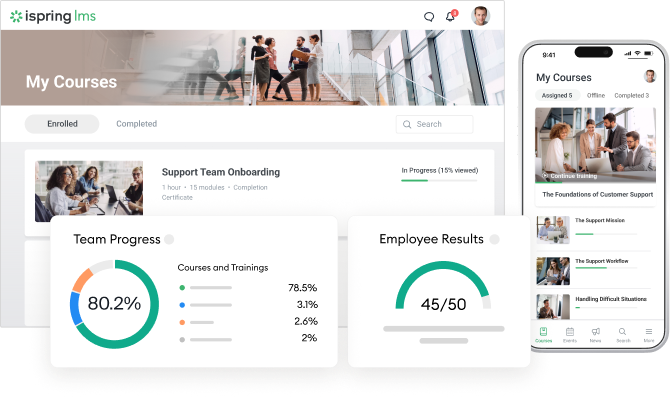
The enterprise learning management system works particularly well with iSpring Suite AI, allowing teams to create interactive training courses, simulations, quizzes, and videos directly in PowerPoint.
Pricing
iSpring LMS uses active-user pricing, so businesses pay only for learners who access the platform during the month:
- 100 active users: $8,286/year
- 300 active users: $16,050/year
- 500 active users: $23,790/year
- Enterprise: Custom pricing for up to 150,000 users
What users think about iSpring LMS
Pros
In reviewing user feedback, I found that customers praise its intuitive admin and learner progress, responsive 24/7 support, straightforward implementation, and powerful reporting. Its automation is especially valuable for lean teams.
Cons
Advanced content development requires iSpring Suite AI. Highly specialized reports or integrations may also require customization.
Is a free trial available?
Yes. iSpring offers a 30-day free trial.
What are the best features?
- Automated enrollment, certificates, notifications, and reports
- Robust learning analytics dashboards and report templates
- Knowledge base and shared resources
- On-the-job training and 360-degree reviews
- Blended and virtual learning
- Customizable multilingual portals
- Mobile apps with offline access
- Chats, comments, catalogs, and supervisor tools
- Microsoft Teams, Zoom, Google Meet, HR, and CRM integrations
Who is this enterprise LMS best for?
iSpring LMS is ideal for enterprises with HR or L&D teams of one to three people that need to automate training, create engaging content, and support learner engagement at scale without adding administrative complexity.
2. Absorb LMS
| G2: 4.6 Capterra: 4.5 |
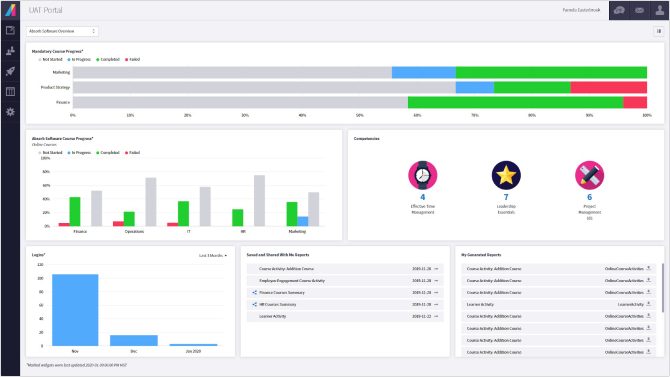
Absorb LMS supports employee onboarding, compliance, upskilling, customer education, and partner training. Its AI tools assist with course creation, administration, search, and personalized learning, while its ecommerce module lets organizations sell courses.
Pricing
Available upon request. Vendr reports that contracts for 500 or more learners typically start in the mid-five figures annually, with implementation and onboarding potentially charged separately. Actual pricing depends on learner volume, features, and contract terms.
What users think about Absorb LMS
Pros
G2 and Capterra reviewers frequently praise the straightforward implementation, intuitive learner interface, responsive support, and flexible reporting and branding tools.
Cons
Some administrators report persistent bugs, extra steps in common workflows, and limited integrations with certain HR systems. Reviewers also say issue resolution can sometimes require repeated follow-up.
Is a free trial available?
Yes. Absorb offers a free trial, although its duration is not published.
What are the best features?
- Absorb Infuse embedded learning
- Ecommerce and course monetization
- Branded portals for different audiences
- AI-assisted authoring and administration
- Custom reports and learner analytics
- Personalized course recommendations
Who is this enterprise LMS best for?
I think Absorb is best for organizations that need highly branded internal and extended training or continuous learning through an enterprise learning management system, especially when learning must fit into existing business systems and customer workflows.
3. Cornerstone Learning
| G2: 4.1 Capterra: 4.3 |
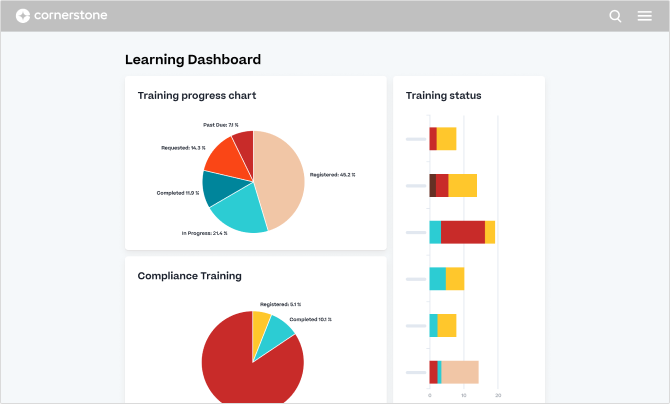
Cornerstone Learning helps to manage onboarding, compliance, certifications, instructor-led sessions, and ongoing skills development as a useful enterprise learning management system. It supports personalized learning and automated assignments, making it suitable for coordinating training across roles, departments, and locations.
Pricing
Available upon request. Cornerstone states that pricing varies according to the organization’s size and requirements.
What users think about Cornerstone Learning
Pros
G2 and Capterra reviewers frequently praise Cornerstone’s extensive customization, curriculum management, compliance tracking, and reporting capabilities. Users also value its ability to organize large course catalogs and assign learning by role or certification level.
Cons
Some reviewers find the administrative interface complex or dated, with basic tasks occasionally requiring several steps. Others report that custom reporting can involve workarounds or data exports, while implementation and configuration may require specialist support.
Is a free trial available?
No standard product trial is advertised. Cornerstone offers a free personalized demo.
What are the best features?
- Automated compliance assignments and reminders
- Personalized learning based on roles and skills
- Certification and curriculum management
- Instructor-led, virtual, self-paced, and blended learning
- Mobile access with offline learning
- Custom reports and compliance audit tracking
- Integrations with Workday, Microsoft Teams, Salesforce, and other enterprise systems
- Support for 50 languages
Who is this enterprise LMS best for?
Cornerstone Learning is best suited to large or global organizations with complex compliance, skills development, and talent management requirements.
4. Docebo
| G2: 4.3 Capterra: 4.4 |
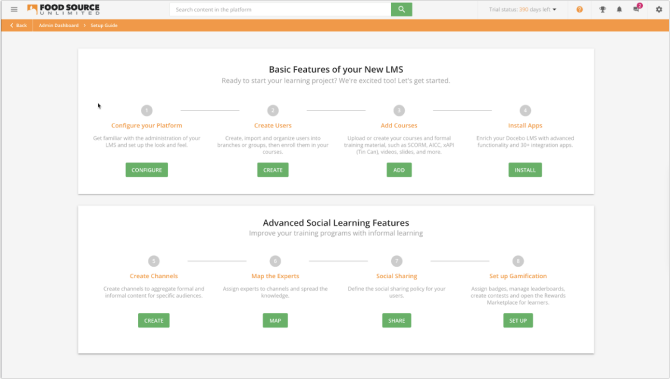
Docebo enables enterprises to deliver onboarding, compliance, skills development, customer education, and partner training from one platform. It combines learning management with AI-assisted content creation, recommendations, translations, automation, and reporting.
Pricing
Docebo provides custom pricing through two plans: Elevate and Enterprise. Costs depend on the plan, optional add-ons, and active learners, which can be calculated monthly, yearly, or by registered active users. Contracts start at one year, although Docebo says most customers choose three- to five-year terms.
What users think about Docebo
Pros
G2 and Capterra reviewers often praise Docebo’s intuitive learner experience, customization, branding, scalability, and support for external and internal learners. Reporting, learning plans, bulk enrollment, and integrations also receive positive feedback.
Cons
Reviewers report that initial setup and advanced administration can be complicated. Some workflows require more steps than expected, and building specific reports may involve workarounds. Users also note that optional modules and advanced features can increase the overall cost.
Is a free trial available?
No standard free trial is currently advertised. Organizations can request a demonstration or guided product tour.
What are the best features?
- AI-assisted content creation and translation
- Personalized recommendations and skills intelligence
- Multidomain extended enterprise training
- White-label portals and a branded mobile app
- Workflow automation and bulk enrollment
- Social learning, communities, and gamification
- Custom dashboards and advanced analytics
- APIs, webhooks, and hundreds of integrations
Who is this enterprise LMS best for?
Docebo is best for midsize and large organizations training at least 250 employees, customers, or partners. In my opinion, it suits enterprises that need extensive customization and integrations, provided they have the resources to handle a more involved setup and pricing model.
5. 360Learning
| G2: 4.6 Capterra: 4.7 |
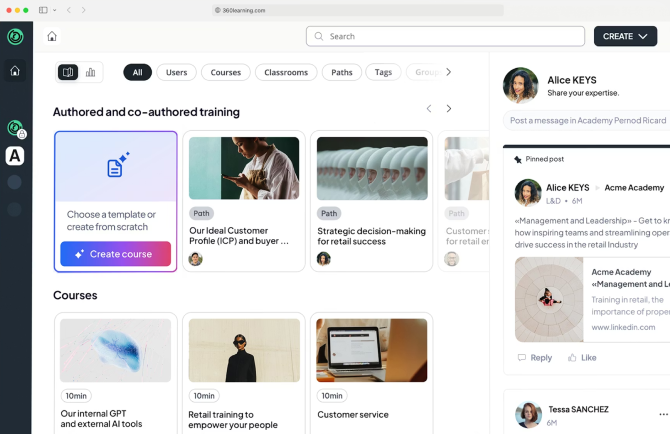
360Learning helps organizations create, distribute, and track employee, customer, partner, and compliance training. Its intuitive authoring tools let internal experts build courses without specialist development skills, while AI supports course creation, translation, and content recommendations.
Pricing
The Team plan costs $8 per user per month and supports up to 100 users. Pricing for larger organizations is available upon request.
What users think about 360Learning
Pros
G2 and Capterra reviewers regularly highlight the approachable course builder, clean learner experience, responsive customer support, and collaborative features. Users appreciate being able to create and revise training quickly while involving subject-matter experts directly.
Cons
In some reviews, a desire for greater visual customization and more flexible reporting is mentioned. Others mention limitations in live-session management, mobile functionality, and certain administrative workflows. Frequent platform updates can also require users to readjust established processes.
Is a free trial available?
Yes. The self-service Team plan includes a 30-day free trial without requiring a credit card.
What are the best features?
- Collaborative course authoring and editing
- AI-assisted content creation and translation
- Comments, reactions, and ways to gather learner feedback
- Learning needs identification and voting
- Automated enrollment and completion reminders
- Custom learning tracks and skills development
- Mobile learning and offline access
- Reporting and compliance tracking
- HRIS, collaboration, and content integrations
Who is this enterprise LMS best for?
360Learning is best for organizations that want employees and internal experts to contribute actively to training. In my view, it’s particularly suitable for fast-moving companies with small L&D teams.
6. LearnUpon LMS
| G2: 4.5 Capterra: 4.7 |
LearnUpon brings employee development, customer education, compliance training, and association learning into one platform. Organizations can create courses, automate learning journeys, run live sessions, issue certifications, and track training outcomes without a particularly technical setup.

Pricing
Pricing is available upon request and varies by product, learner volume, and selected capabilities. Employee plans start at 100 users, association plans at 150, and customer education plans at 300. Every plan includes implementation guidance, customer success services, and 24/7 technical support.
What users think about LearnUpon
Pros
G2 and Capterra reviewers repeatedly praise LearnUpon’s helpful support team, approachable interface, smooth implementation, and straightforward course administration. Multiple portals, automated reports, dynamic assignment rules, and SCORM support also receive positive feedback.
Cons
Some reviewers want more detailed dashboard analytics, stronger search and filtering, and additional control over scheduled assignments. Others report occasional limitations in the mobile app, live-session registration, integrations, and certificate customization.
Is a free trial available?
No standard free trial is currently advertised. Prospective customers can book a personalized demonstration.
What are the best features?
- Separate portals for different learning audiences
- Dynamic enrollment rules and learning journeys
- AI-assisted authoring and assessments
- Certifications and recertification
- Automated and scheduled reports
- SCORM and xAPI support
- Live learning and webinar integrations
- Custom branding and white labeling
- eCommerce for selling courses
- HRIS, Salesforce, HubSpot, Zapier, and API integrations
Who is this enterprise LMS best for?
LearnUpon is best for organizations that need to manage employee, customer, member, or partner education from one accessible platform. In my opinion, its responsive support and manageable administration make it a strong fit for lean teams, provided its minimum user volumes and custom pricing suit their budget.
7. Sana Learn
| G2: 4.8 Capterra: 4.9 |
Sana Learn combines an LMS, learning experience platform, authoring tool, and virtual classroom. Enterprises can manage onboarding, compliance, skills development, and external training while using AI to generate courses, assessments, translations, voiceovers, and personalized recommendations.

Pricing
Plans start at 300 users and use per-user, per-month pricing. G2 and Capterra currently list the Core plan from $8 per user per month, while Enterprise pricing is customized. Sana advises organizations to request a quote because rates vary by volume and requirements.
What users think about Sana Learn
Pros
G2 and Capterra reviewers praise Sana’s modern interface, AI-assisted authoring, search capabilities, straightforward onboarding, and responsive customer service. Users also appreciate how quickly employees without instructional design experience can create engaging courses.
Cons
In some reviews, people mention wanting more control over content layouts, notifications, assignments, and reporting. Other recurring requests include broader API capabilities, additional integrations, offline access, and a less crowded homepage.
Is a free trial available?
Capterra lists a free trial, but Sana doesn’t publish its duration or offer self-service registration. Organizations need to contact the vendor about a demo or pilot.
What are the best features?
- AI-generated courses, quizzes, images, and translations
- Conversational AI tutor
- Enterprise knowledge search
- Personalized learning recommendations
- Live and self-paced training
- Collaborative content creation
- Automated administration and user provisioning
- Granular analytics and dynamic dashboards
- Multilingual, white-labeled environments
Who is this enterprise LMS best for?
Sana Learn is best for enterprises seeking AI-assisted content creation, knowledge sharing, and personalized learning in one modern environment. In my opinion, it works really well for teams replacing several disconnected learning tools.
8. Seismic Learning
| G2: 4.7 Capterra: 4.7 |
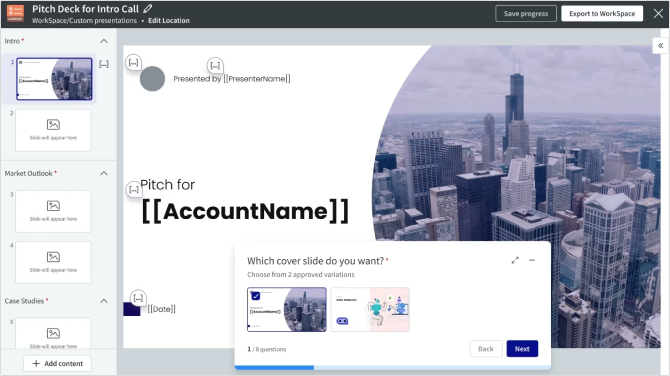
Formerly known as Lessonly, Seismic Learning helps organizations onboard, train, and coach sales and other customer-facing teams. Companies can create lessons, organize personalized learning tracks, test knowledge, and monitor readiness from one platform.
Pricing
Current pricing is available upon request and depends on the chosen Seismic products, user count, and implementation requirements. Capterra’s legacy Lessonly listing shows plans starting at $300 per month, but this may not represent current Seismic Learning packages.
What users think about Seismic Learning
Pros
G2 and Capterra reviewers frequently praise its straightforward interface, lesson builder, organized onboarding experience, and responsive customer support. Users find it easy to create lessons, assign training, track progress, and provide practice-based feedback without extensive administrator training.
Cons
The platform lacks customization, interactive question types, gamification, and control over scheduled assignments. Search, reporting, mobile access, and video uploads can also present limitations.
Is a free trial available?
No public self-service trial is advertised. Seismic offers personalized demos and a self-guided platform tour. Its legal terms indicate that limited trials may be arranged through an order form.
What are the best features?
- Simple lesson and assessment creation
- Personalized learning options
- AI-driven skills assessments
- Video practice and manager feedback
- Sales training and role-play simulations
- Smart groups and automated assignments
- Certifications and progress tracking
Who is this enterprise LMS best for?
Seismic Learning is best for sales enablement, onboarding, and coaching customer-facing teams. In my opinion, it makes the most sense for organizations already using or planning to adopt the broader Seismic platform.
9. Litmos
| G2: 4.3 Capterra: 4.2 |
Litmos supports onboarding, compliance, workforce development, customer education, and partner training. Organizations can create original courses, import SCORM content, automate assignments, and deliver self-paced, instructor-led, or blended learning through browsers and mobile apps.

Pricing
Litmos offers three plans: Foundation, Platinum, and Platinum AI. All use custom pricing based on the organization’s requirements, and exact rates are available from the sales team. Advanced AI capabilities are concentrated in the Platinum AI package.
What users think about Litmos
Pros
Litmos gets consistent praise for its straightforward administration, learner-friendly interface, responsive support, and easy course creation. Its content library, SCORM compatibility, compliance automation, and ability to organize large workforces by team, role, or location also receive positive feedback.
Cons
Reporting is the most consistent source of criticism. Reviewers describe some reports as complicated, inflexible, or dependent on additional configuration. Users also mention limited customization, cumbersome bulk actions, short dashboard data windows, and useful AI or management features being reserved for higher-priced packages.
Is a free trial available?
Yes. Litmos offers a 14-day free trial without requiring a credit card.
What are the best features?
- Built-in course authoring and SCORM imports
- Extensive ready-made content libraries
- Compliance assignments and certifications
- Automated enrollment, reminders, and escalations
- AI assistant, authoring, and learning playlists
- Instructor-led, virtual, and blended learning
- eCommerce and external training
- Custom roles, teams, and permissions
Who is this enterprise LMS best for?
Litmos is best for distributed organizations that need accessible compliance training, mobile delivery, and a broad catalog of ready-made courses. It may work particularly well for lean teams prioritizing quick deployment.
10. Adobe Learning Manager
| G2: 4.0 Capterra: 4.3 |
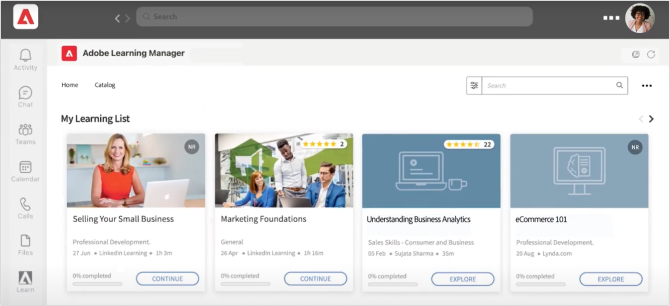
Adobe Learning Manager delivers personalized training to employees, customers, and partners. It supports learning options, certifications, social learning, gamification, blended programs, and AI-driven course recommendations.
Pricing
Adobe does not publish standard rates. Pricing is customized and available under registered-user or monthly-active-user licensing models. A 30-day free trial is available.
What users think about Adobe Learning Manager
Pros
Reviewers value its flexible learning tracks, content recommendations, support for multiple training formats, and integration with Adobe products. Many also find the learner interface clear and course assignment straightforward.
Cons
Users report a learning curve for administrators, limited or complicated reporting, occasional slow performance, and inconsistent search results. Cost is another concern, particularly for smaller organizations.
Is a free trial available?
Yes. Capterra reports that Adobe offers a 30-day free trial.
What are the best features?
- AI-powered content recommendations
- Headless learning experiences
- Automated learning paths
- Blended and social learning
- Gamification and certifications
- Extended enterprise training
- Mobile learning with offline access
- Adobe, Salesforce, and Microsoft Teams integrations
- Large third-party course marketplace
Who is this enterprise LMS best for?
Adobe Learning Manager is best for midsize and large enterprises that need an enterprise learning management system that provides personalized, branded learning across multiple channels.
11. SAP SuccessFactors Learning
| G2: 4.1 Capterra: 3.7 |
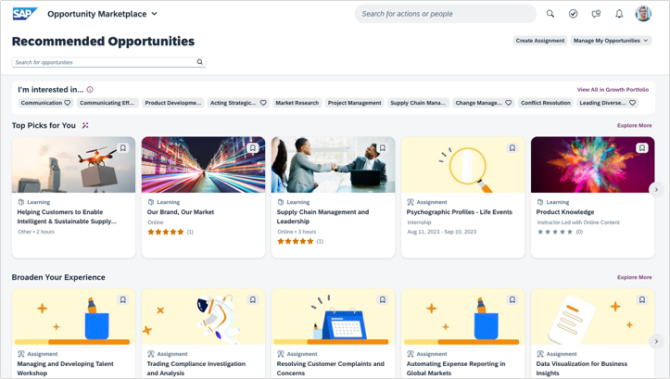
SAP SuccessFactors Learning is an enterprise training management system within the broader SuccessFactors HCM suite. It suits large, global organizations that need to connect employee development, compliance training, and workforce data.
Pricing
SAP provides customized pricing for SuccessFactors Learning. Capterra lists the wider HCM suite from $75.60 per user per month, but the cost of the Learning module depends on company size, products, and implementation.
What users think about SAP SuccessFactors Learning
Pros
Reviewers value its enterprise scalability, compliance tracking, extensive configuration, and connection to wider HR processes. Automated course assignments and centralized employee records are also well regarded.
Cons
Users frequently describe the interface as dated or difficult to navigate. Administration, configuration, and reporting can require specialist knowledge, while occasional slow performance and inconsistent support are also mentioned.
Is a free trial available?
SAP offers a 30-day guided SuccessFactors HCM trial. It uses sample data and includes limited functionality, so it is not a full trial of the Learning module.
What are the best features?
- Automated learning assignments
- Compliance and certification tracking
- Classroom, virtual, and online training
- Skills and competency development
- Learning histories within employee profiles
- Mobile access
- SAP and partner content integrations
- Enterprise reporting and permissions
Who is this enterprise LMS best for?
SAP SuccessFactors Learning is best for large organizations already using SAP for HR and talent management. Companies without an SAP environment may find its implementation and administration heavier than necessary.
12. Workday Learning
| G2: 4.0 Capterra: No reviews |
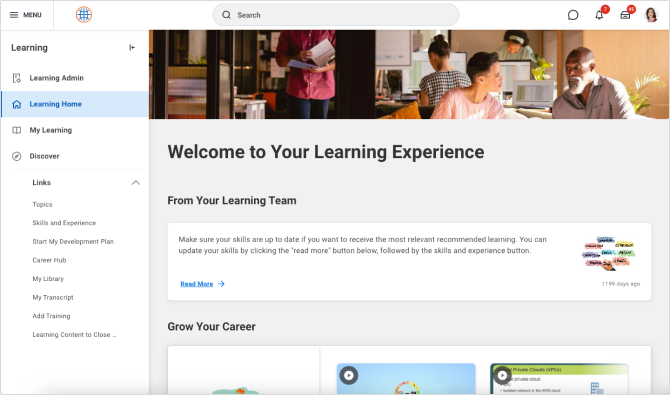
Workday Learning connects onboarding, compliance, skills development, and career learning with employee data already stored in Workday HCM. Assignments can respond to roles, job changes, and organizational structures without separate user administration.
Pricing
Pricing is available upon request and depends on workforce size, selected Workday products, and implementation. Workday does not publish a standalone Learning rate.
What users think about Workday Learning
Pros
G2 reviewers value the HCM integration, compliance management, automated assignments, and convenient access alongside other employee tasks.
Cons
Users describe search, content discovery, and some administrative workflows as less intuitive than expected. Reporting and knowledge-sharing capabilities have also attracted criticism.
Is a free trial available?
No public free trial is advertised. Organizations can request a demonstration.
What are the best features?
- Native Workday HCM integration
- AI-assisted course authoring
- Personalized AI tutors
- Automated enrollment and assignments
- Compliance tracking and audit trails
- Skills intelligence
Who is this enterprise LMS best for?
Workday Learning is best for enterprises already using Workday HCM and wanting learning within the same employee ecosystem. Organizations outside Workday will gain less from its strongest advantage.
13. D2L Brightspace
| G2: 4.4 Capterra: 4.2 |
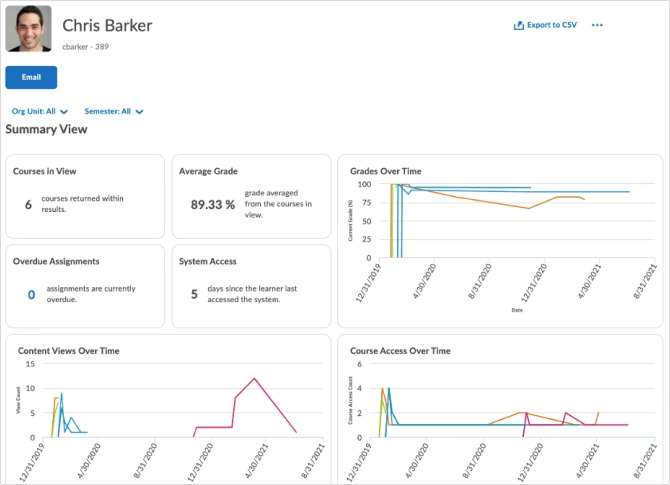
D2L Brightspace is a flexible enterprise learning system used by businesses, associations, and educational institutions. It supports personalized, competency-based, and blended learning, making it a good fit for organizations with complex training programs.
Pricing
Pricing is available upon request and depends on learner numbers, required products, and services. D2L does not publish standard enterprise rates.
What users think about D2L Brightspace
Pros
Reviewers praise its accessible design, learner-friendly navigation, customization, analytics, integrations, and responsive support. Course, enrollment, role, and permission management also receive positive feedback.
Cons
Some users find administration and initial configuration complex. Inconsistent course layouts can affect navigation, while reporting data exports, discussions, notifications, and third-party integrations may require extra work.
Is a free trial available?
Yes. D2L offers a 30-day Brightspace trial, despite Capterra currently listing no free trial.
What are the best features?
- Accessible and responsive course delivery
- Competency-based learning paths
- Adaptive release conditions
- Detailed progress and engagement analytics
- Assessments and certifications
- Online training, live courses, and blended learning
- Automated enrollment and notifications
Who is this enterprise LMS best for?
D2L Brightspace is best for organizations prioritizing accessibility, flexible program design, and detailed learning analytics. Its education-oriented heritage also makes it well suited to companies delivering formal or instructor-led training.
14. CYPHER Learning
| G2: 4.4 Capterra: 4.5 |
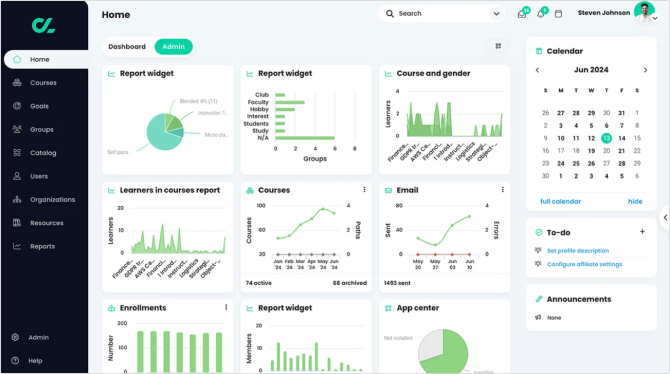
CYPHER Learning supports onboarding, compliance, employee development, and customer training. Its AI agent can generate courses, assessments, skills mappings, and gamified activities, reducing manual content-development work.
Pricing
CYPHER Learning provides customized Enterprise pricing based on learner numbers and required features. Public rates and a free trial are not currently listed. Organizations can request pricing and schedule a demonstration through the company’s website.
What users think about CYPHER Learning
Pros
Reviewers praise its course creation, attractive interface, gamification, assessments, automation, and responsive support. Many find everyday course and learner management straightforward.
Cons
Users mention limited advanced reporting, integrations, offline access, and design customization. Some deeper settings require extra clicks, while the mobile app may not expose every desktop feature.
Is a free trial available?
No public self-service trial is currently advertised. Organizations can contact CYPHER Learning for a demo and tailored quote.
What are the best features?
- AI-generated courses and assessments
- Skills and competency mapping
- Personalized learning paths
- Rule-based automation
- Gamification and mastery tracking
- Compliance and certification management
- eCommerce
- Mobile apps
- Multilingual interface
Who is this enterprise LMS best for?
CYPHER Learning is best for organizations seeking automated course creation, gamified learning, and skills-based development. Its annual starting cost makes it less practical for very small training programs.
15. WorkRamp
| G2: 4.4 Capterra: 4.5 |
WorkRamp brings employee development, compliance training, sales enablement, and customer education into a single platform. Teams can create interactive courses, organize structured learning paths, run live events, and track certifications without relying on separate systems.

Pricing
WorkRamp does not publish standard subscription rates. Pricing depends on the selected learning products, features, and number of users. A public free trial is not currently advertised, but businesses can request a personalized demo and quote.
What users think of WorkRamp
Pros
Users frequently praise the intuitive interface, straightforward course creation, responsive support, and smooth implementation. Reviewers also like having content, assignments, and learner progress centralized.
Cons
Some reviewers want more customizable reporting, bulk-editing options, and design controls. Others mention that certain content-management processes become manual as programs grow.
Is a free trial available?
Capterra lists a free trial, although WorkRamp does not publish its duration or terms. Prospective customers can request a demo.
What are the best features?
- Separate employee and customer learning environments
- AI-assisted course creation and grading
- Built-in authoring and collaborative editing
- Learning paths, events, certifications, and challenges
- Branded customer and partner academies
- Integrations with HR, CRM, communication, and content tools
Who is this enterprise LMS best for?
WorkRamp is a strong choice for mid-sized and growing enterprises that want one approachable platform for both workforce development and customer or partner education.
16. EducateMe
| G2: 4.8 Capterra: Not listed |
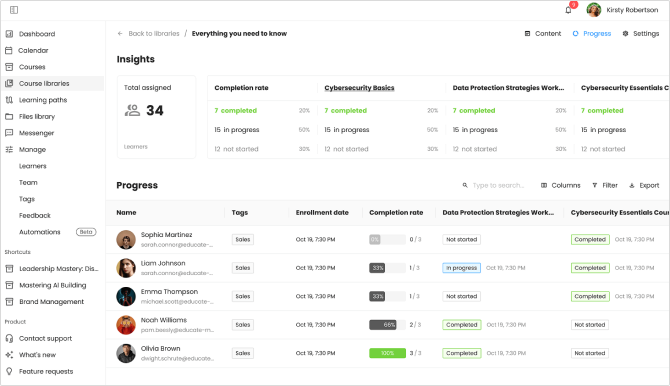
EducateMe supports employee onboarding, compliance training, upskilling, and external education. Teams can combine self-paced lessons with live sessions, assignments, peer reviews, and group discussions, making the platform particularly well suited to interactive programs.
Pricing
EducateMe’s pricing starts at $239/month for 80 users. Premium costs $399/month for 100 users, while Scale costs $999/month for 200 users. Annual billing saves 10%, and enterprise pricing is customized.
What users think about EducateMe
Pros
Reviewers praise its intuitive interface, interactive course formats, flexible learning paths, real-time progress tracking, and responsive support. Users also appreciate its automation and integrations.
Cons
Some users want a native mobile app, deeper branding controls, and built-in gamification. A few note that learning the full feature set takes time.
Is a free trial available?
Yes. EducateMe offers a 14-day free trial without requiring a credit card.
What are the best features?
- AI course creation and role-play coaching
- Self-paced, instructor-led, and recurring courses
- Assignments, peer reviews, events, and discussions
- Automated enrollment, reminders, and certificates
- Multiple learning spaces
- SCORM support
- Analytics and progress dashboards
- Zoom, Slack, Notion, Zapier, and API integrations
Who is this enterprise LMS best for?
EducateMe is best for growing organizations and training providers that run cohort-based, instructor-led, or blended programs and want more interaction than a conventional course library provides.
17. AcademyOcean
| G2: 4.9 Capterra: Not listed |
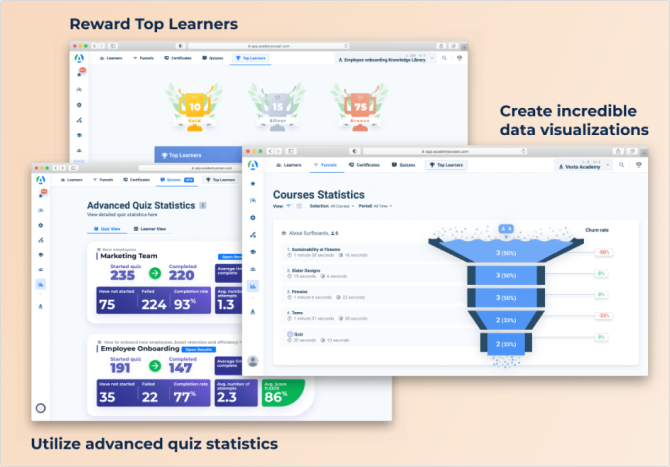
AcademyOcean is an AI-powered LMS for employee onboarding, workforce development, customer education, and partner certification. Its authoring tools help teams turn existing materials into courses, quizzes, and personalized learning paths.
Pricing
AcademyOcean pricing starts at $250/month for Essential and $500/month for Professional. Enterprise pricing is available upon request.
What users think about AcademyOcean
Pros
Users praise its approachable interface, quick course creation, customization, analytics, and responsive support. Reviewers also appreciate how its automation and multiple academies simplify training different audiences.
Cons
Some users report limitations in standard reporting, notifications, and email functionality. Others say initial configuration can require extra effort, while the mobile experience could be stronger.
Is a free trial available?
No public free trial is advertised. AcademyOcean offers a personalized demo, and the Essential plan can be purchased directly.
What are the best features?
- Multiple branded training academies
- AI lesson, quiz, grading, and analytics tools
- Dynamic, personalized course content
- Built-in authoring and SCORM support
- Certificates, assessments, and gamification
- Detailed learner and course analytics
- Multilingual portals and AI translation
- API, webhooks, SSO, Zapier, and Make integrations
Who is this enterprise LMS best for?
AcademyOcean is best for growing companies that need distinct, branded academies for employees, customers, partners, departments, or regional learner groups.
18. Disprz
| G2: 4.5 Capterra: 4.7 |
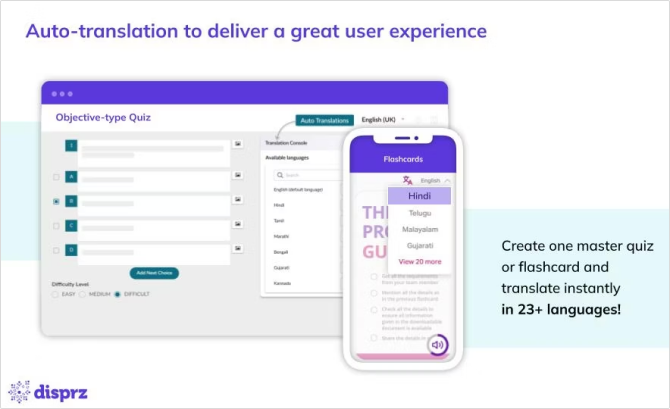
Disprz combines an LMS, learning experience platform, and skills-management tools. Enterprises can deliver classroom, virtual, mobile, microlearning, and on-the-job training while automating enrollments, approvals, reporting, and certification tracking.
Pricing
Disprz pricing starts at $3 per learner per month for the Essentials Learning plan. The Learning + Skills Enterprise plan uses custom pricing.
What users think about Disprz
Pros
Reviewers frequently praise the intuitive interface, mobile learning experience, responsive support, scalability, and flexible learning paths. Users also value its gamification and support for multiple content formats.
Cons
Some reviewers want more advanced built-in authoring, better-organized content libraries, and greater branding flexibility. Others say parts of the browser and mobile interfaces could feel more modern.
Is a free trial available?
Capterra lists a free trial, but Disprz does not publish its duration or conditions. Organizations can also request a personalized demo.
What are the best features?
- AI-powered LMS and LXP
- Role and skills mapping
- Personalized learning recommendations
- Mobile and multilingual learning
- Instructor-led, virtual, and on-the-job training
- Assessments, certifications, badges, and leaderboards
- Career pathways and development plans
Who is this enterprise LMS best for?
Disprz is best for large, distributed organizations that need an enterprise learning management solution to build role-specific skills across frontline, mobile, or geographically dispersed workforces.
19. Moodle
| G2: 4.1 Capterra: 4.3 |
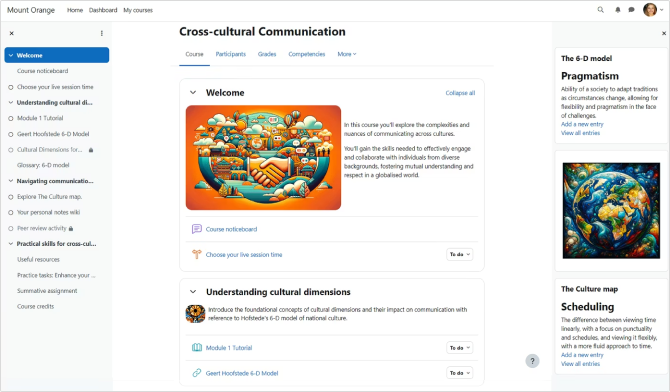
Moodle is a free, open-source LMS that organizations can host, modify, and extend with themes, plugins, and integrations. It supports course creation, assessments, forums, grading, learning paths, competencies, and mobile learning.
Pricing
Self-hosted Moodle LMS has no license fee, but organizations must cover hosting, implementation, maintenance, security, and support.
MoodleCloud starts at $170/year for 50 users and reaches $2,110/year for 750 users. Moodle Workplace and larger managed deployments use partner-provided custom pricing.
What users think about Moodle
Pros
Users value Moodle’s flexibility, broad feature set, active community, plugin ecosystem, and low licensing cost. Reviewers also appreciate its course-management and assessment capabilities.
Cons
Reviewers frequently mention a steep administrative learning curve, an interface that can feel cluttered or dated, and reporting that requires configuration. Self-hosting also creates ongoing technical and maintenance work.
Is a free trial available?
Yes. MoodleCloud offers a 28-day free trial without requiring a credit card. The self-hosted open-source edition is free to download and use.
What are the best features?
- Open-source architecture
- Extensive plugins and integrations
- Competencies and personalized learning paths
- Forums and collaborative activities
- Multilingual and accessibility features
- Mobile app with offline learning
- Enterprise multi-tenancy through Moodle Workplace
Who is this enterprise LMS best for?
Moodle is best for organizations with the technical resources to build and maintain a deeply customized enterprise learning system.
20. TalentLMS
| G2: 4.6 Capterra: 4.7 |
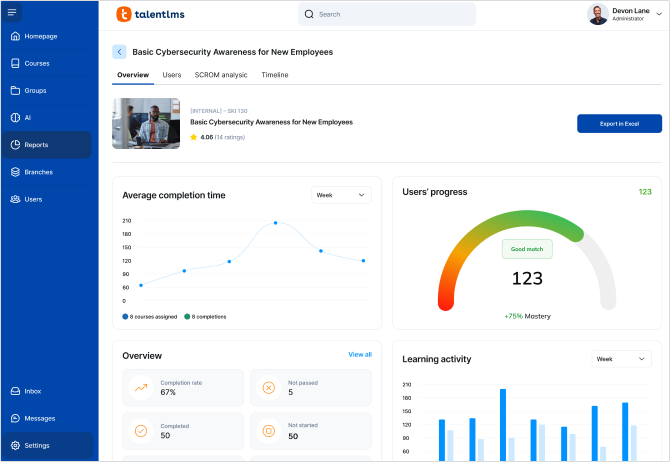
TalentLMS is a cloud-based platform for onboarding, compliance, skills development, and customer training. Its straightforward course builder supports videos, documents, quizzes, assignments, SCORM packages, and instructor-led sessions.
Pricing
TalentLMS pricing starts at $119/month for Core, $229/month for Grow, and $449/month for Pro when billed annually. Enterprise pricing is customized. Costs increase with the selected user capacity.
What users think about TalentLMS
Pros
Users consistently praise the easy setup, intuitive administration, course creation tools, affordability, and responsive support. Reviewers also value its automation, branding, and support for multiple content formats.
Cons
Some users want more flexible reporting, branding, user permissions, and advanced authoring. Reviews also note that valuable capabilities are restricted to higher-priced plans and that internally created content can be difficult to export.
Is a free trial available?
TalentLMS offers a forever-free plan for up to five users and 10 courses, with no credit card required. This can serve as a practical trial before upgrading.
What are the best features?
- AI-assisted course creation with TalentCraft
- SCORM, video, quizzes, and assignments
- Automated enrollments and reminders
- Learning paths and certifications
- Branches for separate learner groups
- Gamification with badges and leaderboards
- Mobile app with offline access
- Ready-made courses through TalentLibrary
Who is this enterprise LMS best for?
TalentLMS is best for small and midsized companies that want an affordable, approachable platform that can expand as their training programs and learner numbers grow.
Choose the right enterprise LMS for your organization
The best enterprise learning platform fits your learners, goals, resources, and technology. Compare content creation, integrations, reporting, security, mobile access, scalability, and total cost, then use demos or trials to test everyday workflows. And the best learning management system for IT companies should make it easy to update product, technical, and customer training as technology evolves.
Other platforms may suit different priorities. Cornerstone Learning stands out for global enterprises with complex compliance and talent management and complex training needs, while Docebo offers a highly configurable, AI-supported environment for training multiple audiences. And for organizations that want employees and internal experts to create training together, 360Learning is also worth considering. In my opinion, iSpring LMS is a strong choice of enterprise learning management system for lean HR and L&D teams. Its automation, reporting, content creation, mobile learning, and 24/7 support make large-scale training easier to manage.
FAQ
What is an enterprise learning management system?
An enterprise online learning management system helps large organizations deliver and track training across teams, locations, and audiences. It’s built to handle large learner numbers, automation, integrations, and detailed reporting.
What are the top 5 LMS platforms?
In my opinion, five top enterprise LMS platforms are iSpring LMS, Absorb LMS, Cornerstone Learning, Docebo, and 360Learning. Choosing the best enterprise learning management system depends on your goals, budget, and team resources.
Does the LMS still exist?
Yes. The best enterprise LMS platforms are still widely used, but they now do much more than host courses, from AI-backed content creation and mobile learning to automation, skills tracking, and reporting.
Is there a free LMS system?
Yes. Moodle is free and open source, while TalentLMS offers a limited free plan. However, larger organizations typically need a paid LMS or enterprise learning management system for stronger support, security, integrations, and scalability.