Employee training software programs are what stands between a compliance deadline met and a compliance deadline missed, and I have spent the last six months living inside them. I built courses, broke reports on purpose, and emailed support at 2 a.m. to see who answered. What follows is what I learned about web based training software, the tools HR teams actually rely on, including the parts that irritated me. If you are hunting for the best software for corporate training programs and your L&D function is two people and a spreadsheet, this was written for you.
One number frames the whole exercise. The World Economic Forum’s Future of Jobs Report 2025 found that 39% of workers’ core skills will change by 2030, and that 63% of employers name the skills gap as the single biggest barrier to transforming their business. You cannot close a gap like that with a shared drive of PDFs. You close it with structured learning that reaches people at their own pace, tracks employee performance, and shows where the skill gaps sit.
What is training software?
Training software is the system your company uses to build, deliver, and track the whole training process for its own staff. Everything after that is a question of how much of the job the tool takes off your hands, and how much it leaves on your desk.
The distinction that trips people up is between a learning management system and an authoring tool. The management system is the airport: schedules, records, and who gets through which gate. The authoring tool is the aircraft, the thing people actually consume. Some vendors sell both, some sell one and imply the other does not matter.
Company training software covers a predictable set of jobs. It stores and delivers training content, enrols people (ideally without you doing it by hand), runs training assessments, issues certificates, handles progress tracking so you see who finished what, and produces the training report your auditor asks for. Good employee development software also runs instructor-led sessions and blended paths, because most real training is not purely self-paced.
A SaaS employee training tool is hosted by the vendor and billed per user; a self-hosted system is yours to run and patch. Nearly all online training software for employees is now sold the first way.
That is why a cloud-based employee training platform describes the default rather than a feature. It also lets learners access training anytime, from any device, with nothing for IT to provision, which is the practical appeal of web-based employee training for a distributed workforce.
You will also meet a zoo of names for the same category, and the labels only differ at the edges. Staff training software and personnel training software usually describe exactly what I am reviewing here, so treat the vocabulary as marketing rather than a distinction worth agonising over.
When I score an employee training platform, a handful of key features do most of the work. Content creation tools let you customise training materials. Automation assigns training by role or department, so a new hire in sales is enrolled the moment they appear. Real-time tracking measures the impact on productivity, not just completion. Built-in reporting tools turn that into something you can show a board, and integration with your existing systems stops the platform becoming another island.
Assessment tools deserve their own line. A platform should provide varied assessment options, quizzes, exams, and practical projects, because a single question type gauges very little. Effective assessments let you tailor training programs to what a learner actually needs, and real-time reporting then tracks individual employee performance and engagement against those assessments.
One technical check saves pain later. SCORM and xAPI are the standards that let training content move between systems; if a vendor cannot say which they support, that tells you something. It also decides whether the online courses you already own will run, or whether switching means rebuilding your training materials from scratch.
The key benefits fall into a few groups. The first is time: automation handles enrolment, reminders, and reporting, so a small team can deliver training to hundreds without a matching rise in admin. The second is visibility, as progress tracking and real-time reporting let you track progress and employee performance against a plan, so you know who has completed training and who has fallen behind.
The third is reach: people access training anytime, on any device, which matters for shift workers and remote staff. Self paced learning lets each person move at their own pace, while collaboration tools add the collaborative learning and discussion that stop online training feeling like isolation.
Then there is the effect on people. Training reduces employee turnover, by as much as 40% in figures published by vendors themselves, and 68% of employees feel more prepared for the future of work when their employer invests in learning. Personalized learning paths keep employees engaged with a route that fits each role, and adaptive learning adjusts sequence and difficulty to the individual. Interactive learning and a little social learning help motivate learners and engage learners who would otherwise click through on autopilot.
Finally, structure. A learning management system bridges skill gaps through structured learning rather than ad-hoc lunch-and-learns, and built-in reporting tools tell you whether those skill gaps are closing. Modern platforms increasingly use AI to create courses quickly, which lowers the cost of keeping employee learning software current and supports the continuous learning your people need for career growth.
What are the leading employee training platforms?
The honest answer is that ten or so tools show up on every serious shortlist, and the differences between them are narrower than the marketing suggests. In my view, the current leading employee training platforms for business are iSpring LMS, TalentLMS, Docebo, 360Learning, Absorb LMS, LearnUpon, Litmos, Cornerstone OnDemand, Moodle, and Adobe Learning Manager.
For an independent read, the Fosway Group publishes a 9-Grid for Learning Systems scoring vendors on performance, potential, market presence, and total cost of ownership across a European buyer base. Their 2025 edition made a point I keep seeing in demos: an AI roadmap is now table stakes, but real customer adoption of those features lags the noise around them.
What separates the leaders is rarely a feature list. It is whether the platform assumes you have an admin team. Docebo and Cornerstone quietly assume you do. iSpring LMS and TalentLMS assume you do not, which is why I keep pointing small teams towards them.
What software do training teams use?
Almost nobody uses one thing. The typical stack I encountered pairs an authoring tool with a learning management system, then bolts on video conferencing and an HR system.
A common combination is iSpring Suite AI to build courses in PowerPoint, iSpring LMS to deliver them, Zoom or Teams for live sessions, and BambooHR or Workday feeding in the employee list. Smaller teams skip authoring, buy an off-the-shelf library of ready-made training courses, and use the platform only to deliver training and track training progress.
Training Magazine’s 2025 Training Industry Report puts some shape on this. US organisations spent 102.8 billion dollars on training in 2025, up 4.9% on the previous year, and the delivery mix was roughly 34% online or computer-based, 28% instructor-led classroom, 24% virtual classroom, and 22% blended.
That matters because blended delivery has an evidence base the industry rarely cites. A 2023 multi-country meta-analysis in Frontiers in Psychology found consistent positive effects on performance and engagement, and a JMIR review reported the same advantage on knowledge acquisition in the health professions. Most of that work sits in academic settings, so treat it as support for blended design as a default, not a percentage to promise your CFO. The signal is consistent: a good learning experience mixes formats, and the software has to support all of them.
Training software platforms: top-rated
Before the list, my criteria, because a ranking without stated criteria is just an opinion in a costume.
I weighted five things: how long it takes a non-technical HR person to create courses and get one live; whether reporting can be automated and scheduled rather than exported by hand; whether the platform handles delivering training programs, both on-the-job and classroom training programs; how honest the pricing is; and what support does at an inconvenient hour.
I tested each platform hands-on where a trial existed, sat through demos otherwise, and cross-read verified reviews on G2 and Capterra. Ratings and prices below were checked in July 2026 and will drift. One point no vendor volunteered: the European Accessibility Act has applied since 28 June 2025, its standard EN 301 549 maps to WCAG 2.1 level AA, so if your learners are in the EU, ask for the conformance report before you sign.
I judged each product as training software for business, so a tool that is wonderful for selling courses to the public but awkward at tracking your own staff scored badly. The top-rated software for employee training programs and the best tool for a course creator are rarely the same thing. Training tools for employees can mean anything from a quiz builder to a full platform, so ask what is behind the phrase before you compare prices.
The top-rated training software platforms I would put in front of a corporate L&D team this year:
- iSpring LMS, the best all-round online staff training platform for small HR and L&D teams
- TalentLMS, the fastest to stand up, and free for very small groups
- Docebo, the strongest AI and multi-audience option if you have the budget
- 360Learning, built for collaborative authoring by subject matter experts
- Absorb LMS, a polished mid-market choice with strong onboarding support
- LearnUpon, best when you train employees, customers, and partners separately
- Litmos, for teams that want a ready-made content library on day one
- Cornerstone OnDemand, enterprise learning tied to skills and performance
- Moodle, the open-source route if you have IT resource to spend
- Adobe Learning Manager, for multi-tenant delivery and social learning
Web based training software: best solutions
Everything below runs in a browser. No servers to provision, no client software for learners, which is why web-based training software displaced the previous generation. Reviews run in the order I would recommend them, and each covers the same ground: what it does well, what it costs, where it disappoints, and who it suits.
1. iSpring LMS (formerly iSpring Learn)
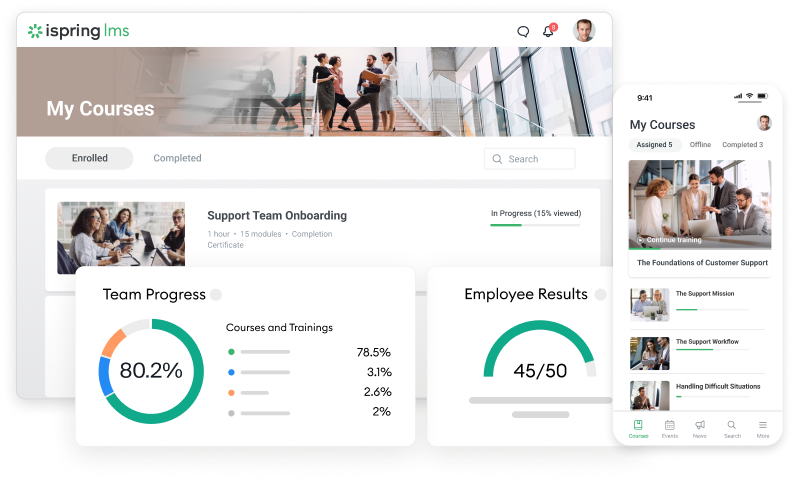
A naming note first, because half the internet has it wrong. In October 2025 iSpring Learn was renamed iSpring LMS. Same platform, same data, new name. The authoring tool, iSpring Suite AI, keeps its own name and is sold separately.
This is an online employee training system built for HR teams of one to three people. My first enrollment rule took under a minute: pick a department, pick a course, done. New starters are enrolled automatically after that, certificates issue themselves, and any of the twenty-odd reports can be saved as a template that mails itself monthly.
The on-the-job training and 360-degree appraisal modules are more substantial than I assumed. Supervisors get observation checklists they complete on a phone on the shop floor, which is how you assess skills that never show up in a quiz. As job training software for frontline roles little else comes close, and the employee training app works offline.
IMT Matcher, an IVF laboratory software firm of about 90 staff, cut training costs by 25% after moving to remote delivery. Motivera, a Swedish trainer with a team of three, took online delivery from 10% to 30% of its business. Oticon’s L&D team called it simple to use, just like Netflix. It accepts SCORM and xAPI, so the online training modules for employees you already own will run in it.
The irritation is pricing. iSpring LMS is sold per active user on Business and Enterprise plans, but the tiers are fixed and the real number comes from a sales call. Report exports do not always include every field you were hoping for, and the iSpring Suite AI desktop app is Windows-only, though its Cloud version runs in the browser and works well on any device. Configuration covers most of what teams commission as customizable training software development. Around 4.6 out of 5 on G2 and Capterra. Best as employee training software for small business. iSpring LMS offers a 30-day trial with no card required.
2. TalentLMS
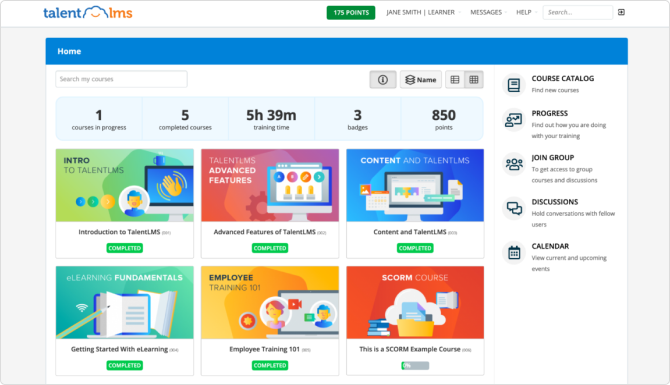
TalentLMS is the fastest thing on this list to get running. I had a course live in about twenty minutes. Epignosis, the company behind it, also owns eFront and TalentCards, and TalentLMS is the piece aimed at small and mid-sized businesses.
The free plan covers five users and ten courses, enough to evaluate properly rather than just look at a demo. Setup is the strong suit: a mobile-first platform, clean course creation, and enough automation to enrol people by group. Staff can access online training anytime and complete training between other tasks, which is the point for shift-based teams.
Paid plans start near 119 dollars a month for up to 100 users. It is ISO 27001 certified and GDPR compliant, and the vendor cites more than 70,000 teams using it. Its own case studies describe training that cut turnover from around 40% to 25%; that is an editor’s figure rather than an independent study, but it points the same way as the wider evidence that training reduces turnover.
What it does less well is scale gracefully. The built-in reporting tools stay basic as soon as your questions stop being basic, and collaborative authoring is not really its game. Compliance teams needing granular audit trails will feel the ceiling within a year. Rated around 4.6 on G2. Best for a company under 100 people that wants online training running this week.
3. Docebo
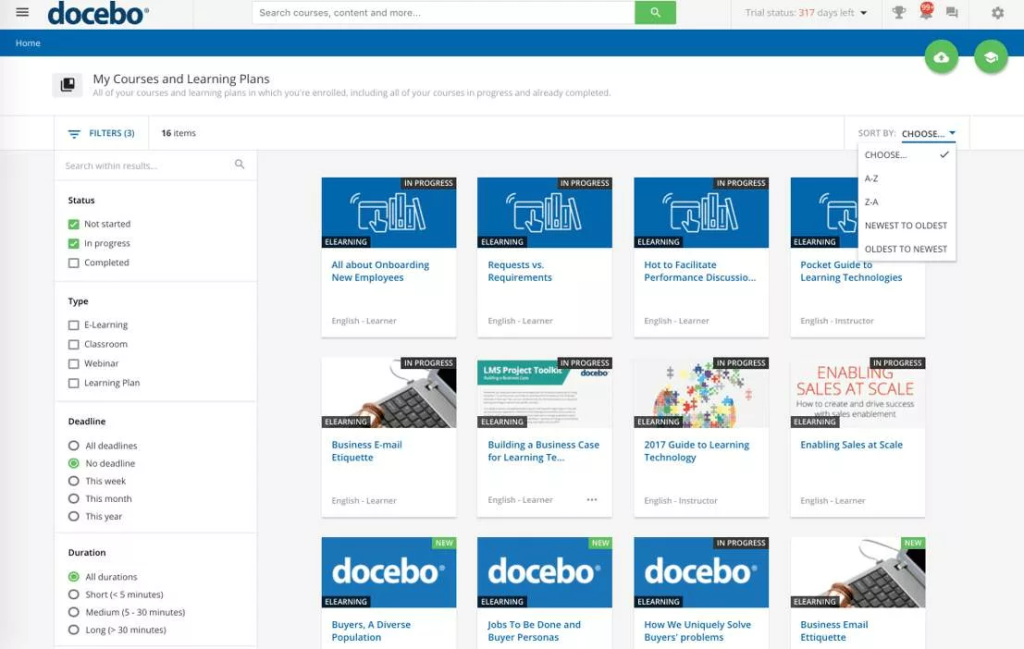
Docebo is the enterprise AI story, and a real one rather than a bolt-on. Auto-tagging, content recommendations, and its Harmony layer do things I have not seen at this level, and its adaptive learning genuinely adjusts the learning paths it serves each learner rather than shuffling a catalogue.
It handles extended enterprise properly: employees, customers, partners, and franchisees on separate branded portals, each with its own catalogue and rules. For a company training several audiences at once, that separation is worth a great deal, and the reporting tools slice by audience without manual exports.
Pricing is quote-only and lands around 25,000 dollars a year, per active user. In January 2026 Docebo moved premium Creator functionality to a credit-based model, which is worth understanding before you sign, because it changes the shape of your bill as usage grows rather than staying flat.
The recurring criticism on G2, and it matches my demo experience, is that some add-on modules feel half-finished relative to the core, and the advanced features carry an enterprise learning curve. You need an administrator who owns the platform; it does not run itself the way the SMB tools do. Rated around 4.3. Best for enterprises with an admin team, several audiences, and a five-figure budget.
4. 360Learning
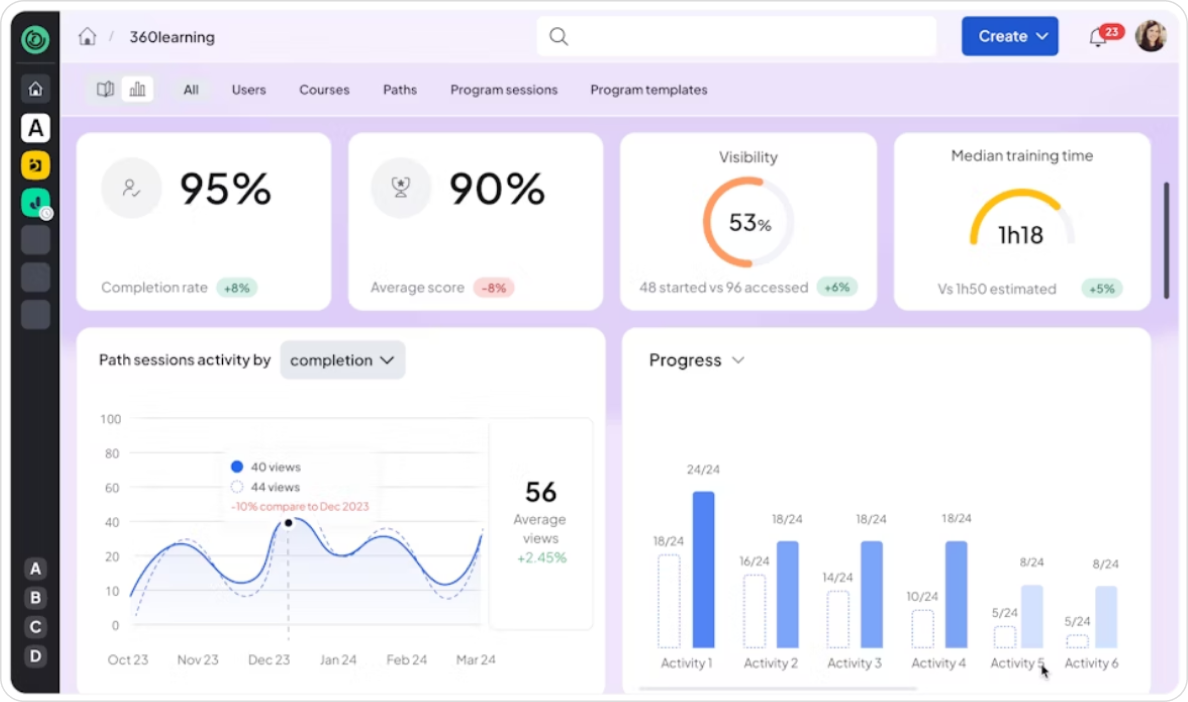
360Learning is built on a premise I like: your subject matter experts should create courses, not your L&D team. Authoring is collaborative and social by design, with course creation, feedback, and iteration in one place, and the platform nudges experts to contribute instead of waiting on a central queue.
As staff development software it is unusually good at turning internal knowledge into something reusable. Discussion sits inside courses, so questions get answered where they are asked, and knowledge sharing happens without you standing up a separate forum. If collaborative learning is your priority, nothing here does it better.
It starts around 8 dollars per user per month on the Team plan for up to 100 users. It holds SOC 2 Type II and ISO 27001, runs on Azure, and is rated 4.6 on G2 across well over a thousand reviews. Its mobile app is among the best here, so mobile access is a strength rather than an afterthought.
Two things to know before you commit. It is less suited to strict compliance training, where version control and sign-off matter more than collaboration. And downgrading from Business to Team blocks content migration, which is an unpleasant surprise to discover later. Best for organisations where expertise is distributed and people will actually contribute.
5. Absorb LMS
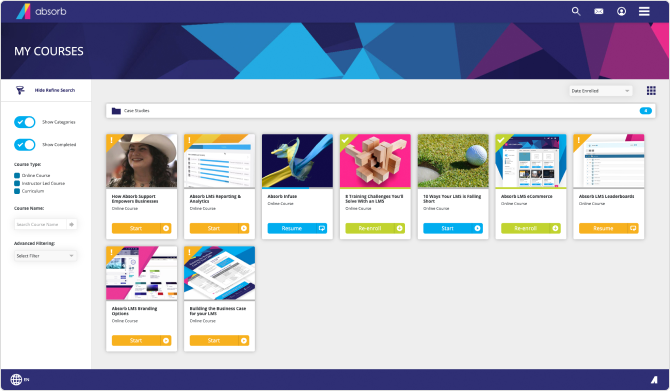
Absorb sits in the mid-market and is the best-looking platform on this list. Implementation is quick by enterprise standards, typically under sixty days, and you get a named customer success manager. Its interface pulls learners in, which does more for completion rates than any feature list.
The admin side is genuinely capable: rules-based enrolment, a decent course creation workflow, and enough configuration to cover what smaller teams would otherwise pay a developer for. It launched Aura AI and Aura Create in June 2026, adding AI course creation to speed up content work, and the templates are usable rather than decorative.
Pricing is quote-based, which makes comparison harder than it should be, and the sales cycle is slower than the SMB tools. Rated 4.6 on G2 with 24/7 support that answered inside the hour in my testing. Integrations cover the usual HRIS and conferencing suspects, and the learner dashboard does a good job of showing people what is outstanding without nagging them.
My reservation is commercial rather than technical: the advanced reporting layer, Analyze, is a paid add-on. Reporting depth is not a luxury for a compliance team, and charging separately for it grates when cheaper platforms include it. Best for mid-market companies who want a polished rollout with someone holding their hand.
6. LearnUpon
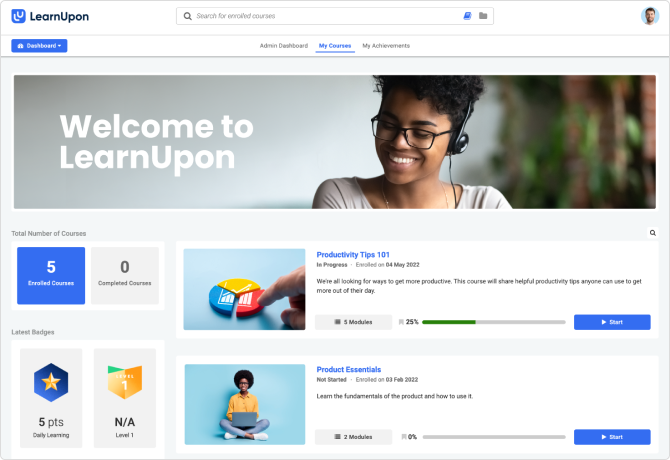
LearnUpon exists for portals. If you train employees, customers, and partners and need those audiences separated with their own branding and their own knowledge bases, this is the cleanest implementation I have used.
As training course management software it is straightforward: several audiences run from one console, without the configuration sprawl that usually comes with that. Administration is deliberately simple, the learner side is quiet and uncluttered, and the support reputation is among the better ones in this bracket.
There is no public pricing. Procurement data from Vendr in February 2026 suggests roughly 6 to 9 dollars per active learner per month, a median contract around 31,667 dollars a year, and a practical floor of 10,000 to 15,000, with the entry tier capped near 150 active learners. Budget for the portals you will actually use, because the count drives the quote more than the headcount does.
Its built-in authoring is limited, so plan on pairing it with an authoring tool rather than building courses inside it. There is no offline mode either, which rules it out for field staff without reliable connectivity. If your training audience is purely internal, you are paying for separation you will never use. Best for companies whose training audience is not only their own staff.
7. Litmos
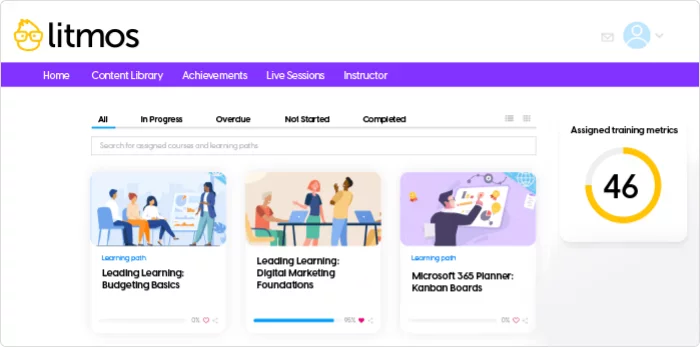
Litmos left SAP in December 2022 and has been owned by Francisco Partners since, so if you see it called SAP Litmos, you are reading something written before the split.
Its distinguishing asset is the Litmos Heroes content library, thousands of ready-made online courses on compliance, soft skills, and safety. If your requirement is workplace compliance training live next month and you have nobody to build it, that library is worth real money. It is the fastest route I know from nothing to a working programme.
It supports SCORM 1.2 and xAPI, so bought or inherited training materials slot into your existing systems, and mobile access is solid. Content is refreshed centrally, which spares you the annual rewrite that compliance material otherwise demands. Pricing is quote-based, and the entry tiers are competitive for the content you get, particularly if the library replaces an external training budget you were already spending.
The trade-off is rigidity. Course structure is less flexible than most here, so bending it to an unusual training process is a fight, and the authoring tools are basic next to a dedicated suite. Useful features are scattered across pricing tiers, which makes comparing quotes tedious. Best for buying training rather than building it.
8. Cornerstone OnDemand

Cornerstone is the heavyweight, and it has been shopping: EdCast and SumTotal in 2022, Talespin’s XR business in March 2024, and SkyHive in May 2024, each folded into a platform now branded Galaxy.
What you get is employee training and development software in the fullest sense: learning, performance management, and skills development as one system, so you see not just what someone completed but what skills your organisation holds and which ones it is short of. Nothing else here ties talent development to training at the same depth, which is why large employers use it for organizational success.
What you also get is weight. It is complex to administer and complex to use, implementation runs in quarters rather than weeks, and you will need people whose actual job is the platform. Reporting is powerful once configured, but configuring it is a project in itself, and the vocabulary takes a while to learn. Pricing is quote-based and firmly enterprise-grade.
If all you need is onboarding and compliance, you will be paying for an aeroplane to cross the street, and your admins will spend the first year learning the vocabulary. Smaller teams routinely underestimate the internal resource this needs. Best for large enterprises running workforce planning, not just training.
9. Moodle
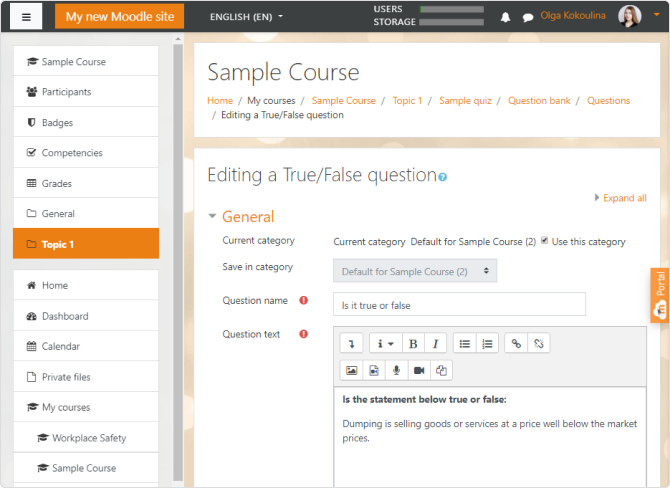
Moodle is open source, and self-hosted Moodle costs nothing in licence fees. Moodle Workplace is the commercially supported variant aimed at companies, with tenancies, roles, and certification programmes built for corporate use.
As employee learning management software it is as capable as anything here if you invest in it. The plugin ecosystem is enormous, customisation is effectively unlimited, and your data stays wherever you put it, which settles most data-residency arguments before they start. Nothing sits behind a tier you have not bought.
The word free is doing heavy lifting. You need IT resource for hosting, updates, backups, and security patching, and there is no vendor to call at 11 p.m. when something breaks the night before a compliance deadline. Budget for a partner or an internal owner from the start, because the licence saving reappears as staff time within the first year.
The interface is also dated next to the commercial platforms, and learners notice within a week. Reporting is functional rather than friendly, and pulling a board-ready summary usually means a plugin or a spreadsheet. I watched a two-person HR team try to run Moodle alone, and I would not repeat it. Best for organisations with genuine IT capacity and strong data-residency requirements.
10. Adobe Learning Manager
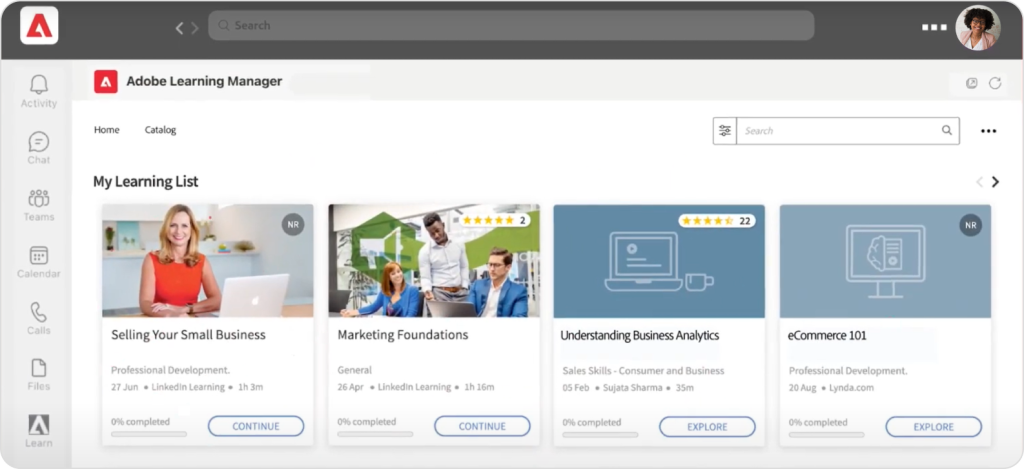
Formerly Captivate Prime, Adobe Learning Manager handles multi-tenant delivery and social learning well, and it looks the part. If knowledge sharing across a big, dispersed workforce is the goal, its social features are a genuine draw, with discussion boards and peer contribution built into the learning experience rather than bolted alongside it.
The recommendation engine surfaces content people would not have gone looking for, which is rarer than it sounds, and reporting is capable once configured. The learner interface is one of the more modern ones on this list.
It suits organisations already running Adobe tools, because the integration with the wider stack is where the value sits, and assets move between applications without an export dance. Pricing is quote-based and rarely cheap once you add the seats you actually need, so model the full year before committing.
The learning curve is the steepest here, for administrators and for whoever builds content, and there is no native authoring, so you buy into the wider Adobe stack whether you meant to or not. Support was slower than the SMB platforms when I tested it, and the documentation assumes more product knowledge than a first-time admin has. Best for organisations already committed to Adobe.
Conclusion
Six months in, my view has not moved much. For a small HR or L&D team carrying onboarding, compliance, and on-the-job training with no headcount coming, iSpring LMS is the employee training software I would buy, because it automates the parts that eat your week and its OJT and appraisal modules cover the training that does not happen at a desk. The pricing opacity is a real irritation, so get the quote before you fall in love with the product.
If your situation is different, the answer changes, and the employee training software solutions above split fairly cleanly. Under a hundred people and in a hurry, TalentLMS. Enterprise with an admin team and AI ambitions, Docebo. Distributed expertise you want to harness, 360Learning. Customers and partners to train alongside staff, LearnUpon. IT resource and data-residency rules, Moodle. Employee training software for corporates that need workforce planning, Cornerstone. A polished mid-market rollout with someone guiding it, Absorb LMS. A compliance library you need live next month rather than built, Litmos. An existing Adobe stack you would rather extend than replace, Adobe Learning Manager. Choosing employee training software is mostly matching the tool to your team size and obligations, not chasing the longest feature list.
Whatever you shortlist, run the trial with your own content and your own awkward edge case, not the vendor’s demo data. The best employee training management software is the one your colleagues still use in eighteen months, and no feature comparison can tell you that. Among online employee training platforms, some of them offer a trial version, the cheapest way I know to find out whether an employee training software solution fits how your team actually works.
FAQ
How long does a rollout actually take?
For a small team with content in hand, a fortnight to a month is realistic on the SMB platforms; I had a course live in twenty minutes on TalentLMS, but that is a demo, not a rollout. Absorb-class implementations run under sixty days, enterprise deployments in quarters. The variable is almost never the software. It is how long your experts take to hand over their material, and how much of the onboarding process you automate up front, which is what cuts employee onboarding time.
Can I keep my existing courses if I switch platforms?
If they are SCORM or xAPI packages, yes, and any platform on this list will import them. If they were built inside a vendor’s proprietary editor, often not, and that is the lock-in nobody mentions during the demo. Ask for an export before you migrate anything in, and confirm the new platform can deliver training in the same formats your training content already uses.
Where should I start if I have never bought a platform before?
Write down the three obligations that will not wait: onboarding, a compliance deadline, and the one report somebody senior always asks for. Then trial two platforms against exactly those, using your own content rather than demo data, and give each a fortnight. Judge employee training software programs on what your colleagues still open unprompted at the end of it, not on the feature grid. For small teams, the web based training software that has survived that test for me is iSpring LMS, whose 30-day trial needs no card, so all you risk is the fortnight.