

Most teams hit a point where the same questions keep getting asked, the same documents cannot be found, and the person who “just knows” is on vacation. A knowledge base (KB) is the fix. This guide covers what one is, the main types, and how to figure out which setup fits your situation.
What Is a Knowledge Base?
A knowledge base (KB) is a structured, searchable system for storing and retrieving information. Unlike a simple document folder or a shared drive full of files, a knowledge base is organized around how people actually search for things: by topic, keyword, category, or question, rather than by who created the file or when it was saved.
The term covers a wide range of setups. At the simple end, a knowledge base might be a Notion workspace where a small team keeps its SOPs. At the more complex end, it might be a vector database that feeds answers to an AI chatbot. What those setups share is the same core idea: one place to put information so it can be found again.
Knowledge base, or KB, is also the term you will see inside many software platforms for their help documentation. That usage is consistent with the definition. A help center is, functionally, a customer-facing knowledge base.
How Does a Knowledge Base Work?
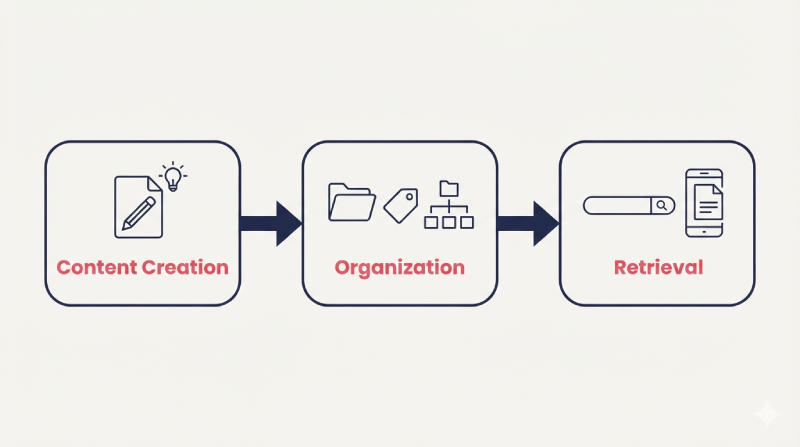
Most knowledge bases follow a three-part flow: content goes in, gets organized, and is then retrieved by someone who needs it.
Content creation is where information gets written, uploaded, or imported. That might mean a support agent writing a troubleshooting article, an HR manager uploading the employee handbook, a subject-matter expert (SME) recording a process walkthrough, or a developer importing documentation from a Git repository. Some platforms let multiple contributors edit content, with role-based permissions controlling who can publish.
Organization and taxonomy determines how content is structured after it is created. This usually involves spaces or categories (broad topic groupings), folders within those spaces, tags or labels for cross-referencing, and version control to track changes over time. Good taxonomy is what separates a knowledge base from an overstuffed shared drive.
Search and retrieval is how a user actually gets to the answer. Traditional keyword search matches terms in titles, descriptions, and article text. More recent platforms layer in semantic search, which can find content even when the user’s phrasing does not exactly match the article wording. Some systems also surface content contextually (an AI assistant suggesting a relevant article mid-ticket, for example).
Analytics close the loop. Most platforms track which articles are read, how often, and where searches return no results. Those gaps are your next round of content to write.
Types of Knowledge Base
The phrase “knowledge base” gets used to describe several different things depending on context. Here are the three main categories.
Internal or Team Knowledge Base
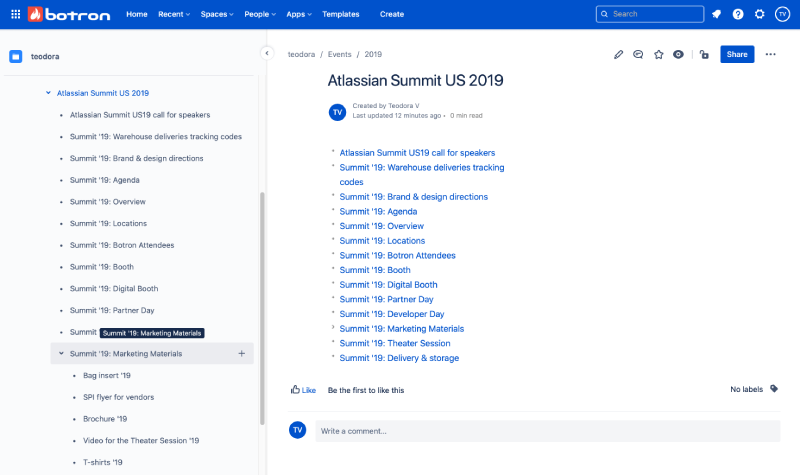
An internal knowledge base is built for employees. Its job is to make institutional knowledge accessible to everyone in the organization, not just to the person who has been there longest.
Common content includes company policies and handbooks, onboarding materials, standard operating procedures (SOPs), training guides, product documentation for internal teams, IT troubleshooting steps, and department-specific FAQs. The goal is a single source of truth that any employee can search on their own, without sending a message in Slack or waiting for a colleague to be available.
Tools used for this include Atlassian Confluence (widely used in technical teams for wiki-style documentation), Notion (popular with smaller teams for its flexible structure), Guru (which focuses on keeping knowledge accurate and surfacing it inside other tools like Slack and CRMs), Bloomfire (designed around search and AI-powered answers), and Document360 (which offers structured versioning and review workflows). Many organizations also use their LMS for employee training when their learning platform includes a built-in knowledge base feature (more on that below).
The internal knowledge base is probably the most under-served category in the literature. Most “what is a knowledge base” articles focus on help centers. But for organizations dealing with tribal knowledge, high turnover, or distributed teams, the internal case is often more urgent.
External or Customer-Facing Knowledge Base (Help Center)
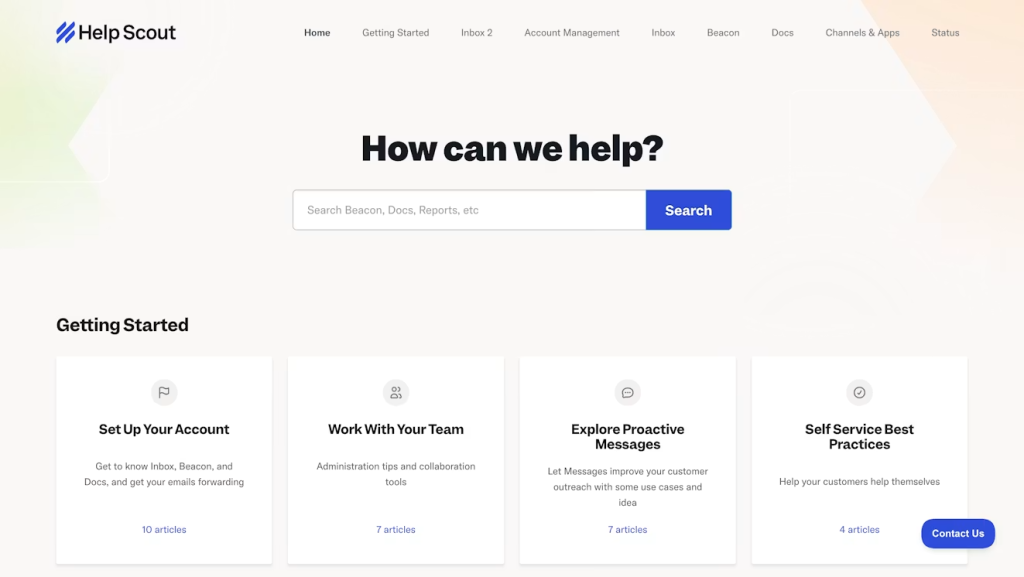
A customer-facing knowledge base (often called a help center or self-service portal) is built for customers, users, or the general public. Its job is to deflect support tickets by giving people a way to answer their own questions.
Zendesk, Salesforce Knowledge, and Help Scout all include help center modules built directly into their customer support platforms. The logic is that the same team writing ticket responses is also maintaining the documentation, so the content stays connected to real support volume.
Good external knowledge bases are organized by product area or customer journey stage, not by internal team structure. A customer does not care which department owns the billing FAQ; they just want to find it fast.
Ticket deflection is the primary metric here. If 30% of incoming tickets are about the same three topics and those topics are in the help center, something is wrong with findability, not content coverage.
AI or Machine-Readable Knowledge Base
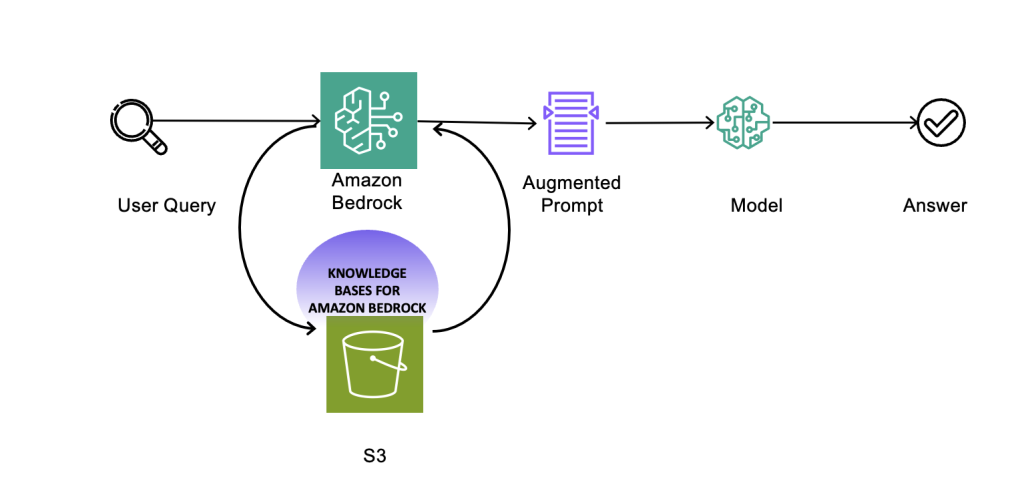
This category has grown significantly as organizations adopt AI assistants, chatbots, and retrieval-augmented generation (RAG) systems.
A machine-readable knowledge base is structured so that an AI system can query it and use the results to generate accurate, grounded answers. Instead of an AI generating a response purely from training data, a RAG setup retrieves relevant chunks from a curated knowledge base and includes them in the model’s context. The result is answers that reflect your actual documentation rather than a generic version of what the AI has seen before.
Amazon Bedrock Knowledge Bases is one common implementation: organizations connect their documents to a vector store, and Bedrock retrieves relevant passages when users query an AI assistant. Similar setups exist on Azure and Google Cloud.
The distinction between this category and the first two is not about what the knowledge base contains; it is about who is doing the retrieving. An internal knowledge base serves humans. A machine-readable knowledge base serves an AI system, which in turn serves humans.
Expert systems are an older variant of this idea. Before modern large language models, expert systems encoded domain knowledge as rules and decision trees that software could reason over. The vector-store approach used in RAG is a more flexible successor to the same underlying concept.
What Goes Into a Knowledge Base?
The content depends on the audience and use case, but most knowledge bases draw from the same set of formats.
Articles are the backbone. A knowledge base article covers a single topic clearly and completely. It answers a specific question, explains a process, or describes a concept. Good articles have a clear title that matches how someone would search for the topic, a short introductory summary, and a logical structure that lets readers scan quickly.
FAQs collect short answers to the most common questions. They are not a substitute for full articles, but they are good for quick lookups and for capturing questions that do not merit a dedicated page.
SOPs (standard operating procedures) document how a task should be done, step by step. These are especially important in regulated industries or any environment where consistency matters. If you are evaluating SOP software as a standalone tool, that is a separate category worth comparing.
How-to guides are similar to SOPs but often less formal. A how-to guide might walk through setting up a software integration, running a report, or submitting an expense claim.
Policies cover rules and expectations: acceptable use, data handling, leave entitlements, codes of conduct. These belong in an internal knowledge base and should be easy to find, not buried in a company-wide folder no one navigates.
Files and downloads (PDFs, templates, spreadsheets, videos) can sit alongside text articles in most modern knowledge base platforms. The key is that they are searchable by title and description, not just by filename.
The mix of formats is less important than two practical things: each piece of content should answer one question clearly, and there should be a regular process for reviewing and updating content so outdated information does not build up.
Why a Knowledge Base Matters
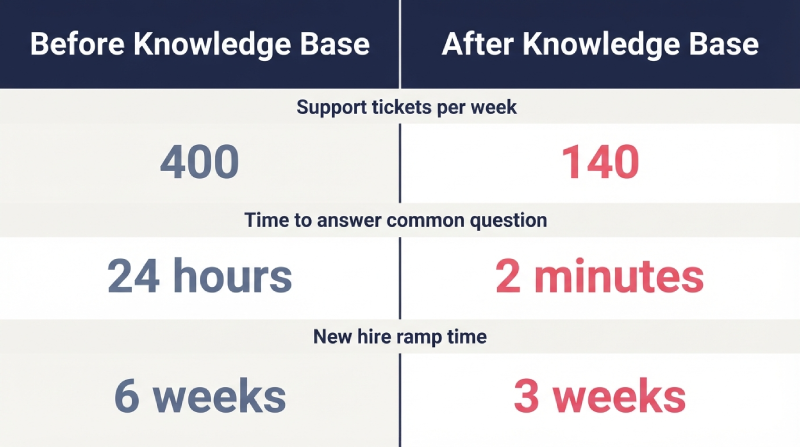
Ticket deflection and support efficiency. When customers can answer their own questions, support volume goes down. This is the most directly measurable benefit of a customer-facing knowledge base. Organizations often track deflection rate as a ratio of self-service resolutions to total support contacts.
Faster onboarding. New hires who can look things up independently get productive faster. An internal knowledge base with clear onboarding content (where to find things, who to contact, how common processes work) reduces the time it takes to reach full productivity.
Single source of truth. When information lives in one searchable place instead of scattered across email threads, chat histories, and personal drives, everyone gets the same answer. This matters for compliance, consistency, and simply for not wasting time hunting for a document.
Knowledge retention. When experienced employees leave, their knowledge does not have to leave with them. A knowledge base that captures institutional knowledge (how things are done, why decisions were made, what the workarounds are) turns individual expertise into an organizational asset.
Measurability. Unlike knowledge that lives in people’s heads, a knowledge base creates a record. Analytics on search terms, article views, and content gaps tell you what people are looking for and where the documentation falls short.
Knowledge Base Examples
Here are a few scenarios that show what a knowledge base looks like in practice.
Customer support team at a SaaS company
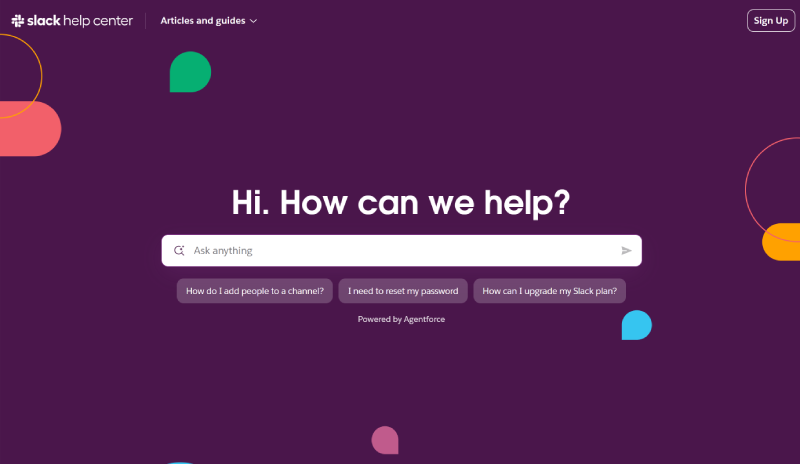
The team is handling 400 tickets a week. Analysis shows that 40% cover the same 15 topics: account resets, billing questions, integration setup steps. They build a help center using their support platform’s built-in documentation tools, write clear articles for each high-volume topic, and add a search widget to the product. Ticket volume on those 15 topics drops by roughly a third within 60 days. The support team shifts time from answering repetitive questions to handling complex cases.
Manufacturer onboarding new production staff
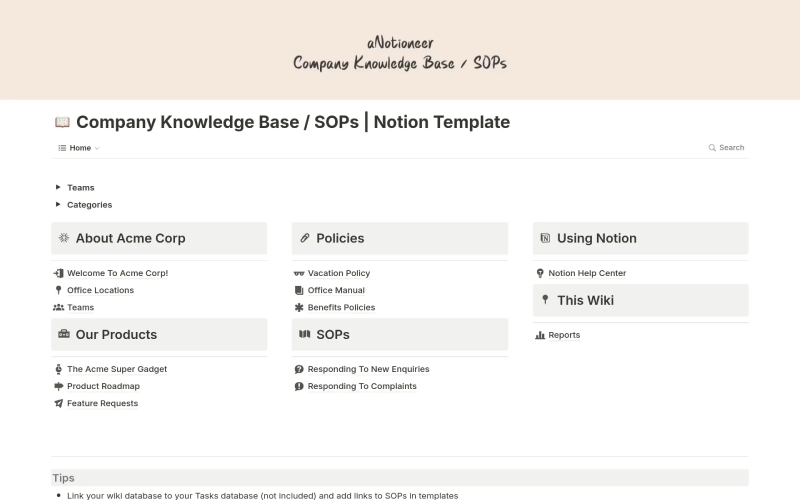
A manufacturing company hires in cohorts, often in multiple locations. Onboarding used to mean shadowing an experienced colleague and working through printed binders. They move SOPs, safety procedures, and job-specific checklists into an internal knowledge base accessible from the shop floor on mobile. New staff can look up a procedure mid-task without finding a supervisor. Consistency improves and the printed binders stop being the single point of failure for accurate information.
HR team capturing policy documentation
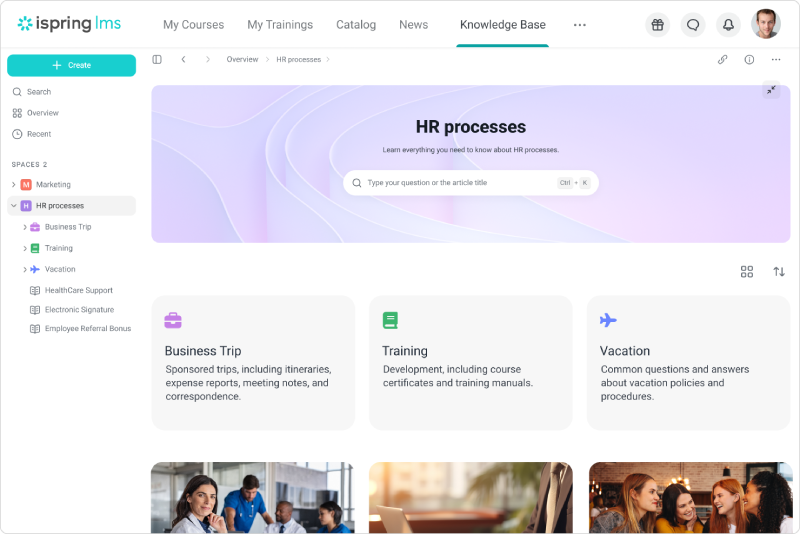
The HR department manages policies across multiple countries. Information was spread across a shared drive, an intranet, and individual team members who “knew where things were.” They built a structured internal knowledge base organized by region, employment type, and topic. Employees can now search for leave entitlements, expense policies, or onboarding steps without submitting a ticket to HR. The HR team redirected a significant portion of their support time to higher-value work.
AI assistant for a customer-facing service
A company builds a chatbot that uses RAG to answer product questions. Rather than fine-tuning a model on product data, they maintain a curated knowledge base of product documentation and connect it to their AI assistant through a vector search layer. The assistant retrieves the relevant article passages before generating its response, so the answers stay accurate even as products change, without retraining the model every time.
Knowledge Base vs Related Terms
These terms overlap enough that they are often confused. Here is how they differ in practice.
Knowledge base vs wiki. A wiki is built for collaborative editing: anyone with access can create or update pages. Wikipedia is the obvious example. A knowledge base is usually more structured and moderated, with defined ownership and review processes. The lines blur, especially with tools like Confluence that can function as either. In practice, “wiki” often means a more open, free-form structure; “knowledge base” implies more deliberate organization and curation.
Knowledge base vs FAQ. An FAQ is a list of questions and short answers. A knowledge base includes FAQs but also holds longer articles, SOPs, guides, policies, and files. Think of an FAQ as one content type that lives inside a knowledge base.
Knowledge base vs knowledge management. Knowledge management (KM) is a broader organizational discipline focused on how knowledge is created, shared, maintained, and transferred across an organization. A knowledge base is a tool or system within that discipline. KM includes culture, processes, roles, and governance; a knowledge base is part of the infrastructure that supports those things.
How to Build a Knowledge Base
The mechanics vary by tool, but the decisions that matter are consistent regardless of which platform you use.
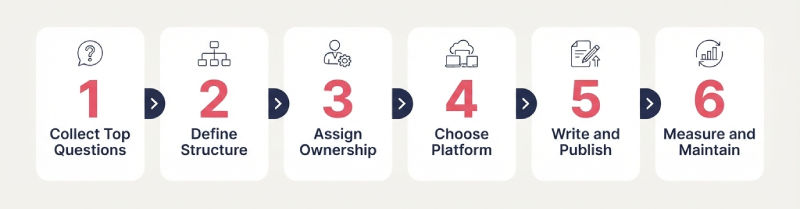
Start with your highest-volume questions. Before choosing a platform or writing a single article, collect the questions your team gets asked most often: from customers, from new hires, from other teams. Those are the first articles you need. Starting from volume means your knowledge base is immediately useful rather than theoretically comprehensive.
Pick your structure before you write. Decide how you will organize content (by topic, product, team, use case, or some combination) before you start creating. Reorganizing a knowledge base after it has grown is painful. A simple hierarchy works better than an elaborate one that no one understands.
Assign ownership. Every article or section should have someone responsible for keeping it accurate. Knowledge bases go stale when content is nobody’s job. This does not require a dedicated team; it might mean that each department head owns their section and reviews it quarterly.
Choose your platform based on audience and workflow. For customer-facing help centers, dedicated tools like Zendesk or Help Scout integrate tightly with support workflows. For internal documentation, Confluence, Notion, Guru, or Document360 each have different strengths depending on team size and technical context. If your organization already uses a learning management system (LMS) for training, it is worth checking whether that platform includes a built-in knowledge base, and some do, keeping training and reference content in one place reduces friction for employees. See my roundup of the best LMS platforms if you are still choosing a system.
Measure and maintain. Set a review cadence from day one. Track search terms that return no results (those are gaps in your content). Track your most-viewed articles (those tell you what to keep current). A knowledge base that is not maintained becomes a liability rather than an asset.
LMS Platforms with Built-In Knowledge Bases
An internal knowledge base does not always need to be a standalone tool. If your organization already runs training through a learning management system, some LMS platforms include a knowledge base module that sits alongside courses and learning paths.
Worth clarifying upfront: this is not as common as you might expect. Most popular LMS platforms (including TalentLMS, LearnUpon, and Absorb LMS) do not include a native employee-facing knowledge base. When those platforms mention a “knowledge base,” they are referring to their own vendor support documentation for administrators learning how to use the product. That is a different thing entirely from a repository where your team can store and search internal policies, guides, and SOPs.
The platforms below have a built-in knowledge base in the sense that matters here: a feature your organization can use to build and maintain a corporate reference library for employees.
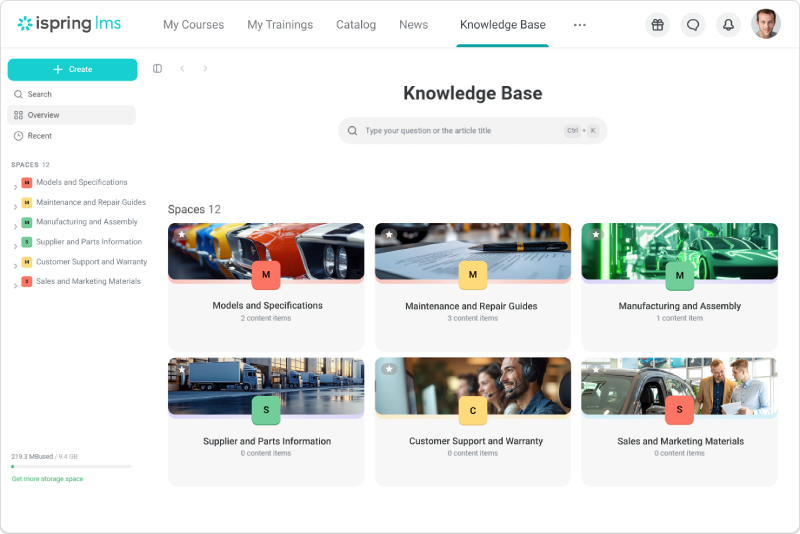
iSpring LMS has one of the more fully developed native knowledge base modules in this category. Administrators can organize content into spaces and folders, write articles directly in the platform using a built-in editor, and upload supporting files of various types. Search covers titles, descriptions, and article body text, so keyword searches surface content even when the phrasing does not exactly match.
Access controls work at the space and folder level, so different teams see only the content relevant to their role (HR content stays separate from sales materials, for example). There is a bookmarks feature so employees can pin frequently used content for quick return. Analytics track article views and view rates per article, which tells administrators what is being used and where there are gaps. The knowledge base is accessible from iSpring LMS‘s mobile app, which is relevant for frontline workers or anyone not sitting at a desk. Analytics cover article views and view rates, giving administrators a read on what is actually being used and where gaps exist.
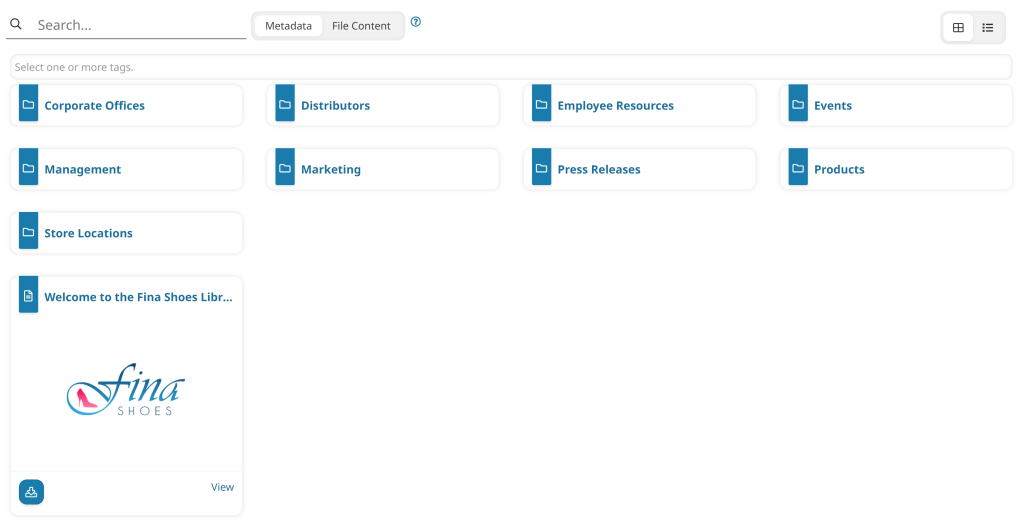
SmarterU LMS is a Canadian platform (built by Neovation) that treats the knowledge base as a first-class feature alongside its course delivery tools. Within SmarterU, you can create two types of content: uploaded files (PDF documents, videos, images, and over 40 other supported formats) and articles (wiki-style or full-page, written directly in the platform). Both are organized into a folder hierarchy, and permissions work at the folder and individual resource level with considerable granularity: you can grant or restrict access by user group, team, learning plan, or individual.
The reporting side is straightforward: SmarterU tracks view counts and download rates per file, giving administrators visibility into which content is being used and which is not. The platform positions the knowledge base as a performance support tool, meaning the intent is for employees to look things up mid-task rather than only before or after formal training. Use cases they document include safety data sheets for manufacturing teams, product catalogs and policy documents for retail, and regulatory guidelines for healthcare and call centers.
SmarterU is not a household name in the LMS market the way some of the larger platforms are, but for organizations that specifically want course delivery and a structured employee reference library in one system, it is one of the more purpose-built options in this space.
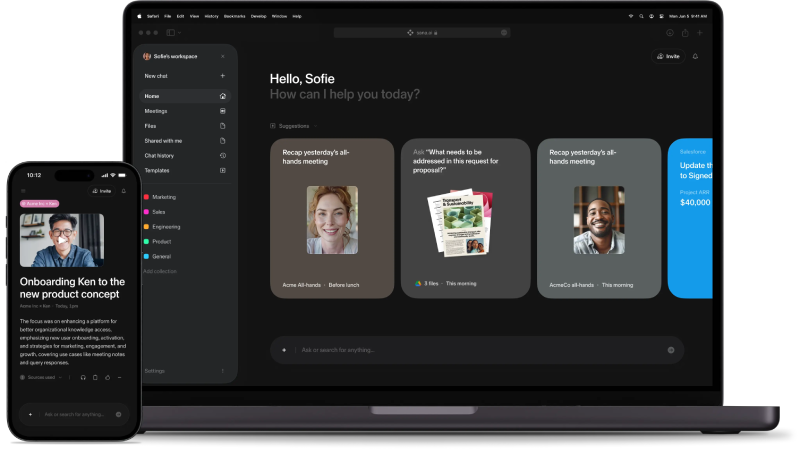
Sana Learn is an AI-native platform (now part of Workday, though sold independently) that takes a fundamentally different approach to the same problem. Rather than a traditional folder-and-article KB module, Sana’s answer is AI-powered knowledge retrieval layered across everything stored in the platform. Employees type a question in natural language and get an answer drawn from courses, session transcripts, uploaded documents, and content in connected tools like Slack, Notion, and Google Drive. The search is semantic rather than keyword-based, so it can surface a relevant excerpt from a recorded workshop transcript even if the employee’s wording does not match the original text.
The structural unit in Sana is Teamspaces: collaborative areas where teams organize courses, resources, and documentation with role-based access controls, either public to the organization or restricted to specific groups.
Sana works best when your company’s knowledge is relatively well-documented (even if scattered across tools), and when employees are comfortable querying an AI assistant rather than browsing a folder tree. It is a stronger fit for knowledge-intensive organizations that already live in tools like Slack or Notion and want those sources unified into a single searchable layer. It is less suited for organizations that need a tightly governed, article-by-article reference library with explicit version control and content ownership. For that use case, the folder-and-permissions model of iSpring LMS or SmarterU is a more direct fit.
The takeaway is that “does this LMS have a knowledge base?” is a question worth asking explicitly and testing during any evaluation. The answer is often “we call it that, but it’s our help docs.” The platforms above offer meaningfully different implementations, from traditional folder-and-article structures to AI-driven retrieval across connected content, and the right fit depends on how your team actually looks for information, not just whether the feature is listed on a pricing page.
FAQ
What is the purpose of a knowledge base?
A knowledge base exists so that people (employees, customers, or AI systems) can find accurate information without having to ask a person. Its core functions are reducing repetitive questions, preserving institutional knowledge, and giving everyone access to the same information.
What is a knowledge base article?
A knowledge base article is a single piece of content within a knowledge base, typically covering one topic or answering one question. It might be a how-to guide, a troubleshooting walkthrough, a policy explanation, or an FAQ entry. Good articles have clear titles, structured body text, and are written with search terms in mind.
Is a knowledge base the same as a wiki?
Not exactly. A wiki is a collaborative, open-editing format: anyone with access can create and update pages. A knowledge base tends to be more curated, with defined ownership, review processes, and deliberate structure. Many tools can function as either, but the distinction matters when you are deciding how formally to manage content.
What is a knowledge base in AI?
In AI contexts, a knowledge base refers to a curated set of documents or data that an AI system retrieves from when generating answers. In a retrieval-augmented generation (RAG) setup, the AI pulls relevant passages from the knowledge base before responding, which grounds the output in your actual documentation rather than in generic training data. This is different from fine-tuning, which updates the model itself.
What should a knowledge base contain?
Start with your highest-volume questions, whatever people ask most often. Typical content includes FAQs, how-to guides, SOPs, policies, product documentation, and onboarding materials. The format matters less than clarity and findability. Each article should answer one question completely and have a title that matches how someone would search for it.
How do you know if a knowledge base is working?
The main signals are ticket deflection rate (for customer-facing KBs), search terms that return no results (content gaps), article view rates, and time to proficiency for new hires (harder to measure, but worth tracking). If people are searching for things that are not in the knowledge base, that is the next round of content to write.
Searching for the right system to host your training and reference content? See my roundup of best LMS platforms.