Reports show that the LMS market is expected to grow by almost 250% by 2033, and that’s for a reason. Around 91% of L&D pros say human skills are increasingly important for business growth. And LMSs for enterprises are perceived as the best way to upskill employees.
Businesses often start with their own learning solution, but as the company grows, something bigger, more powerful, and more efficient is needed. In this article, we’ve chosen the 20 best enterprise LMS software options that offer more than simple employee training and can cover most big business needs. Let’s examine them together!
What is an enterprise LMS, and how should you choose one?
Choosing an LMS is easy when you need to gather your 15 employees together and show them the working rules. Basically, PowerPoint and any screencasting app are a good fit. But as the company grows, it gets harder to train dozens or hundreds or thousands of people.
One day, you’ll need a solution that enables you to author your own courses, make them interactive, and track results — and before you know it, the list of requirements gets extremely long! At that point, you’re looking for a bigger solution: probably an AI-powered, enterprise-level LMS that supports all your HR processes and organizational needs.
So, finding the best enterprise LMS that will cover all big enterprises’ ambitions and needs is not a simple task. For those seeking a quick solution to this challenge, we prepared a comparison chart of the best enterprise LMSs. For more details, click on the LMS or scroll down.
| Enterprise LMS systems | Scalability | Integrations | Extended-enterprise* | Authoring and content | Mobile-friendly |
|---|---|---|---|---|---|
| Absorb LMS | Top enterprise LMS scalability | RESTful API, SSO, HRIS and more | From authoring to selling | Moderate, limited | Native mobile app |
| iSpring LMS | Top enterprise LMS scalability | Albato, RESTful API, SSO, HRIS, CRMs and more | From authoring to selling | Strong (via iSpring Suite) | Native mobile app |
| Cornerstone Learning | Highly scalable | HRIS, SSO, APIs | Strong | Moderate | Native mobile app |
| Docebo | Top enterprise LMS scalability | API ecosystem | Excellent | Built-in tools | Mobile App publisher |
| 360Learning | Strong | SSO, HRIS | Moderate | Very strong | Native mobile app |
| LearnUpon LMS | Highly scalable | APIs | Excellent | Basic | Native mobile app |
| Sana | Strong | APIs | Moderate | Strong AI authoring | Native mobile app |
| Seismic Learning | Strong | SSO | Moderate | Good | Native mobile app |
| Litmos | Highly scalable | SAP, SSO, HRIS | Strong | Basic | Native mobile app |
| Adobe Learning Manager | Top enterprise LMS scalability | Adobe, SSO, HRIS | Strong | Strong | Native mobile app |
| SAP SuccessFactors Learning | Top enterprise LMS scalability | SAP HRIS | Strong | Limited | Native mobile app |
| Workday Learning | Top enterprise LMS scalability | APIs | Limited | Moderate | Native mobile app |
| D2L Brightspace | Highly scalable | SSO, APIs | Moderate | Strong | Native mobile app |
| CYPHER Learning | Good | SSO, APIs | Strong | Good | Native mobile app |
| WorkRamp | Highly scalable | SSO | Strong | Good | Native mobile app |
| EducateMe | Good | APIs | Limited | Strong | Limited mobile app |
| AcademyOcean | Good | SSO | Strong | Moderate | Mobile-friendly |
| Disprz | Top enterprise LMS scalability | Provides integrations, unknown | Strong | Good | Unknown |
| Moodle | Limited but variable | Wide plug-in ecosystem | Possible with add-ons | Strong | Native mobile app |
| TalentLMS | Moderate | APIs | Strong | Basic | Native mobile app |
Now, let’s dig deeper and see what each of these learning management systems offers.
1. Absorb LMS
| G2: 4.6 Capterra: 4.5 | Pricing and plans: Upon request Free trial: Yes |
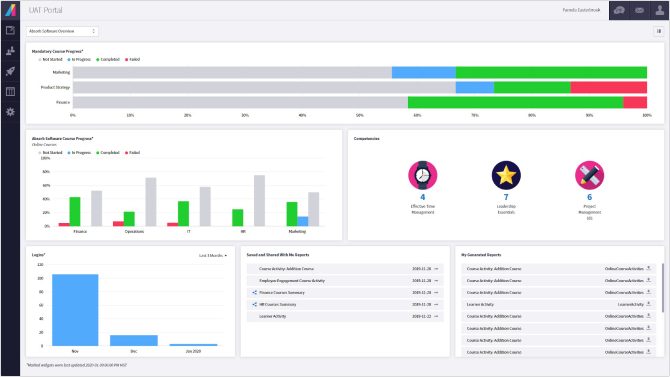
Absorb is a learning management system that promises to cover the entire learning process from onboarding to compliance. This is a scalable AI-based solution that’s a good fit for enterprises, although most Absorb users are small and midsize businesses. While not the flashiest LMS, it’s a dependable choice for companies that prioritize consistency and a smooth training routine.
Key Absorb LMS capabilities
Here’s a short list of what Absorb LMS offers:
- Building custom reports and dashboards
- Course authoring (AI-powered)
- Selling and managing online courses
- AI-driven personalization
- Library of 20,000+ ready-made courses
- Reliable support
Absorb LMS user insights
Users of this solution often appreciate Absorb LMS for its intuitive and flexible interface, as well as its accessible client support. The biggest challenges are some bugs and slow resolution times. While users value the software design, they wish there were more content and customization features and better reporting.
It looks like a perfect solution for those who need a stable authoring tool but aren’t very ambitious about creating ideal courses.
2. iSpring LMS
| G2: 4.6 Capterra: 4.6 | Pricing and plans: From $3.58 per user/month; Business / Enterprise Free trial: 30 days |
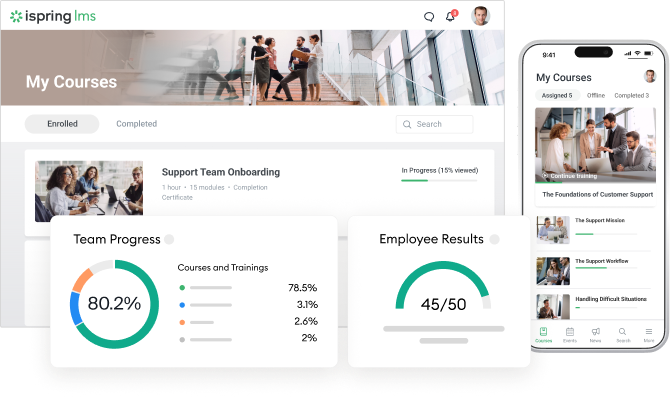
iSpring LMS is a full-cycle, enterprise-level LMS for training that supports a wide range of interactive content formats. This top enterprise LMS covers everything from onboarding to compliance and external training. It integrates into your daily work easily, offering quick user import, automatic course enrollment, and fast reports, and iSpring AI helps enhance training content with course development features.
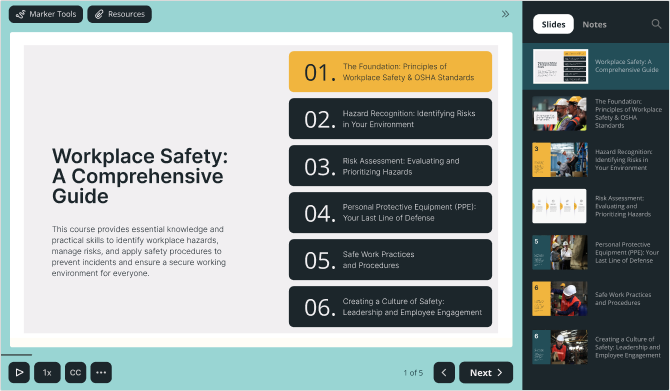
iSpring LMS comes bundled with the AI-based authoring tool iSpring Suite. This cloud-based solution helps L&D teams create interactive SCORM-ready courses in a familiar PowerPoint environment.
Key iSpring LMS capabilities
With structured training delivery, built-in authoring, and progress tracking all in one, the platform offers a robust set of enterprise capabilities:
- AI-powered course creation and management: from ready-made to personalized tracks
- Social learning, a knowledge base, and clear learning paths for a better learner experience and enhanced development
- Various reports and analytics tools offering a 360-degree picture of employee performance
- Multiple integration options with CRMs, HRIS, video conferencing, and more, useful for internal and external connections
- Top enterprise LMS security and 24/7 premium support
- Easy customization and white labeling
- Customer Success Manager option
iSpring LMS user insights
According to user reviews, iSpring LMS offers standout benefits in course creation and tracking. Learners gain a great user experience and deeper knowledge retention, while businesses benefit from effortless growth and ongoing support. This is an LMS at the enterprise level, so its capabilities cover all users’ needs.
iSpring LMS is highly recommended if you are a growing enterprise or planning to scale soon. You can start with something essential and then just expand.
3. Cornerstone Learning
| G2: 4.1 Capterra: 4.3 | Pricing and plans: Upon request Free trial: Demo only |
Cornerstone is a mature, enterprise-level LMS. The key powers of the platform are structured talent development, compliance workflows, and skills mapping. While it’s not lightweight, Cornerstone is a good choice for businesses that need governance, deep reporting, and a scalable learning culture.
Key Cornerstone LMS capabilities
The Cornerstone enterprise LMS system is most valued for the following capabilities:
- Compliance and certification management with automated renewals
- Structured learning paths and career-skills frameworks
- Deep integration of internal systems
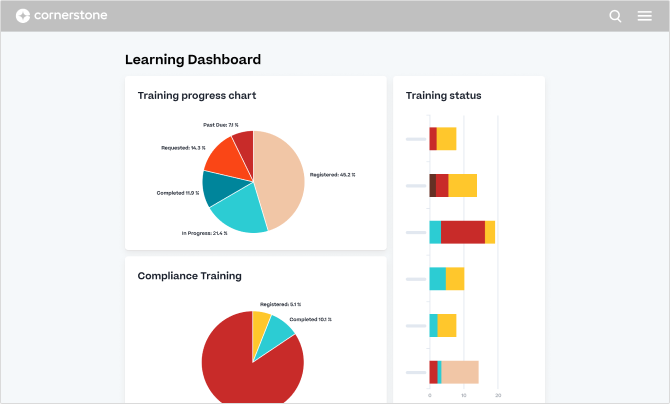
- Advanced reporting and learning analytics dashboards
- Global localization and multi-language support
- Role-based permissions and user segmentation
Cornerstone LMS user insights
Users often praise Cornerstone for its ability to handle complex organizational structures and compliance-heavy workflows. They also highlight the depth of its learning analytics and its strong HR integrations, although some mention that the platform can feel heavy and slow to configure.
For large enterprises focused on long-term skill development, Cornerstone offers robust capabilities. However, it may take time to deploy it.
4. Docebo
| G2: 4.4 Capterra: 4.4 | Pricing and plans: Upon request; Elevate / Enterprise Free trial: Demo only |
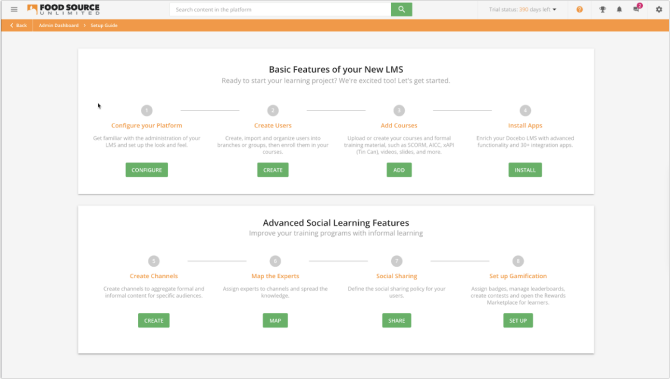
Docebo is a modern, AI-enhanced LMS that enterprises choose, which includes automation, AI-curated learning paths, and strong reporting. Created as a complex ecosystem, it might look like it would be difficult to work with, but for some businesses, it is worth it.
Key Docebo capabilities
Docebo offers some robust capabilities for enterprise-level organizations:
- Certification and compliance tracking with automated retraining workflows
- Extensive integration with business systems via the Docebo Connect marketplace
- Detailed analytics and learning insights dashboards
- Community learning features, gamification, and social engagement
- Enterprise-grade security with GDPR, SOC2, and ISO 27001 compliance
Docebo user insights
Users on Capterra and G2 frequently report that Docebo is a great option, thanks to its flexibility, branding options, and modern UI. They also appreciate the quick and responsive support and the active Docebo Community. On the flip side, people also point out that adding certain modules or deep customizations is quite expensive and turns out to be difficult to manage.
If you aren’t put off by complex systems and are ready to invest some effort into having a great enterprise-level LMS on site, this is a good option. It’s generally a good fit for companies that want a future‑proof, scalable learning ecosystem.
5. 360Learning
| G2: 4.6 Capterra: 4.7 | Pricing and plans: From $8/registered user per month; Team / Business Free trial: Yes |
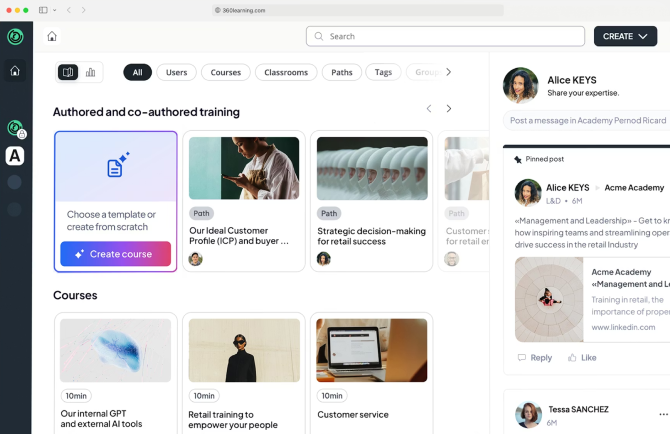
360Learning is a collaborative enterprise LMS + LXP hybrid that allows employees and subject-matter experts to create and share courses, helping companies scale training. With AI-powered skills tagging and mobile SCORM sharing, it’s mostly used in professional training for healthcare and IT services.
Key 360Learning capabilities
This solution features collaboration as its core strength, as well as other capabilities:
- Collaborative authoring by internal experts
- Extended‑enterprise support for employees, partners, and customers
- Certification and compliance tracking
- Basic analytics and dashboards for engagement and learning progress
- Integrations with HR systems and Single Sign-On
- Multilingual support
360Learning user insights
Users note that the platform is intuitive and makes course creation easier for non-L&D staff. Collaboration features are valued, but some mention limited customization and reporting options. A few reviewers highlight a learning curve for advanced features, although the core LMS enterprise features are straightforward to use.
This is a good fit for distributed organizations that want to grow internal expertise and build training around social, peer-based learning.
6. LearnUpon LMS
| G2: 4.6 Capterra: 4.8 | Pricing and plans: Upon request; Essential / Premium / Enterprise Free trial: Demo only |
LearnUpon is a straightforward enterprise LMS for managing training across multiple audiences. It provides multi-portal support, reporting, and compliance tracking, although built-in content creation is limited. The system also includes user‑management automation, reporting dashboards, a mobile app, and more.

Key LearnUpon LMS capabilities
The LearnUpon LMS offers the following core features:
- Course assignments and learning paths with assessments
- Compliance and certification tracking with automated reminders
- Integrations with HR systems, CRM, SSO, and webinar tools
- Analytics dashboards and reporting
- Basic course import (SCORM, xAPI, video)
LearnUpon LMS user insights
LearnUpon LMS stands out for its simplicity, clean UI, and ease of managing multiple learner groups. While some users feel that the reporting and customization options can feel basic, many appreciate the responsiveness of the Customer Success team.
This one is best suited for companies that want a reliable, scalable system for training different audiences without the complexity of a highly technical LMS for enterprises.
7. Sana Learn
| G2: 4.8 Capterra: 4.9 | Pricing and plans: From $13 per license, minimum 300 licenses; Core / Enterprise Free trial: Yes |
Sana Learn is an AI‑driven platform that automates a great deal of the admin burden — from user enrollment to course assignments. The solution personalizes learning paths with AI and offers real-time insights through dashboards. Sana also supports multilingual content and strong security standards.

Key Sana Learn capabilities
While quite simple, the platform has some strengths:
- AI-powered course creation and personalized learning paths
- Interactive content with quizzes, reflection cards, and polls
- Automated notifications and reminders
- Role-based permissions
- Real-time dashboards and AI-driven analytics
- A high level of security
Sana Learn user insights
As Sana is relatively new, some features are still maturing or missing compared to more established LMSs. Reviewers highlight its powerful search capabilities for knowledge sharing and solid AI tools. Some greater flexibility would probably be good. However, it will probably become more flexible in future releases.
Sana Learn will be a great choice for organizations that want a modern, AI-first learning experience with minimal admin friction but are not yet ready for a fully-loaded enterprise LMS.
8. Seismic Learning
| G2: 4.7 Capterra: 4.6 | Pricing and plans: Upon request Free trial: Demo only |
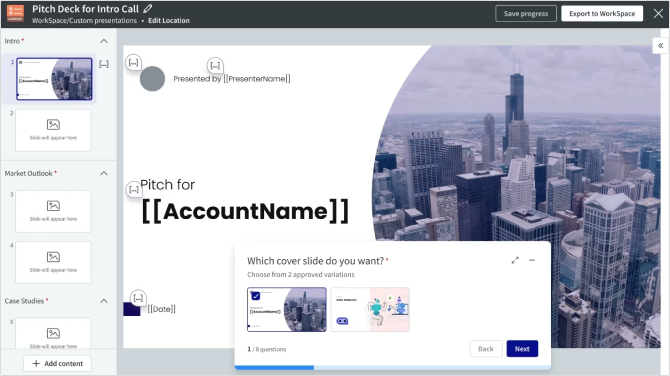
Seismic Learning (formerly Lessonly) is focused on sales enablement and coaching. It supports role-based lessons, skill assessments, and integrated feedback. The platform is designed to streamline onboarding and ongoing training for sales and customer-facing teams.
Seismic Learning’s key capabilities
Here’s what Seismic Learning offers its users:
- Simple lesson builder (text, video, assessments)
- Automated learning paths
- Practice mode for real-life role play and skill assessment
- Feedback, coaching, and manager scorecards for performance improvement
- Sales‑content integration: lessons appear alongside Seismic content in the same UI
- Basic reporting and analytics of learner usage and progress
Seismic Learning user insights
Users like its clean interface and simplicity, although some mention limited customization and fewer options for branded content. Some mention a learning curve, especially in regard to managing permissions. However, its search and storage capabilities seem to compensate for this.
It may not be the best choice for firms with complex approval chains, but it can be an excellent option for more agile and flexible companies.
9. Litmos
| G2: 4.3 Capterra: 4.2 | Pricing and plans: Upon request; Foundation / Platinum / Platinum AI Free trial: Yes |
Litmos is a cloud-based LMS that supports a broad mix of learning formats like video, SCORM, assessments, and more. The platform is mobile-friendly, integrates with HRIS and CRM systems, and is designed to make large-scale learning manageable for distributed teams.

Key Litmos capabilities
Litmos offers some great features, and most of them are good for enterprises:
- Built-in authoring tools + SCORM upload
- Automated compliance workflows (reminders, certifications)
- Reporting dashboards and analytics
- Mobile learning support
- HRIS, CRM, and SSO integrations
- User management and multi-portal support
Litmos user insights
Users on G2 and Capterra value its relatively intuitive interface and ease of deployment across large or distributed teams. Litmos allows automated reminders and flexible user management. What users don’t like is that costs can add up, and deeper customization sometimes requires extra investment.
This one might be a good choice if you don’t need highly creative projects and the company can handle the cost of deployment.
10. Adobe Learning Manager
| G2: 4.0 Capterra: 4.3 | Pricing and plans: Upon request; Registered Users / Monthly Subscription Free trial: 30 days |
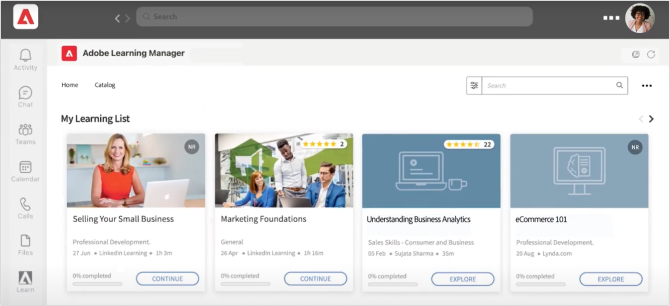
Adobe Learning Manager (formerly Captivate Prime) is a robust LMS that supports blended learning (e.g., classroom, virtual, self‑paced). The “headless” top enterprise LMS capabilities are useful for embedding learning experiences inside other apps or websites.
Key Adobe Learning Manager capabilities
Adobe Learning Manager is a very powerful platform with great resources (it’s hard to choose only a few):
- AI-based personalized learning paths
- Self-paced, ILT, and virtual courses
- Social learning (discussion boards, peer groups)
- Multi-tenant portals for different audiences
- API integrations and headless LMS
- Integration with third-party content (LinkedIn Learning, etc.)
Adobe Learning Manager user insights
Users generally appreciate Adobe Learning Manager for its ability to manage multiple audiences, as an LMS for enterprises does. Users report a bit of a challenge in reporting and a slightly outdated UI. Overall, it’s considered powerful but with a moderate learning curve.
Adobe Learning Manager is useful for branded or deeply integrated training. So, it will fit big enterprises with strong external training needs or a very large team.
11. SAP SuccessFactors Learning
| G2: 3.6 Capterra: Unknown | Pricing and plans: From USD 1.85 per user/month; one base plan with multiple add-ons Free trial: 30 days |
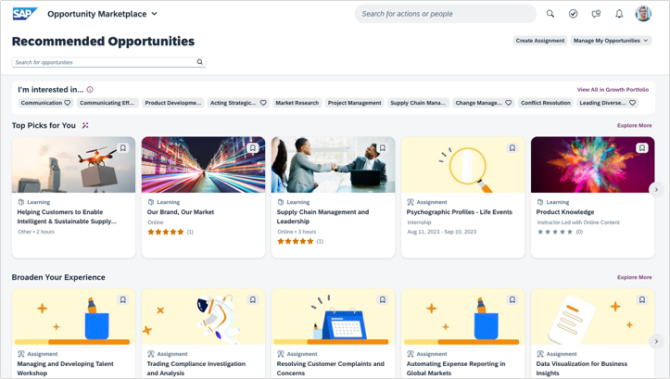
The SAP SuccessFactors Learning solution was created in 2019 to drive skills management, learning, and development. While based on a quite rigid SAP solution, this new enterprise LMS software uses AI-driven learning recommendations and supports structured learning journeys.
Key SAP SuccessFactors Learning capabilities
The solution is quite flexible compared to other SAP software and offers multiple new capabilities:
- Automated training assignment
- Mobile learning support with offline access for SCORM content
- Gamification and social learning
- Reporting and analytics for tracking learning activity and compliance
- Integration with the rest of SuccessFactors HCM
SAP SuccessFactors Learning user insights
Users appreciate SuccessFactors Learning for its integration with the wider SAP HCM suite. Some say the interface can feel clunky, and implementation often requires time and technical expertise. However, most enterprise LMS users who are used to SAP software notice that this is one of the best SAP solutions around.
To be honest, most SAP products are heavy and difficult to learn and use. However, this one is much easier to use and is lightweight. So, it will be a fit for everyone who has used SAP for years and now needs a modern solution that will work with all the SAP software flawlessly.
12. Workday Learning
| G2: 4.0 Capterra: No reviews | Pricing and plans: Upon request Free trial: Demo only |
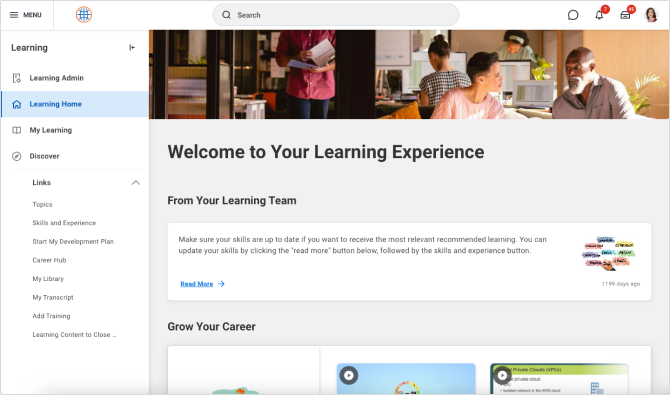
Workday Learning is the LMS/LXP component embedded in the Workday HCM suite. This is the contextual LMS that uses AI for recommendations, personalization, and more. The core strength is that the platform provides managers with real-time, actionable insights and compliance dashboards.
Key Workday Learning capabilities
While integrated with Workday HCM, the solution offers the standard capabilities of a modern LMS:
- AI / skills-intelligence recommendations
- Learning campaigns: automated assignments for onboarding, promotions, or role changes
- Content curation and centralized management of learning resources
- Real-time insights and dashboards for compliance and learning progress
- Support for interactive content (quizzes, questions)
- Support for external learners (partners, contractors)
Workday Learning user insights
People notice it has some localization limitations and fragmented reporting. However, most users mention that this is a basic LMS and all key features work stably. Also, as it’s aligned with Workday’s broader user experience, it facilitates adoption and faster onboarding.
If you’re planning to deploy a huge global project, you should probably look elsewhere. Otherwise, this is a good option for those who need a simple but stable learning solution.
13. D2L Brightspace
| G2: 4.4 Capterra: 4.2 | Pricing and plans: Upon request Free trial: 30 days |
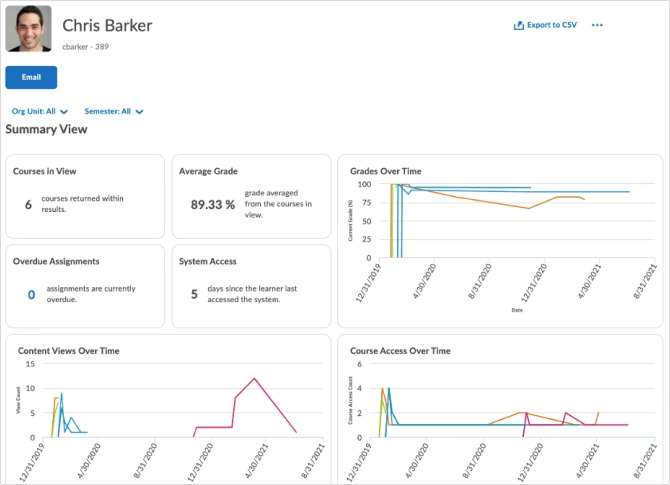
Brightspace is a flexible, cloud-based LMS built to support education as well as corporate and government training programs. The platform is designed to be accessible and integrates with a wide range of systems, while also offering AI-powered tools. The solution is well-suited for organizations that value adaptive learning, deep analytics, and accessibility.
Key D2L Brightspace capabilities
The features this solution offers include standard capabilities and some know-how capabilities:
- Course authoring and interactive content (Creator+, H5P)
- Standard-based integration (APIs, LTI, real-time data exchange)
- Detailed analytics and predictive insights for engagement and outcomes
- AI features (Lumi) for smart personalization and content creation
- Automation via “intelligent agents” to trigger actions based on learner behavior
D2L Brightspace user insights
Most users value it for how user-friendly and customizable the solution is. They report that the mobile app and course navigation are generally solid, with occasional bugs. People appreciate that it’s user-friendly and offers a quick start.
While sometimes lackluster, this platform seems to be a good choice for enterprises with limited resources. If you’re looking for scalable tools and advanced customization on the web, this one might be worth looking into.
14. CYPHER Learning
| G2: 4.4 Capterra: 4.5 | Pricing and plans: Upon request; Enhanced / Enterprise Free trial: Demo only |
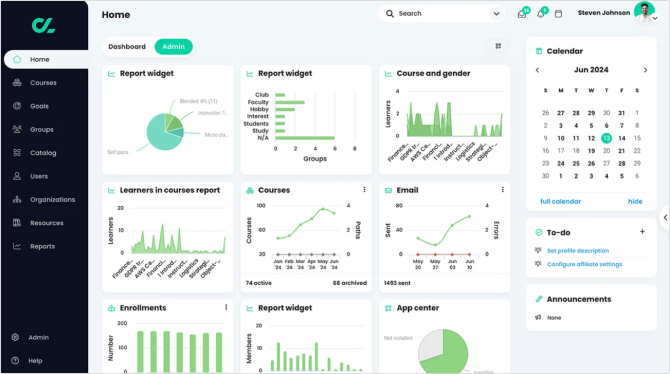
CYPHER Learning is a modern LMS that combines AI-powered content automation, gamification, and skills mastery. It supports automated workflows, structured paths, and adaptive learning, making it effective for both compliance and development-focused training.
Key CYPHER Learning capabilities
The features and capabilities this platform offers are quite standard for typical enterprise needs:
- Built-in course authoring
- Synchronous and asynchronous learning
- SCORM compliance
- Gamification and interactions
- Assessment and eCommerce management
CYPHER Learning user insights
Users on G2 and Capterra find CYPHER Learning to be particularly valuable for creating interactive and customizable environments. While mentioning some limitations of customization and compatibility, people still value the platform as a structured and organized way to access training.
This one is a pretty simple solution that can be used at the very beginning of your L&D journey. It’s a good fit for all levels of B2B businesses.
15. WorkRamp
| G2: 4.4 Capterra: 4.5 | Pricing and plans: Upon request; Professional / Enterprise + Add-ons Free trial: Demo only |
While used primarily by small and midsize businesses in software services and marketing, the WorkRamp solution offers great capabilities for smaller enterprises or those just starting their training transformation. The great thing is that it supports Slack integration and also offers its AI-powered Analytics Studio for dynamic reporting.

Key WorkRamp capabilities
The platform’s features make it a suitable LMS for enterprises, so you can grow from SMB to enterprise status with WorkRamp. It provides:
- AI-driven personalization
- Support for employee, partner, and customer training from a single platform
- Blended learning
- Certifications and skill assessments
- Analytics and dashboards: configurable reports
- Enterprise-level security and compliance: SOC 2, GDPR, etc.
WorkRamp user insights
Reviewers value its ease of use and support but cite limitations with reporting and offline access. However, if the advanced features are not a priority yet, users also mention intuitive design, fast content creation, and very promising AI-powered features.
WorkRamp seems to be a practical choice for those who want to create and manage their training without a dedicated instructional designer.
16. EducateMe
| G2: 4.8 Capterra: Unknown | Pricing and plans: From $2 per user/month; Starter / Pro / Premium, + Add-Ons Free trial: 14 days |
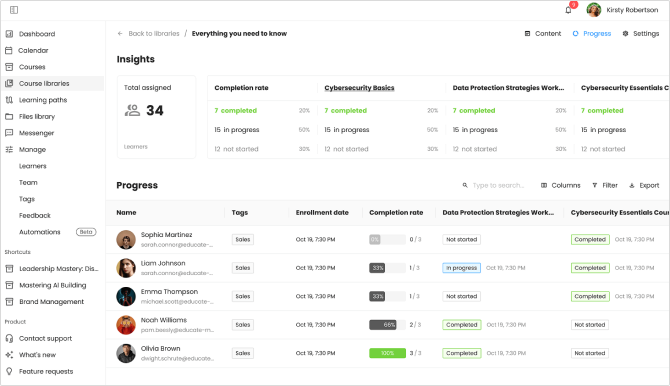
EducateMe is an AI-powered LMS designed for creating and managing interactive, cohort-based training programs. It supports course types like live webinars, self-paced video lessons, quizzes, and SCORM content, and includes automation for enrollment, reminders, and learner progress.
Key EducateMe capabilities
This LMS offers many content creation and management capabilities:
- AI-assisted course creation with a block-based editor
- Automation of workflows (e.g., auto-assigning courses, sending follow-up emails)
- SCORM 1.2 and 2004 support for interactive eLearning content
- Live sessions + self-paced learning + quizzes
- Centralized reporting and course progress dashboards
- Role-based learning paths and multi-cohort structures
EducateMe user insights
EducateMe users often highlight the ease of building custom learning paths, an intuitive UI, and responsive customer support. They mention it lacks a full-sized mobile app. However, most users say they save time and resources using the solution.
It is well-suited for companies running cohort-based or blended training programs, such as onboarding bootcamps, partner academies, or internal upskilling.
17. AcademyOcean
| G2: 4.9 Capterra: 4.9 | Pricing and plans: From $250/month; Essential / Professional / Enterprise Free trial: Demo only |
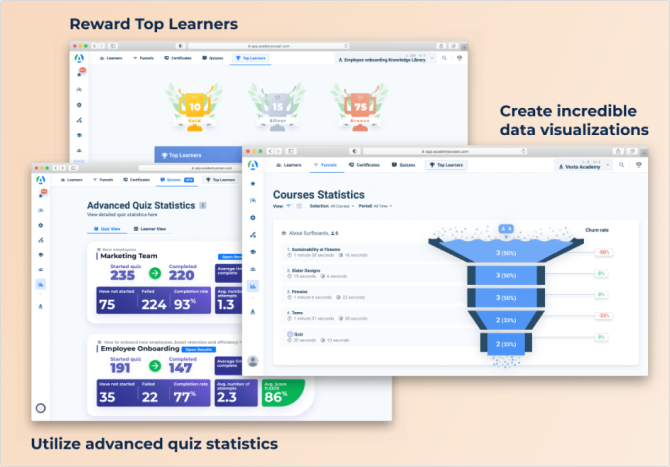
AcademyOcean is an AI-powered cloud LMS designed to enable fast, scalable training for employees, customers, and partners. It allows the creation of multiple branded portals (academies) for different audiences and offers a visual, interactive editor for building lessons quickly.
Key AcademyOcean capabilities
Everything a business needs can be found in this solution:
- Course Management
- Tests/Assessments
- Asynchronous Learning
- Course Tracking
- Learner Portal
AcademyOcean user insights
While having only 12 reviews on Capterra and 22 reviews on G2, this is a highly rated solution! The biggest complaints are a lack of transparent pricing and limited visual customization. As for functionality, users highly praise its enterprise-level LMS capability to engage learners and improve connection with customers, which generates better leads.
It’s probably not ideal for highly ambitious, huge enterprises, but it is one of the best solutions for mid-sized businesses that plan to grow into enterprises soon and need a robust yet simple solution to try out.
18. Disprz
| G2: 4.5 Capterra: 4.7 | Pricing and plans: From $3 per user/month; One-time purchased license or subscription Free trial: Yes |
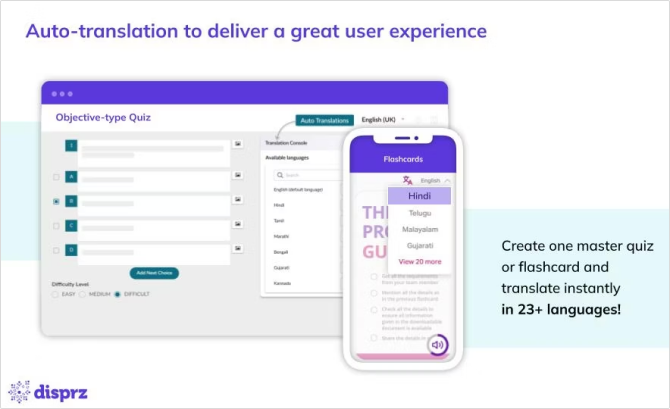
Disprz is a single platform for training employees, onboarding, product and process training, and more. This is an AI-powered solution with a mobile-first design, microlearning capabilities, and social engagement features. Disprz seems well-suited for both office-based and frontline teams.
Key Disprz capabilities
The included capabilities can prove to be a great helping hand for your L&D team:
- GenAI content summarization and auto-generation
- Skill-graph and role-based pathways
- Multilingual microlearning with interactions
- Blended learning support with attendance tracking via QR code
- L&D workflows: automated enrollment, reminders, and “just in time” micro bursts
Disprz user insights
Users like its intuitive interface, interactive learning modules, and quiz and certification tools. Some say the feedback pop-ups feel intrusive, and the platform can be slow at times. However, it offers many useful features like skill-gap analysis and usability that are a great help.
In case you want to link learning directly to skills and performance, this solution might be perfect for you.
19. Moodle
| G2: 4.1 Capterra: 4.3 | Pricing and plans: From $150 per 50 users annually; Starter / Mini / Small / Medium / Standard Free trial: 28 days |
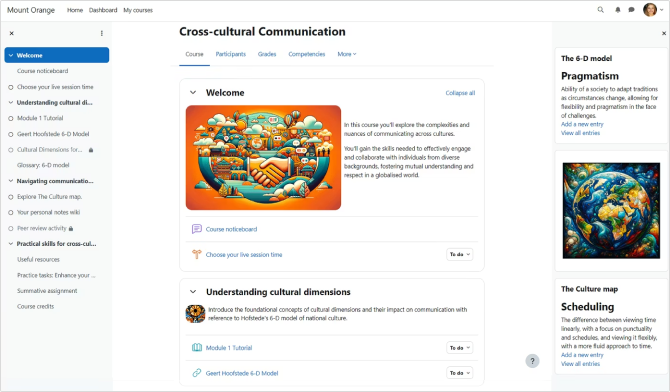
Moodle (or MoodleCloud) supports structured course delivery and hosted setup and gives organizations complete control over data, security, and user experience. It includes a wide range of built-in tools for training that are often used in education as well. Because it’s open source, you can host it on your own infrastructure, which means flexibility in deployment and lower costs.
Key Moodle capabilities
As one of the top enterprise and education LMSs, Moodle offers everything universities may require:
- Fully customizable UI, workflows, and dashboards
- Over 2,000 open-source plug-ins to extend functionality
- AI integration for content generation
- Competency frameworks and learning plans to map skills and track progress
- Strong access control and data privacy (MFA, secure deployment)
- A mobile app with offline learning capabilities
Moodle user insights
Users praise its flexibility, especially when they have in-house technical resources. Some users note that setting up and maintaining Moodle can be complex, but most say it’s quite straightforward and makes learning easy.
Moodle is a strong option for organizations that have the technical capability to manage an LMS, want deep customization, or need full control over data and hosting.
20. TalentLMS
| G2: 4.6 Capterra: 4.7 | Pricing and plans: From $119/month; Core / Grow / Pro / Enterprise Free plan: no time limit, core features only |
TalentLMS is a flexible, cloud-based LMS that aims to make training simple and scalable. Its strengths lie in its ease of use, AI-augmented course creation, branching portals, and solid support for blended learning. The solution remains a go-to for organizations that need a practical, low-friction LMS.
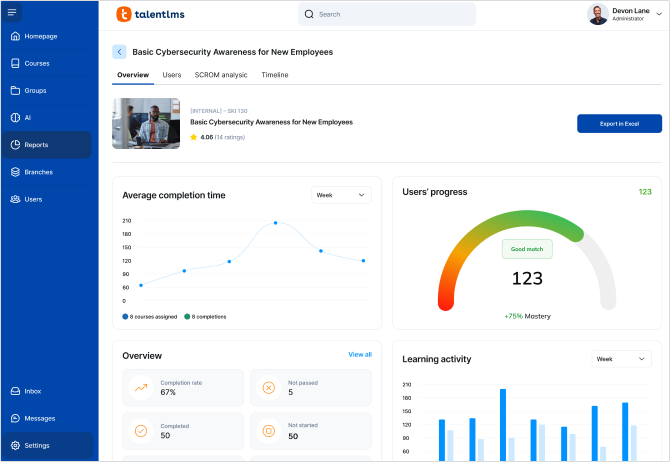
Key TalentLMS capabilities
This solution provides an easy start with its core capabilities:
- AI-powered course creation
- Skills and role mapping
- Structured learning paths
- Blended and virtual training
- Gamification and engagement
- Mobile and offline access
TalentLMS user insights
Users like how easy it is to upload content, assign courses, and track completions. Some mention that reporting is too basic and that course duplication can break image links. However, many appreciate its affordability, simplicity, and the ability to run external training.
TalentLMS looks like a nice option for those who need something simple but robust to experiment with.
So, what should you choose?
Well, it took some time and effort to compare all these enterprise LMSs! However, the choice is still not an obvious one because everything looks good. Before you choose, however, ask yourself where your business is on the growth scale, how big your enterprise is, and how far you plan to develop L&D in your company.
In my opinion, all of these solutions are good, but they fit different purposes. Let’s say we need an LMS for an institution of higher education; I would definitely look at Moodle. What about commercial enterprises? I’ve been there, and if you need corporate training, I would check out the iSpring, Absorb, or Cornerstone products. Why? Because big commercial enterprises need robust LMS features to retain employees and attract customers. These solutions are packed with such capabilities and may even offer more than I expected.
To sum up, it always depends on your actual needs and resources. The best choice always lies in the analytics of your business needs. And if you’re not sure, try something that can scale up. Start small, keep analyzing, and decide based on actual needs and data. This is the key to success.
FAQ
How is an Enterprise LMS different from a regular LMS?
An Enterprise Learning Management System (enterprise LMS) is a training platform designed specifically for large organizations with complex, distributed, and often global learning needs. Compared to a regular LMS, an Enterprise LMS focuses on scalability and customization.
How much does an Enterprise LMS cost?
Enterprise LMS pricing varies widely, and most vendors offer their pricing only upon request. However, the analysis of open-price platforms like iSpring LMS, 360 Learning, Sana,TalentLMS, and others, shows that the price is often around $3 per user/month. For 10,000 learners, the price would then start at $30,000 per month.
How long does it take to implement an Enterprise LMS?
The entire process usually takes anywhere from a week to months, depending on the organization’s size and the complexity of the LMS. However, some easy-to-use LMSs can be ready for your trainers and first learners to use after several days.
Can an Enterprise LMS be used to train customers, partners, or external learners?
Sure! Enterprise LMSs are designed to train multiple kinds of learners. Most of them support external training and can be integrated into your customers, partners, or external learners’ tools.
What common mistakes should companies avoid when selecting an Enterprise LMS?
Based on my experience, these are the key mistakes to avoid when choosing an Enterprise LMS:
- Focusing only on features, not usability. Take advantage of demos and free trials, ask questions, and ensure the system is not only powerful but also easy to use.
- Ignoring integration requirements. Be sure to check compatibility with HRIS, CRM, SSO, and other core systems that will allow your business to grow in the future.
- Overlooking hidden costs. Always examine the fees for implementation, support, integrations, and add-ons. Ask your vendor what you are paying for now and what you’ll have to pay for in the future, including scalability costs.